 SunSet查看:81 回复:0 评论:0 创建时间:2021-05-13T11:37:41
用户:SunSet查看:81 回复:0 评论:0 创建时间:2021-05-13T11:37:41
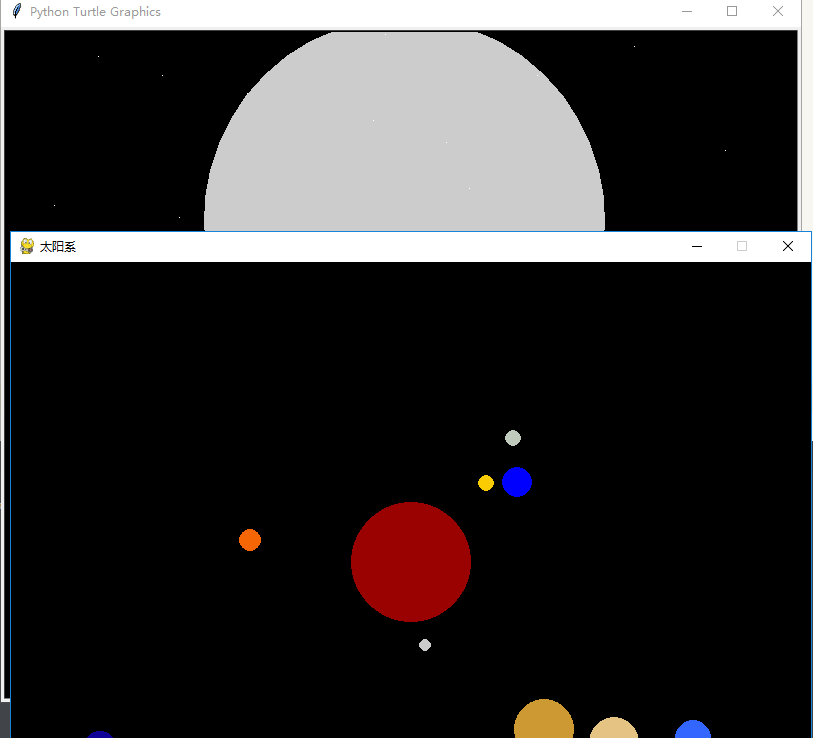
【作品展示】
【作品介绍】
运用turtle与pygame的一个宇航员和太阳系星系。pygame是动态的。
【作品源代码】
import sys
import math
import pygame
from pygame.locals import *
import turtle as t
import time
import turtle as t
import random


t.speed(0)
t.bgcolor('black')
t.up()


t.color('white')

t.goto(-350, -300)
t.down()
t.write('请看完此作品,后面还有pygame', font=('Arial', 20, 'normal'))
t.up()
t.color('#CCCCCC')
t.fillcolor('#CCCCCC')
t.goto(0, -50)
t.begin_fill()
t.down()
t.circle(200)
t.end_fill()


t.color('white')
for x in range(50):
    t.up()
    t.goto(random.randint(-400, 400), random.randint(-400, 400))
    t.down()
    t.forward(1)
t.fillcolor('white')
t.begin_fill()
t.circle(3)
t.end_fill()

t.pensize(5)
t.color('white')
t.up()
t.goto(0, -100)
t.down()
t.circle(100)
t.up()
t.goto(0, -80)
t.down()
t.circle(80)

t.up()
t.goto(-80, -50)
t.down()
t.right(90)
t.forward(250)
t.left(90)
t.forward(160)
t.left(90)
t.forward(250)

t.up()
t.goto(-80, -100)
t.down()
t.left(90)
t.forward(80)
t.left(90)
t.forward(40)
t.left(90)
t.forward(80)
t.left(90)
t.forward(40)
t.left(90)
t.forward(10)
t.left(90)
t.forward(40)
t.left(90)
t.forward(10)
t.left(90)
t.forward(40)
t.left(90)
t.up()
t.goto(80, -100)
t.down()
t.right(180)
t.forward(80)
t.right(90)
t.forward(40)
t.right(90)
t.forward(80)
t.right(90)
t.forward(40)
t.right(90)
t.forward(10)
t.right(90)
t.forward(40)
t.right(90)
t.forward(10)
t.right(90)
t.forward(40)
t.right(90)

t.up()
t.goto(80, -300)
t.down()
t.right(60)
t.forward(80)
t.right(90)
t.forward(40)
t.right(90)
t.forward(100)
t.up()
t.goto(-80, -300)
t.down()
t.left(120)
t.forward(80)
t.left(90)
t.forward(40)
t.left(90)
t.forward(100)

t.up()
t.goto(-60,-160)
a = t.textinput('对话框', '请输入你要设计的LOGO(字符在10个以内,否则LOGO将会变成MADE IN CHINA)')
if len(a)>10:
    a = 'MADE IN CHINA'
t.down()
t.write(a, font=('Arial', 10, 'normal'))


pygame.init()
DRED = (153, 2, 0)
WHITE = (255, 255, 255)
SILVER = (192, 192, 192)
BLACK = (0, 0, 0)
GREEN = (0, 255, 0)
RED = (255, 0, 0)
BLUE = (0, 0, 255)
YELLOW = (255, 255, 0)
SandyBrown = (244, 1喵, 96)
PaleGodenrod = (238, 232, 170)
PaleVioletRed = (219, 112, 147)
Thistle = (216, 191, 216)
size = width, height = 800, 600
screen = pygame.display.set_mode(size)
pygame.display.set_caption("太阳系")
clock = pygame.time.Clock()
pos_v = pos_e = pos_mm = []
roll_v = roll_e = roll_m = 0
roll_3 = roll_4 = roll_5 = roll_6 = roll_7 = roll_8 = 0
position = size[0] // 2, size[1] // 2


while True:
    for event in pygame.event.get():
        if event.type == QUIT:
            sys.exit()
    screen.fill(BLACK)
    pygame.draw.circle(screen, DRED, position, 60, 0)
    roll_e += 0.01
    pos_e_x = int(size[0] // 2 + size[1] // 4.5 * math.sin(roll_e))
    pos_e_y = int(size[1] // 2 + size[1] // 4.5 * math.cos(roll_e))
    pygame.draw.circle(screen, BLUE, (pos_e_x, pos_e_y), 15, 0)
    # pos_e.append((pos_e_x, pos_e_y))
    # if len(pos_e) > 255:
    #     pos_e.pop(0)
    # for i in range(len(pos_e)):
    #     pygame.draw.circle(screen, SILVER, pos_e[i], 1, 0)

    roll_m += 0.1
    pos_m_x = int(pos_e_x + size[1] // 13.34 * math.sin(roll_m))
    pos_m_y = int(pos_e_y + size[1] // 13.34 * math.cos(roll_m))
    pygame.draw.circle(screen, (192, 203, 189), (pos_m_x, pos_m_y), 8, 0)
    # pos_mm.append((pos_m_x, pos_m_y))
    # if len(pos_mm) > 255:
    #     pos_mm.pop(0)
    # for i in range(len(pos_mm)):
    #     pygame.draw.circle(screen, SILVER, pos_mm[i], 1, 0)
# -----------------------------------------------------------------
    roll_v += 0.015
    pos_v_x = int(size[0] // 2 + size[1] // 7 * math.sin(roll_v))
    pos_v_y = int(size[1] // 2 + size[1] // 7 * math.cos(roll_v))
    pygame.draw.circle(screen, (204, 204, 204), (pos_v_x, pos_v_y), 6, 0)

    roll_3 += 0.025
    pos_3_x = int(size[0] // 2 + size[1] // 5.5 * math.sin(roll_3))
    pos_3_y = int(size[1] // 2 + size[1] // 5.5 * math.cos(roll_3))
    pygame.draw.circle(screen, (250, 204, 1), (pos_3_x, pos_3_y), 8, 0)

    roll_4 += 0.035
    pos_4_x = int(size[0] // 2 + size[1] // 3.7 * math.sin(roll_4))
    pos_4_y = int(size[1] // 2 + size[1] // 3.7 * math.cos(roll_4))
    pygame.draw.circle(screen, (246, 102, 5), (pos_4_x, pos_4_y), 11, 0)

    roll_5 += 0.06
    pos_5_x = int(size[0] // 2 + size[1] // 2.8 * math.sin(roll_5))
    pos_5_y = int(size[1] // 2 + size[1] // 2.8 * math.cos(roll_5))
    pygame.draw.circle(screen, (204, 153, 51), (pos_5_x, pos_5_y), 30, 0)

    roll_6 += 0.075
    pos_6_x = int(size[0] // 2 + size[1] // 2.2 * math.sin(roll_6))
    pos_6_y = int(size[1] // 2 + size[1] // 2.2 * math.cos(roll_6))
    pygame.draw.circle(screen, (229, 195, 131), (pos_6_x, pos_6_y), 25, 0)

    roll_7 += 0.09
    pos_7_x = int(size[0] // 2 + size[1] // 1.8 * math.sin(roll_7))
    pos_7_y = int(size[1] // 2 + size[1] // 1.8 * math.cos(roll_7))
    pygame.draw.circle(screen, (51, 102, 255), (pos_7_x, pos_7_y), 18, 0)

    roll_8 += 0.095
    pos_8_x = int(size[0] // 2 + size[1] // 1.65 * math.sin(roll_8))
    pos_8_y = int(size[1] // 2 + size[1] // 1.65 * math.cos(roll_8))
    pygame.draw.circle(screen, (15, 2, 153), (pos_8_x, pos_8_y), 18, 0)

    pygame.display.flip()
    clock.tick(40)
【提示】
部分含有Python第三方库相关内容的作品,在海龟编辑器网页端无法运行哦!如遇到这种情况,可以打开下面的链接,下载海龟编辑器客户端:
https://python.codemao.cn