 小河鱼查看:0 回复:0 评论:0 创建时间:2021-05-09T21:27:20
用户:
【作品展示】
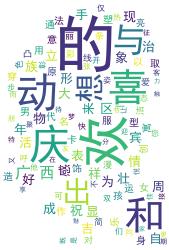
【作品介绍】
经过批改老师的要求,感谢玉林钟老师的提醒和结合再次看了老师的视频制作的。
【作品源代码】
#导入词云库
import pygame
import wordcloud
#导入分词库
import jieba
#导入imageio库
import imageio
#读取图片轮廓
mk1 = imageio.imread('欢欢p.png')
mk2 = imageio.imread('喜喜p.png')
#创建词云对象
wc1 = wordcloud.WordCloud(mask=mk1, background_color='white', font_path='simhei.ttf')
wc2 = wordcloud.WordCloud(mask=mk2, background_color='white', font_path='simkai.ttf')
#读取文件内容
txt = open("欢欢.txt", 'r', encoding='utf-8').read()
txt = ' '.join(txt)
#设置云图参数
wc1.generate(txt)
wc2.generate(txt)
#生成云图片
wc1.to_file('hhc.png')
wc2.to_file('xxc.png')
#设置两张角喵片作标
x1 = 0
x2 = 600
y1 = 200
y2 = 170
while True:
    #遍历pygame事件列表
     pygame.init()
     for event in pygame. event.get():
         #判断事件是否为点击关闭按键
         if event.type ==pygame. QUIT:
             #退出系统
             sys.exit()
pygame.display.update()
#设置时间延迟10毫秒(防止移动过快)
pygame.time.delay(15)

#将背景设置为白色
screen.fill('white')
screen.blit(hh,(x1,y1))
screen.blit(cc,(x2,y2))
#绘制欢欢图片
screen.blit(hh,(x1,y1))
x1 = x1+2
if x1 > 200:
    x1 = 200
#绘制喜喜图片
screen. blit(xx,'x2,y2')
#设置移动的步长
x2 = x2-2
y2 = y2+0.4
if x2 < 400:
    x2 = 400
    y2 = 210
screen.blit(w1, (100, 100))
screen.blit(w2, (200, 40))
screen.blit(w5,(X5,150))
screen.blit(w3,(250,y3))
screen.blit(w4,(470,y4))
y3 = y3-1
y4 = y4-1
if y3 <500:
     y3=500
if y4 < 500:
    y4 = 500
x5 -x5-3
if x5 < 130:
    x5 = 130
pygame.display.update()

'''******游戏窗口******'''
#设置游戏窗口的宽高
size = width, height = 800, 600
#创建游戏窗口
screen = pygame.display.set_mode(size)
#创建游戏窗口的标题
pygame.display.set_caption("欢欢喜喜介绍函")
#加载角喵片
hh = pygame.image.load('欢欢p.png')
#加载角喵片
xx = pygame.image.load('喜喜p.png')
#加载角喵片
hhc = pygame.image.load('hhc.png')
#加载角喵片
xxc = pygame.image.load('xxc.png')
while True:
   #遍历pygame事件列表
   for event in pygame.event.get():
       #判断事件是否为点击关闭按键
       if event.type == pygame.QUIT:
           #退出系统
           sys.exit()
   pygame.display.update()
   #设置时间延迟10毫秒(防止移动过快)
   pygame.time.delay(15)

#初始化pygame
pygame.init()
#定义一个字体对象,None表示系统默认字体,大小为50
font1 = pygame.font.SysFont(None, 40)
font2 = pygame.font.SysFont("simhei",50)
font3 = pygame.font.SysFont("simhei",30)
font4 = pygame.font.SysFont("simhei",30)
font5 = pygame.font.SysFont("simhei",15)
font6 = pygame.font.SysFont("simhei",30)
#设置字体属性,生成字体对象
w1 = font1,render('Gvanglish Bouxcuengh Swcigih 1958', 1, 'orange')
w2 = font1,render('广西壮族自治区', 1, 'orange')
w3 = font1, render('欢欢', 1, 'purple')
w4 = font1, render('喜喜', 1, 'purple')
w5 = font1, render('想要更详细地了解我吗?点我吧', 1, 'red')
w6 = font1,render('广西欢迎您', 1, 'purple')
#设置字体坐标
y3 = 700
y4 = 700
x5 = 800
while True:
    #将背景设置为白色
    screen.fill('white')
    #绘制字体对象
    screen.blit(w1,(100,100))
    #绘制欢欢图片
    screen.blit(hh, (x1, y1))

#获得鼠标位置
mouse_x, mouse_y = pygame.mouse.get_pos()
#创建变量num,控制界面的切换
num = 0
while True:
   #遍历pygame事件列表
   for event in pygame.event.get():
       #判断事件是否为点击关闭按键
       if event.type == pygame.QUIT:
           #退出系统
           sys.exit()
        #判断事件是否为点击关闭按键
       elif event.button == 1:
             #判断鼠标点击的区域是否在两个角色之间
             if mouse_x > 200 and mouse_x < 570 and mouse_y > 170 and mouse_y <400:
                 num = num +1
                 print(111)
#第一个界面效果
if num ==0:
    #将背景设置为白色
    screen.fill('white')
    #绘制字体对象
    screen.blit(w1,(100,100))
    #绘制欢欢图片
    screen.blit(hh, (x1, y1))
    x1 = x1+2
    if x1 > 200:
        x1 = 200
    #绘制欢欢图片
    screen.blit(xx, (x2, y2))
    #设置移动的步长
    x2 = x2-2
    y2 = y2+0.4
    if x2 < 400:
        x2 = 400

#第二个界面效果
if num == 1:
    #将背景设置为白色
    screen.fill('white')
    #绘制欢欢词云图片
    screen.blit(hhc, (x1, y1))
    #绘制喜喜词云图片
    screen.blit(xxc, (x2, y2))
    screen.blit(w1, (100, 100))
    screen.blit(w2, (200, 40))
    screen.blit(w3, (250, y3))
    screen.blit(w4, (470, y4))
    screen.blit(w6, (250, 140))

#创建变量num,控制界面的切换
num = 0
pygame.mixer.init()#初始化mixer
pygame.mixer.music. set_volume(0.2) # 设置音量为0.2
pygame.mixer.music.load('民歌.mp3')  # 加载歌曲
pygame.mixer.music.play()  # 播放
【提示】
部分含有Python第三方库相关内容的作品,在海龟编辑器网页端无法运行哦!如遇到这种情况,可以打开下面的链接,下载海龟编辑器客户端:
https://python.codemao.cn