 我是曲奇饼干查看:44 回复:1 评论:0 创建时间:2021-05-05T17:20:02
用户:我是曲奇饼干查看:44 回复:1 评论:0 创建时间:2021-05-05T17:20:02
【作品展示】
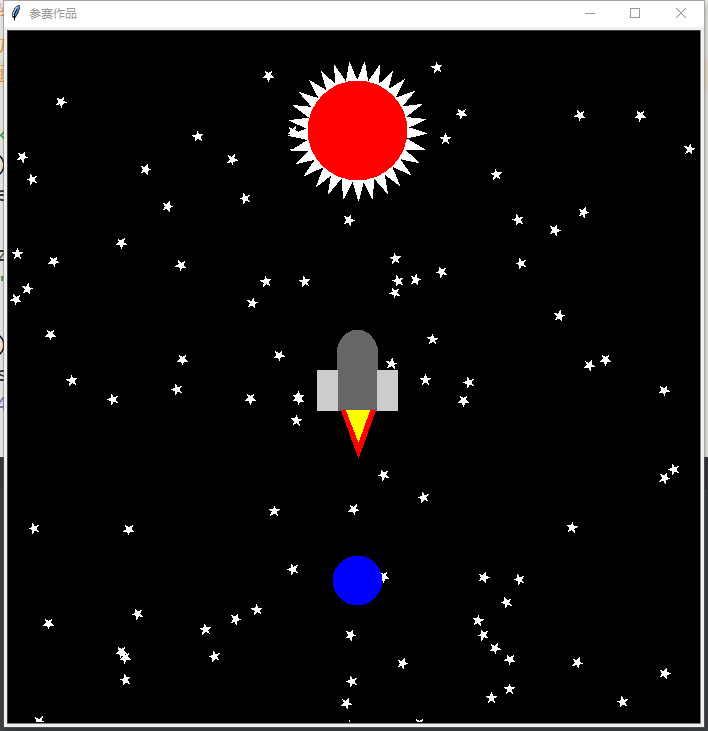
【作品介绍】
中国喵党100周年万岁!喵102周年万岁!
很久以前,人们对太空充满了向往,
嫦娥奔月,吴刚伐桂,玉兔捣药……
后羿射日,夸父逐日……
现在科技发达了,让我们登上月球,探求银河系之外的宇宙,
但是,奔向太阳,尽管他会耍脾气让飞行器灰飞烟灭
奔向太阳,追求永远的光明,
现代的夸父,已经变成了一个个飞船,飞向太阳,享受太阳的关怀
【作品源代码】
import turtle     #导入turtle库
import math       #为计算三角形
import random     #随机

turtle.bgcolor('black')    #模拟太空的黑色背景
turtle.setup(700,700)#设置背景大小为700*700的方形
sun_earse = turtle.Pen()#绘制太阳和地球的专用画笔

def draw_five(pen,size):#绘制五角星(星空用)的函数
    pen.color('white','white')
    pen.begin_fill()
    for i in range(5):
        pen.forward(size)
        pen.right(144)
    pen.end_fill()

def draw_stars(star_num):#绘制星星的函数
    new_p = turtle.Pen()  # 独立画笔,方便绘制
    new_p.hideturtle()
    new_p.speed(0)
    for i in range(star_num):  # 循环star_num次
        up_goto(new_p,random.uniform(-350,350),random.uniform(350,-350))
        new_p.setheading(random.randint(0,360))
        draw_five(new_p,10)

def up_goto(pen,x=0,y=0):#抬笔+goto+落笔,封装成函数会省不少事
    pen.penup()
    pen.goto(x,y)
    pen.pendown()

def draw_sun(pen,x=0,y=0,size=45,color='red',side_color='white'):#绘制太阳
    per=60/45
    pen.speed(0)
    up_goto(pen, x-size*per/2, y-size/5.3)#通过悉心调整参数可得
    pen.color(side_color,side_color)
    pen.begin_fill()
    for i in range(30):#该循环会绘制太阳外部光芒
        pen.forward(size*per)
        pen.left(149)  # 改变方向
    pen.end_fill()
    up_goto(pen, x, y)#复位
    pen.dot(size, color)  # 绘制红圈

def draw_earth(pen,x,y,size):#地球实在没法优化了
    up_goto(pen,x,y)
    pen.dot(size,'blue')

def draw_squarre(pen,x,y,size_x,size_y,color):#绘制实心中心点在(x,y)的长方形
    pen.color(color,color)
    up_goto(pen,x-size_x/2,y+size_y/2)
    pen.setheading(0)
    pen.begin_fill()
    for i in range(2):
        pen.forward(size_x)
        pen.right(90)
        pen.forward(size_y)
        pen.right(90)
    pen.end_fill()

def draw_sanjiao(pen,x,y,color='red',size=30):#绘制火箭下层的火焰
    up_goto(pen,x-size/2,y)
    pen.color(color,color)
    pen.begin_fill()
    pen.setheading(0)
    pen.forward(size)
    pen.right(110)
    pen.forward(size/3*5)#通过试数可得
    pen.right(140)
    pen.forward(size/3*5)
    pen.end_fill()


def draw_feichuan(pen,x,y):
    draw_squarre(pen, x, y, 40, 60,  '#666666')
    up_goto(pen, x, 10+y)
    pen.color('#666666', '#666666')
    pen.begin_fill()
    pen.circle(20)
    pen.end_fill()
    draw_squarre(pen,x-30,y-10,20,40,'#cccccc')
    draw_squarre(pen, x+30, y-10, 20, 40, '#cccccc')
    pen.hideturtle()
    draw_sanjiao(pen, x+3, y-30)
    draw_sanjiao(pen, x+2, y-30,'yellow',20)

turtle.title('参赛作品')#设置标题

#调用函数
draw_stars(100)
draw_sun(sun_earse, 0, 250, 100)  # 后面的那些参数都提前设置了,就不一一敲写了
draw_earth(sun_earse, 0, -200, 50)
sun_earse.hideturtle()
chuan = turtle.Pen()
chuan.speed(1)
draw_feichuan(chuan,0,0)

turtle.done()#保持窗口打开
【提示】
部分含有Python第三方库相关内容的作品,在海龟编辑器网页端无法运行哦!如遇到这种情况,可以打开下面的链接,下载海龟编辑器客户端:
https://python.codemao.cn