 云阙_轻功小木查看:34 回复:2 评论:0 创建时间:2021-05-04T20:39:42
用户:云阙_轻功小木查看:34 回复:2 评论:0 创建时间:2021-05-04T20:39:42
【作品展示】
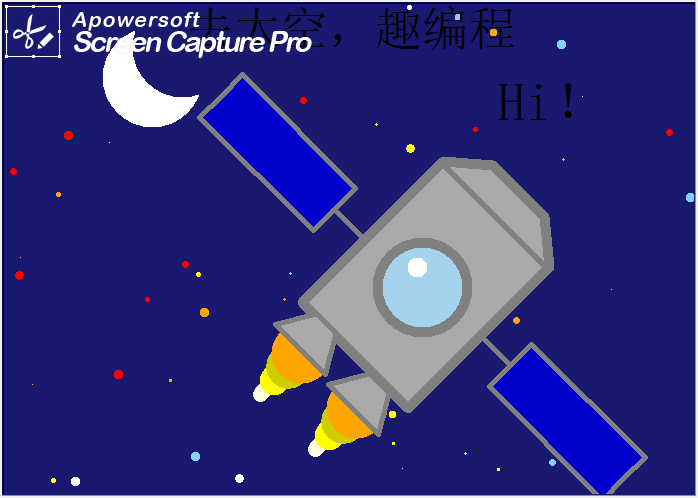
【作品介绍】
小的时候,心里总是希望,自己可以飞向太空,去别的星球到外星人家里做客。如今,航天技术不断壮大,从东方红卫星到神舟五号,从神舟五号又到月球背面探测,从月球背面探测再到月球采壌返回······
虽然我不是宇航员,但我却可以通过编程,飞向太空,翱翔宇宙。
现在,载人飞行舱已脱离火箭,正在次级点火推进中。
星辰大海,我来啦!
【作品源代码】
import turtle
import random

mypen = turtle.Pen()
myscreen = turtle.Screen()
mypen.hideturtle()
myscreen.tracer(0)

#设置窗口大小
myscreen.setup(700, 500)
turtle.bgcolor("midnightblue")

#设置移动函数
def yd (x, y):
    mypen.penup()
    mypen.goto(x, y)
    mypen.pendown()

#画出星空
color = ["red", "orange", "yellow", "light sky blue", "white"]

for i in range(100):
    wz = random.randint(-350, 350)
    wz_ = random.randint(-300, 300)
    yd(wz, wz_)

    jg = random.choice(color)
    jg_ = random.randint(1, 10)
    mypen.dot(jg_, jg)

#画出月亮
yd(-200, 175)
mypen.dot(100, "white")
yd(-170, 205)
mypen.dot(100, "midnightblue")

#画出飞船船身
mypen.pencolor("grey")
yd(-50, -50)
mypen.left(45)
mypen.pensize(10)
mypen.begin_fill()
mypen.fillcolor("darkgrey")

for i in range(2):
    mypen.forward(200)
    mypen.right(90)
    mypen.forward(150)
    mypen.right(90)
mypen.end_fill()

#画出飞船玻璃
yd(70, -35)
mypen.dot(100, "grey")
mypen.dot(80, "lightskyblue2")
yd(65, -15)
mypen.dot(20, "white")

#画出太阳能电池板
cd = [30, 160, 60, 160, 30]
def dcb (a, b, c):
    yd(a, b)
    mypen.right(c)
    mypen.pensize(5)
    mypen.forward(200)
    mypen.begin_fill()
    mypen.fillcolor("blue3")
    for i in cd:
        mypen.left(90)
        mypen.forward(i)
    mypen.end_fill()

dcb(130, -85, 90)
dcb(10, 15, 270)

#画出出舱口
yd(-50, -50)
mypen.right(180)
mypen.forward(200)
mypen.fillcolor("darkgrey")
mypen.begin_fill()
mypen.pensize(10)
fx = [50, 40, 40, 140]
喵 = [50, 72, 50, 140]
j = 0
while j < 3:
    mypen.right(fx[j])
    mypen.forward(喵[j])
    j += 1
mypen.end_fill()

#画出推进器火焰
def hy(a, b):
    zj = [15, 30, 45, 60]
    ys = ["lightyellow", "yellow", "yellow3", "orange"]
    jl = [60, 40, 20, 1]
    i = 0
    while i < 4:
        yd(a, b)
        mypen.pensize(zj[i])
        mypen.pencolor(ys[i])
        mypen.forward(jl[i])
        i += 1
mypen.right(50)
hy(-50, -100)
hy(5, -155)

#画出推进器推进孔
def tjk(a, b):
    yd(a, b)
    fx_ = [30, 240, 240, 330]
    jl_ = [40, 70, 40, 60]
    mypen.pencolor("grey")
    mypen.pensize(5)
    mypen.begin_fill()
    mypen.fillcolor("darkgrey")
    l = 0
    while l < 3:
        mypen.right(fx_[l])
        mypen.forward(jl_[l])
        l += 1
    mypen.end_fill()
tjk(-38, -62)
mypen.right(210)
tjk(15, -122)

#写下 Hi!
yd(200, 125)
mypen.pencolor("black")
mypen.write("Hi!", font=("文泉驿正黑", 40), align="center")


#写下 去太空,趣编程
yd(0, 200)
mypen.write("去太空,趣编程", font=("文泉驿正黑", 35), align = "center")

turtle.done()
【提示】
部分含有Python第三方库相关内容的作品,在海龟编辑器网页端无法运行哦!如遇到这种情况,可以打开下面的链接,下载海龟编辑器客户端:
https://python.codemao.cn