沈1122查看:87 回复:1 评论:0 创建时间:2021-05-01T21:12:04
用户:沈1122查看:87 回复:1 评论:0 创建时间:2021-05-01T21:12:04
【作品展示】
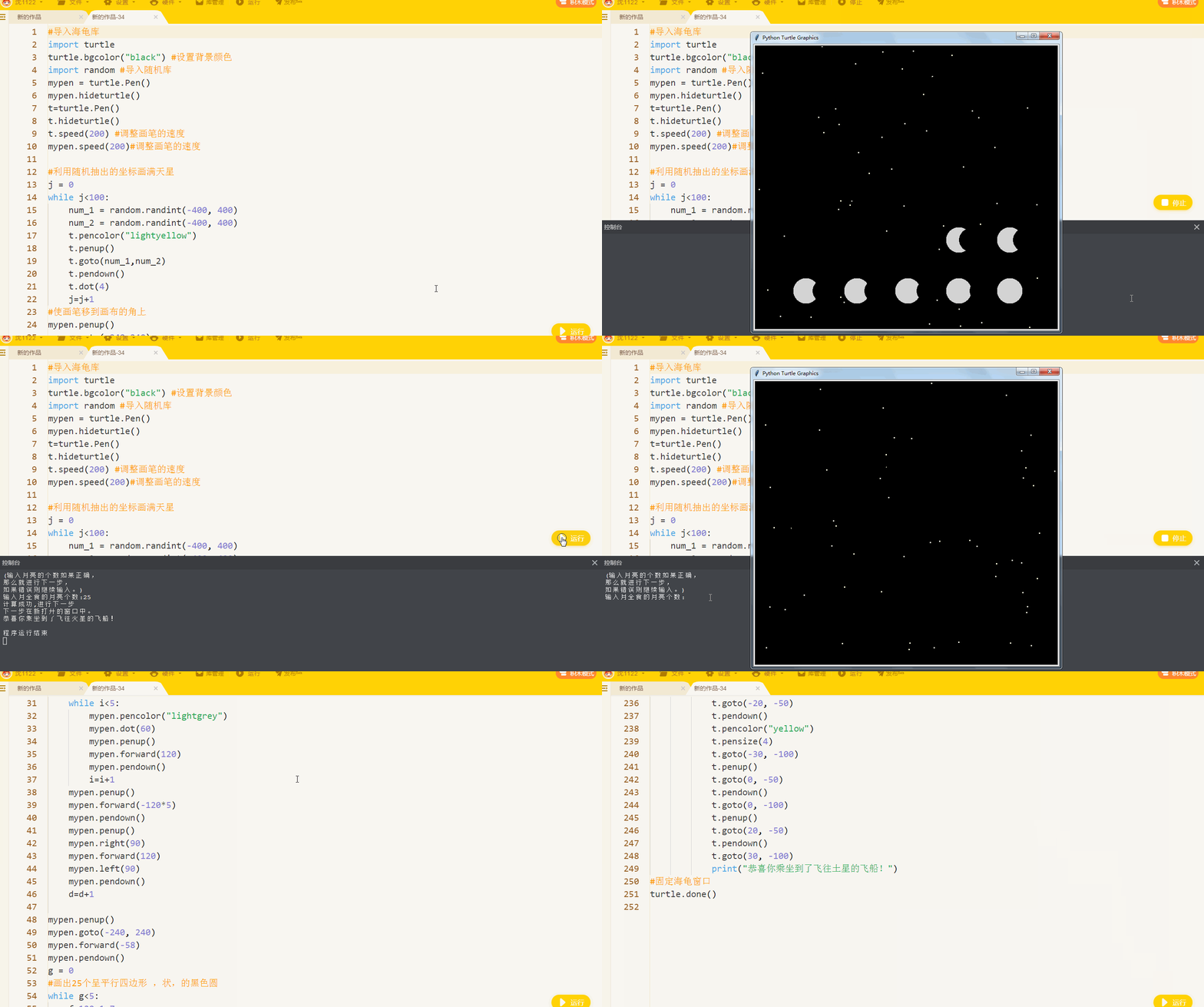
【作品介绍】
因为这个动图每次需要运行两次,所以请耐心观看。
【作品源代码】
#导入海龟库
import turtle
turtle.bgcolor("black") #设置背景颜色
import random #导入随机库
mypen = turtle.Pen()
mypen.hideturtle()
t=turtle.Pen()
t.hideturtle()
t.speed(200) #调整画笔的速度
mypen.speed(200)#调整画笔的速度

#利用随机抽出的坐标画满天星
j = 0
while j<100:
    num_1 = random.randint(-400, 400)
    num_2 = random.randint(-400, 400)
    t.pencolor("lightyellow")
    t.penup()
    t.goto(num_1,num_2)
    t.pendown()
    t.dot(4)
    j=j+1
#使画笔移到画布的角上
mypen.penup()
mypen.goto(-240,240)
mypen.pendown()
#画出25个等距的白色月亮
d=0
while d<5:
    i = 0
    while i<5:
        mypen.pencolor("lightgrey")
        mypen.dot(60)
        mypen.penup()
        mypen.forward(120)
        mypen.pendown()
        i=i+1
    mypen.penup()
    mypen.forward(-120*5)
    mypen.pendown()
    mypen.penup()
    mypen.right(90)
    mypen.forward(120)
    mypen.left(90)
    mypen.pendown()
    d=d+1

mypen.penup()
mypen.goto(-240, 240)
mypen.forward(-58)
mypen.pendown()
g = 0
#画出25个呈平行四边形 ,状,的黑色圆
while g<5:
    f=120+1.7
    e=0
    while e<5:
        mypen.pencolor("black")
        mypen.dot(57)
        mypen.penup()
        mypen.forward(f)
        mypen.pendown()
        f=f+1.7
        e=e+1
    mypen.penup()
    mypen.forward(-120*5)
    mypen.pendown()
    mypen.penup()
    mypen.right(90)
    mypen.forward(120)
    mypen.left(90)
    mypen.pendown()
    g=g+1
#调整速度并用25个黑色的圆去覆盖白色的圆
mypen.speed(10)
mypen.penup()
mypen.goto(-240,240)
mypen.pendown()
m=0
while m<5:
    l = 0
    while l<5:
        mypen.pencolor("black")
        mypen.dot(60)
        mypen.penup()
        mypen.forward(120)
        mypen.pendown()
        l=l+1
    mypen.penup()
    mypen.forward(-120*5)
    mypen.pendown()
    mypen.penup()
    mypen.right(90)
    mypen.forward(120)
    mypen.left(90)
    mypen.pendown()
    m=m+1
#用if语句判断选择乘坐的飞船是哪一个
print("(输入月亮的个数如果正确,\n那么就进行下一步,\n如果错误则继续输入。)")
a=0
while a<3:
    choose=input("输入月全食的月亮个数:")
    if choose=="25":
        print("计算成功,进行下一步\n下一步在新打开的窗口中。")
        mypen.clear()#彻底清理部分痕迹

        #准备画火箭
        t.penup()
        t.goto(0,200)
        t.pendown()
        a=3
        screen=turtle.Screen()
        choose=screen.textinput("选择","如果搭乘火箭去太空,\n你想搭乘哪一种(第一种,第二种)\n随便选一种:")
        #开始画第一个火箭的头部
        if choose=="第一种":
            t.begin_fill()
            t.fillcolor("red")
            t.right(60)
            t.forward(50)
            t.right(120)
            t.forward(50)
            t.right(120)
            t.forward(50)
            t.end_fill()
            #身体
            t.begin_fill()
            t.fillcolor("purple")
            t.right(120)
            t.forward(50)
            t.right(30)
            t.forward(100)
            t.right(90)
            t.forward(50)
            t.right(90)
            t.forward(100)
            t.right(90)
            t.forward(50)
            t.end_fill()
            #窗体
            t.penup()
            t.goto(0,100)
            t.pendown()
            t.pencolor("black")
            t.dot(40)
            t.pencolor("yellow")
            t.dot(30)
            #箭翼
            t.penup()
            t.goto(-25,100)
            t.pendown()
            t.begin_fill()
            t.fillcolor("green")
            t.goto(-40,50)
            t.goto(-25,50)
            t.goto(-25,100)
            t.end_fill()
            #箭翼
            t.penup()
            t.goto(25, 100)
            t.pendown()
            t.begin_fill()
            t.fillcolor("green")
            t.goto(40, 50)
            t.goto(25, 50)
            t.goto(25, 100)
            t.end_fill()
            #箭尾火焰
            t.penup()
            t.goto(-20,40)
            t.pendown()
            t.pencolor("yellow")
            t.pensize(4)
            t.goto(-30,0)
            t.penup()
            t.goto(0,40)
            t.pendown()
            t.goto(0, 0)
            t.penup()
            t.goto(20,40)
            t.pendown()
            t.goto(30,0)
            print("恭喜你乘坐到了飞往火星的飞船!")
        #绘制第二个火箭的第一级
        if choose == "第二种":
            t.goto(0, 200)
            t.pencolor("white")
            t.begin_fill()
            t.fillcolor("white")
            t.right(60)
            t.forward(50)
            t.right(120)
            t.forward(50)
            t.right(120)
            t.forward(50)
            t.end_fill()
            #绘制火箭的第二级
            t.pencolor("blue")
            t.penup()
            t.goto(0,150)
            t.pendown()
            t.pensize(53)
            t.goto(0,0)
            t.pencolor("white")
            t.penup()
            t.goto(0,150)
            t.pendown()
            t.goto(0,80)
            t.goto(0, 120)
            t.pencolor("green")
            t.dot(25)
            t.penup()
            t.goto(-30,30)
            t.pendown()
            t.goto(-30,0)
            t.penup()
            t.goto(30, 30)
            t.pendown()
            t.goto(30, 0)
            t.penup()
            t.goto(0,0)
            t.pendown()
            t.right(60)
            t.pencolor("black")
            t.pensize(1)
            t.begin_fill()
            t.fillcolor("red")
            t.right(60)
            t.forward(50)
            t.right(120)
            t.forward(50)
            t.right(120)
            t.forward(50)
            t.end_fill()
            #箭尾火焰
            t.penup()
            t.goto(-20, -50)
            t.pendown()
            t.pencolor("yellow")
            t.pensize(4)
            t.goto(-30, -100)
            t.penup()
            t.goto(0, -50)
            t.pendown()
            t.goto(0, -100)
            t.penup()
            t.goto(20, -50)
            t.pendown()
            t.goto(30, -100)
            print("恭喜你乘坐到了飞往土星的飞船!")
#固定海龟窗口
turtle.done()
【提示】
部分含有Python第三方库相关内容的作品,在海龟编辑器网页端无法运行哦!如遇到这种情况,可以打开下面的链接,下载海龟编辑器客户端:
https://python.codemao.cn