 憨憨的大宝查看:145 回复:2 评论:1 创建时间:2021-04-30T14:52:05
用户:憨憨的大宝查看:145 回复:2 评论:1 创建时间:2021-04-30T14:52:05
【作品展示】
【作品介绍】
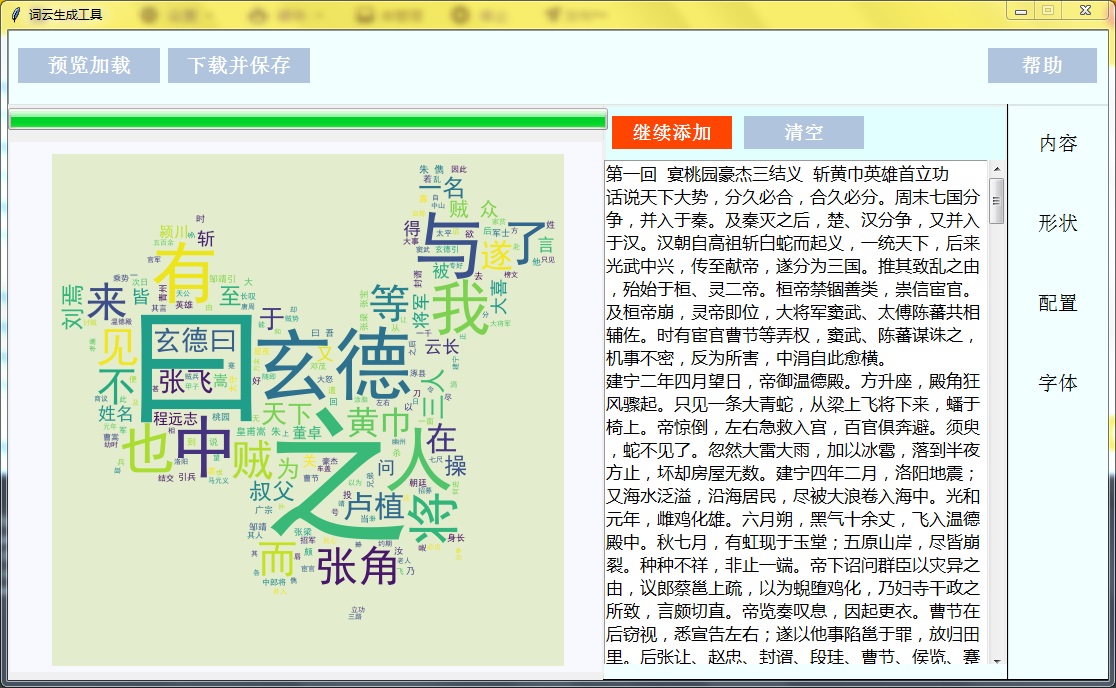
点击“文本”按钮,出现文本框。(1)点击文本框,可粘贴文本。
(2)点击“导入文本”按钮,可在电脑中选择文本。
(3)点击“清空”按钮,可清空已上传文本
点击“形状”,可选择词云形状
点击“配置”按钮,可选择词云内词语数量,背景,文字颜色等设置
点击“字体”按钮,可设置词语字体,如宋体。
点击“预览加载”,可以加载词云的预览图
点击“下载并保存”,可把制作完的词云保存到本地
作品中形状中图片来自“词云生成器”,其他均为原创
【作品源代码】
import time
from tkinter import *
import tkinter.ttk
from tkinter import filedialog
import tkinter.messagebox as tkm
from tkinter.scrolledtext import ScrolledText

import os
import shutil
import jieba
from wordcloud import WordCloud

import numpy as np
from PIL import Image
import matplotlib.pyplot as plt

# 建立窗口
window=Tk()
window.title("词云生成工具")

#窗口初始化
window.resizable(0, 0)
sw = window.winfo_screenwidth()
sh = window.winfo_screenheight()
ww = 1100
wh = 650
喵 = (sw-ww)/2
wy = (sh-wh)/2
window.geometry("%dx%d+%d+%d" % (ww, wh, 喵, wy))

top = PanedWindow(window, background="azure", height=75,
                  width=1101, orient="horizontal", relief="sunken")
top.place(x=0, y=0)
right = PanedWindow(window, background="azure", height=575,
                    width=101, relief="raised")
right.place(x=1000, y=75)
right1 = PanedWindow(window, background="azure", height=576,
                    width=405, orient="vertical", relief="raised")
right1.place(x=595, y=74)

# 画布变量
t = ""
sp = Canvas(window, width=216, height=400, background="white")
dy = Canvas(window, width=216, height=400, background="white")
font_c = Canvas(window, width=216, height=400, background="white")
wordclound_show = Canvas(window, width=592, height=530,
                         background="ghostwhite")
wordclound_show.place(x=0, y=110)
#变量
last_font= "你还选择字体:"
file_path=""
file_savepath=""
file_text=""
photo_list=["photo1","photo2","photo3","photo4","photo5","photo6","photo7","photo8","photo9","photo10","photo11"]
photo_list2 = ["book_p", "China_p", "circle_p",
               "cloud_p", "cloud2_p", "ellipses_p", "fist_p", "good_p"]
color_list = ["color1", "color2", "color3",
              "color4", "color5", "color6", "color7"]
ul=None
num_box = 200
size_box=1
max_box=150
num_text_last=0
size_text_last=0
max_size_last=0
color1="#FFFFFF"
p=""
font_flag="fonts/simhei.ttf"
shape_flag="shape/book.png"
shape_hint=Button(window)
wordcloud=""
wo_show=""
# "文本"按钮功能
def text():
    global t
    global sp
    global dy
    global file_text
    global ul
    if sp.winfo_exists()==1:
        sp.destroy()
    if dy.winfo_exists() == 1:
        dy.destroy()
    t = Canvas(right1, width=399, height=555, background="lightcyan")
    t.place(x=0, y=0)

    #文本框
    t1 = ScrolledText(t, width=38, height=22,font=("微软雅黑",13),background="white")
    t1.place(x=0, y=55)

    #上传
    def upload():
        global file_path
        global file_text
        file_path = filedialog.askopenfilename(title=u"选择文件", filetypes=[("文本", ".txt")], initialdir=os.path.split(os.path.realpath(__file__))[0])
        print("打开文件:",file_path)
        if file_path is not None:
            with open(file=file_path,mode="r+",encoding="utf-8") as file:
                file_text=file.read()
            t1.insert('insert', file_text)
        t_text=t1.get("1.0","end")
        if t_text is not None:
            ul["text"]="继续添加"
    #"上传"按钮
    ul=Button(t,text="导入文本",font=("宋体", 14,"bold"),background="orangered",
              foreground="white", width=10, height=1,relief=FLAT, command=upload)
    ul.place(x=8, y=11)

    if file_text != "":
        t1.insert('insert', file_text)
        t_text = t1.get("1.0", "end")
        ul["text"] = "继续添加"

    #"清空"功能
    def clear():
        t1.delete(1.0,"end")
        ul["text"]="上传"
    #"清空"按钮
    clear_out=Button(t,text="清空",font=("宋体", 14, "bold"),background="lightsteelblue",
                     foreground="white", width=10, height=1,relief=FLAT,command=clear)
    clear_out.place(x=140, y=11)
text()

#6."文本"按钮
text = Button(right, text="内容", font=("宋体", 15),
              background="azure", foreground="black", width=6, height=1, relief=FLAT, command=text)
text.place(x=14, y=20)

# "形状"按钮功能
def shape():
    global t
    global sp
    global dy
    global shape_flag
    global last_shape
    if dy.winfo_exists() == 1:
        dy.destroy()
    if t.winfo_exists() == 1:
        t.destroy()
    sp = Canvas(right1, width=398, height=563, background="lightcyan",
                scrollregion=(0, 0, 700, 700))
    sp.place(x=0, y=0)
    frame = Frame(sp, width=398, height=800, background="lightcyan")
    frame.place(x=0, y=0)
    vbar = Scrollbar(sp, orient=VERTICAL, relief=GROOVE)
    vbar.place(x=378, width=20, height=565)
    vbar.configure(command=sp.yview)
    sp.config(yscrollcommand=vbar.set)
    sp.create_window((200, 402), window=frame)

    hint = Label(frame, text="请选择形状:", font=("微软正黑体", 25, "bold"),background="lightcyan")
    hint.place(x=10, y=10)

    def shape_button(x, y, path, NO,command):
            global photo_list
            photo_list[NO] = PhotoImage(file=path)
            sh_bu = Button(
                frame, image=photo_list[NO], background="white", width=76, height=73, relief=GROOVE,command=command)
            sh_bu.place(x=x, y=y)
            return sh_bu
    global shape_hint
    if shape_flag != "":
        last_shape = PhotoImage(file="shape/book.png")
        shape_hint = Button(frame, image=last_shape, width=76, height=73,
                            relief=FLAT, background="lightcyan")
        shape_hint.place(x=150, y=260)

    Label(frame,text="你选择的形状是:",background="lightcyan",font=("微软正黑体",12,"bold")).place(x=10,y=280)
    def book_b():
        global shape_flag
        global shape_hint
        shape_flag = "shape/book1.png"
        photo_list2[0] = PhotoImage(file="shape/book.png")
        shape_hint.destroy()
        shape_hint = Button(frame, width=75, height=70, image=photo_list2[0],
                            relief=FLAT,background="lightcyan")
        shape_hint.place(x=150, y=260)
    book = shape_button(1, 80, "shape/book.png", 0, book_b)

    def China_b():
        global shape_flag
        shape_flag = "shape/China1.png"
        global shape_hint
        photo_list2[1] = PhotoImage(file="shape/China.png")
        shape_hint.destroy()
        shape_hint = Button(frame, width=75, height=70, image=photo_list2[1],
                            relief=FLAT, background="lightcyan")
        shape_hint.place(x=150, y=260)
    China = shape_button(83, 80, "shape/China.png", 1, China_b)

    def circle_b():
        global shape_flag
        shape_flag = "shape/circle1.png"
        global shape_hint
        photo_list2[2] = PhotoImage(file="shape/circle.png")
        shape_hint.destroy()
        shape_hint = Button(frame, width=75, height=70, image=photo_list2[2],
                            relief=FLAT, background="lightcyan")
        shape_hint.place(x=150, y=260)
    circle = shape_button(165, 80, "shape/circle.png", 2, circle_b)

    def cloud_b():
        global shape_flag
        shape_flag = "shape/cloud1.png"
        global shape_hint
        photo_list2[3] = PhotoImage(file="shape/cloud.png")
        shape_hint.destroy()
        shape_hint = Button(frame, width=75, height=70, image=photo_list2[3],
                            relief=FLAT, background="lightcyan")
        shape_hint.place(x=150, y=260)
    cloud = shape_button(247, 80, "shape/cloud.png", 3, cloud_b)

    def cloud2_b():
        global shape_flag
        shape_flag = "shape/cloud21.png"
        global shape_hint
        photo_list2[4] = PhotoImage(file="shape/cloud2.png")
        shape_hint.destroy()
        shape_hint = Button(frame, width=75, height=70, image=photo_list2[4],
                            relief=FLAT, background="lightcyan")
        shape_hint.place(x=150, y=260)
    cloud2 = shape_button(1, 160, "shape/cloud2.png", 4, cloud2_b)

    def ellipses_b():
        global shape_flag
        shape_flag = "shape/ellipses1.png"
        global shape_hint
        photo_list2[5] = PhotoImage(file="shape/ellipses.png")
        shape_hint.destroy()
        shape_hint = Button(frame, width=75, height=70, image=photo_list2[5],
                            relief=FLAT, background="lightcyan")
        shape_hint.place(x=150, y=260)
    ellipses = shape_button(83, 160, "shape/ellipses.png", 5, ellipses_b)

    def fist_b():
        global shape_flag
        shape_flag = "shape/fist1.png"
        global shape_hint
        photo_list2[6] = PhotoImage(file="shape/fist.png")
        shape_hint.destroy()
        shape_hint = Button(frame, width=75, height=70, image=photo_list2[6],
                            relief=FLAT, background="lightcyan")
        shape_hint.place(x=150, y=260)
    fist = shape_button(165, 160, "shape/fist.png", 6, fist_b)

    def good_b():
        global shape_flag
        shape_flag = "shape/good1.png"
        global shape_hint
        photo_list2[7] = PhotoImage(file="shape/good.png")
        shape_hint.destroy()
        shape_hint = Button(frame, width=75, height=70, image=photo_list2[7],
                            relief=FLAT, background="lightcyan")
        shape_hint.place(x=150, y=260)
    good = shape_button(247, 160, "shape/good.png", 7, good_b)

# "配置"按钮功能
def deploy():
    global last_color
    global color_flag
    global t,sp,dy
    global num_box,size_box
    global color
    global fc
    if t.winfo_exists() == 1:
        t.destroy()
    if sp.winfo_exists() == 1:
        sp.destroy()

    dy = Canvas(right1, width=398, height=570, background="lightcyan")
    dy.place(x=0, y=0)

    sc = Canvas(dy,width=380,height=280,background="lightcyan")
    sc.place(x=10, y=90)
    sc.config(highlightthickness=0)

    bg_lb = Label(dy, text="背景色", font=("微软雅黑", 11),
                  width=7, height=2, background="lightcyan",)
    bg_lb.place(x=9, y=25)

    bgcolor_dict = {"河白色": "#FFFFFF", "杏仁黄": "#FAF9DE", "秋叶褐": "#FFF2E2",
                  "胭脂红": "#FDE6E0", "青喵绿": "#E3EDCD", "海天蓝": "#DCE2F1",
                  '葛巾紫': "#E9EBFE", "极光灰": "#EAEAEF"}

    def fun1(*args):
        global color1
        color1 = bgcolor_dict[bgcolor.get()]
        cb["background"]=color1
    bgcolor =tkinter.ttk.Combobox(dy, postcommand=fun1)
    bgcolor["value"] = ("河白色", "杏仁黄", "秋叶褐", "胭脂红", "青喵绿", "海天蓝", '葛巾紫', "极光灰")

    bgcolor.current(0)
    bgcolor["state"] = "readonly"
    bgcolor.place(x=80, y=34)

    cb = Button(dy, width=8, height=1, background="#FFFFFF", relief=GROOVE)
    cb["state"] = DISABLED
    cb.place(x=250,y=26)
    bgcolor.bind("<>", fun1)
    dy.create_line(15, 65,380,65,fill='grey')

    #单词数量
    def number(num):
        global num_text_last
        global num_box
        num_box = num
        num_text.delete(0, END)
        num_text.insert(END,num_box)
        num_text_last = num_text.get()
    l1 = Label(sc, text="词语数量", font=("宋体", 10, "bold"),
               width=7, height=1, background="lightcyan", foreground="gray")
    l1.place(x=5, y=2)
    sc.create_line(5, 24,375,24,fill='grey')
    word_number = Scale(sc, orient='horizontal', from_=1, to=1000,
                            length=320, sliderlength=20, relief="ridge",
                            sliderrelief=FLAT, command=number)
    word_number.place(x=5, y=28)
    word_number.set(num_box)

    num_text=Entry(sc,width=4)
    num_text.place(x=340, y=37)

    def Enter(event):
        global num_text_last
        try:
            num_set_up=int(num_text.get())
            word_number.set(num_set_up)
            if num_set_up>1000:
                num_set_up=100
            elif num_set_up<1:
                num_set_up=1
        except:
            messagebox.showwarning('警告','请输入数字(整数)')
            num_text.delete(0,END)
            num_text.insert(END,num_text_last)
    num_text.bind("", Enter)

    #词语大小步距
    def s_num(size):
        global size_box
        global size_text_last
        size_box=size
        size_text.delete(0, END)
        size_text.insert(END, size_box)
        size_text_last=size_text.get()
    l2 = Label(sc, text="词语大小间距", font=("宋体", 10, "bold"),
            width=10, height=1, background="lightcyan", foreground="gray")
    l2.place(x=5, y=94)
    sc.create_line(5, 113, 375, 113, fill='grey')
    word_size = Scale(sc, orient='horizontal', from_=0, to=10,
                    length=320, sliderlength=20, relief="ridge",
                    sliderrelief="flat", command=s_num)
    word_size.place(x=5,y=116)
    word_size.set(size_box)
    size_text = Entry(sc, width=4)
    size_text.place(x=340, y=124)

    def Enter2(event):
        global size_text_last
        try:
            size_set_up=int(size_text.get())
            word_size.set(size_set_up)
            if size_set_up>10:
                size_set_up=10
            elif size_set_up<0:
                size_set_up=0
        except:
            messagebox.showwarning("警告","请输入数字(整数)")
            size_text.delete(0, END)
            size_text.insert(END, size_text_last)
    size_text.bind("", Enter2)
    dy.create_line(15, 345, 380, 345, fill='grey')

    #词语最大字体
    def ms(Max):
        global max_size_last
        global max_box
        max_box=Max
        max_text.delete(0,END)
        max_text.insert(END,max_box)
        max_size_last = max_size.get()
    l3 = Label(sc, text="词语最大字体", font=("宋体", 10, "bold"),
               width=10, height=1, background="lightcyan", foreground="gray")
    l3.place(x=5,y=182)
    max_size = Scale(sc, orient='horizontal', from_=100, to=200,
                     length=320, sliderlength=20, relief="ridge",
                     sliderrelief="flat", command=ms)
    max_size.place(x=5, y=204)
    max_size.set(max_box)
    max_text = Entry(sc, width=4)
    max_text.place(x=345, y=209)
    sc.create_line(5, 202, 380, 202, fill='grey')
    def Enter3(event):
        global max_size_last
        try:
            max_=int(max_text.get())
            max_size.set(max_)
            if max_>200:
                max_=200
            elif max_<100:
                max_=100

        except:
            messagebox.showwarning("警告", "请输入数字(整数)")
            max_text.delete(0, END)
            max_text.insert(END, max_size_last)
    max_text.bind("",Enter3)

#字体
def font():
    global t,sp,dy,font_c
    global last_font
    if t.winfo_exists() == 1:
        t.destroy()
    if sp.winfo_exists() == 1:
        sp.destroy()
    if dy.winfo_exists() == 1:
        dy.destroy()
    font_c = Canvas(right1, width=399, height=555, background="lightcyan")
    font_c.place(x=0, y=0)
    font_dict = {"黑体": "fonts/simhei.ttf", "微软雅黑": "fonts/msyh.ttf", "华文琥珀": "fonts/STHUPO.TTF",
                 "宋体": "fonts/simsun.ttc", "楷体": "fonts/simkai.ttf", "仿宋": "fonts/simkai.ttf"}

    def font_button_set(font_font, text_, x, y, font_size, command):
        font_b = Button(font_c, text=text_,width=35,font=(
            font_font,font_size,"bold"),background="white",relief=FLAT,anchor='w',command=command)
        font_b.place(x=x, y=y)

    font_hint1 = Label(font_c, text="你选择的字体:", background="lightcyan",
                       font=("宋体", 12, "bold"), relief=FLAT)
    font_hint1.place(x=10,y=13)
    font_hint2=Button(font_c,text=last_font,font=("宋体",12,"bold"),
                    background="lightcyan",relief=FLAT)
    font_hint2.place(x=120,y=11)
    def font1_b():
        global font_flag
        global last_font
        last_font = "黑体  SimHei"
        font_flag = font_dict["黑体"]
        font_hint2["foreground"] = "black"
        font_hint2["font"] = ("黑体", 13, "bold")
        font_hint2["text"] = last_font
        font_hint2.place(x=120, y=11)
    font1 = font_button_set("黑体", "黑体  SimHei", 0, 50, 15, font1_b)

    def font2_b():
        global font_flag
        global last_font
        last_font = "微软雅黑  Microsoft YaHe"
        font_flag = font_dict["微软雅黑"]
        font_hint2["foreground"] = "black"
        font_hint2["font"] = ("微软雅黑", 13, "bold")
        font_hint2["text"] = last_font
        font_hint2.place(x=120,y=5)
    font2 = font_button_set("微软雅黑", "微软雅黑  Microsoft YaHe", 0, 85, 13,command=font2_b)

    def font3_b():
        global font_flag
        global last_font
        last_font = "华文琥珀"
        font_flag = font_dict["华文琥珀"]
        font_hint2["foreground"] = "black"
        font_hint2["font"] = ("华文琥珀", 15, "bold")
        font_hint2["text"] = last_font
        font_hint2.place(x=120, y=11)
    font3 = font_button_set("华文琥珀", "华文琥珀", 0, 122, 14, command=font3_b)

    def font4_b():
        global font_flag
        global last_font
        last_font = "宋体 SimSun"
        font_flag = font_dict["宋体"]
        font_hint2["foreground"] = "black"
        font_hint2["font"] = ("宋体", 13, "bold")
        font_hint2["text"] = last_font
        font_hint2.place(x=120, y=11)
    font4 = font_button_set("宋体", "宋体  SimSun", 0, 155, 15,command=font4_b)

    def font5_b():
        global font_flag
        global last_font
        last_font = "楷体  KaiTi"
        font_flag = font_dict["楷体"]
        font_hint2["foreground"] = "black"
        font_hint2["font"] = ("楷体", 13, "bold")
        font_hint2["text"] = last_font
        font_hint2.place(x=120, y=11)
    font5 = font_button_set("楷体", "楷体  KaiTi", 0, 190, 15,command=font5_b)

    def font6_b():
        global font_flag
        global last_font
        last_font = "仿宋  FangSong"
        font_flag = font_dict["仿宋"]
        font_hint2["foreground"] = "black"
        font_hint2["font"] = ("仿宋", 13, "bold")
        font_hint2["text"] = last_font
        font_hint2.place(x=120, y=11)
    font6 = font_button_set(font_dict["仿宋"],"仿宋  FangSong",0,195,15,command=font6_b)


#预览加载
def load_show():
    global file_path
    global file_text
    global shape_flag
    global num_text_last, max_size_last, size_text_last
    global color1
    global font_flag
    global wordcloud
    global wordclound_show,wo_show
    #进度条
    load["state"] = DISABLED
    for i in range(100):
        p1['value'] = i + 1
        window.update()
        time.sleep(0.02)
    load["state"] = NORMAL

    #生成词云
    #1.获取文本
    if file_path is not None:
        with open(file_path, "r", encoding='UTF-8') as f:
                txt = f.read()

    #2.分词
        words = jieba.lcut(txt)
        for ch in ',。?!“”;:、 \n':
            for i in range(words.count(ch)):
                if ch in words:
                    words.remove(ch)

        newtxt = " ".join(words)
        mask = np.array(Image.open(shape_flag))
        wordcloud = WordCloud(mask=mask,max_font_size=int(max_size_last),font_step=int(size_text_last),
                max_words=int(num_text_last),font_path=font_flag,
                background_color=color1, width=10, height=10).generate(newtxt)
        wordcloud.to_file("result/wordcloud.png")
        wo_show = PhotoImage(file="result/wordcloud.png")
        wordclound_show.create_image(300,270,anchor=CENTER,image=wo_show)


p1 = tkinter.ttk.Progressbar(
    window, length=600, orient=HORIZONTAL, mode="determinate")
p1.place(x=0, y=78)
# 进度值最大值
p1['maximum'] = 100
# 进度值初始值
p1['value'] = 0

#下载并保存
def download():
    global wordcloud
    file_savepath = filedialog.asksaveasfilename(title=u'保存文件',
            filetypes=[("图片", ".png")], initialdir=os.path.split(os.path.realpath(__file__))[0])
    file_savepath = file_savepath+".png"
    print('保存文件:', file_savepath)
    shutil.copy("result/wordcloud.png", file_savepath)

def help_show():
    #"帮助"窗口初始化
    h1 = Tk()
    h1.resizable(0, 0)
    sw = h1.winfo_screenwidth()
    sh = h1.winfo_screenheight()
    hw = 500
    hh = 500
    hx = (sw-hw)/2
    hy = (sh-hh)/2
    h1.geometry("%dx%d+%d+%d" % (hw, hh, hx, hy))
    h1.title("帮助中心")
    #文本
    with open("image/help.txt", "r", encoding="utf-8") as tt:
        h3 = tt.read()
    h2 = Label(h1, text=h3, justify=LEFT)
    h2.place(x=0, y=0)

    h.mainloop()


# 按钮
#1.预览加载
load = Button(window, text="预览加载", font=("宋体", 15, "bold"),
              background="lightsteelblue", foreground="white", width=12,relief=FLAT,height=1,command=load_show)
load.place(x=10, y=18)

# 2.下载并保存
dl_sv = Button(window, text="下载并保存", font=("宋体", 15, "bold"),
               background="lightsteelblue", foreground="white", width=12, relief=FLAT,height=1,command=download)
dl_sv.place(x=160, y=18)

#3.帮助
h = Button(window, text="帮助", font=("宋体", 15, "bold"),
           background="lightsteelblue", foreground="white", width=9, relief=FLAT,height=1, command=help_show)
h.place(x=980, y=18)

#4."形状"按钮
text = Button(right, text="形状", font=("宋体", 15),
              background="azure", foreground="black", width=6, height=1, relief=FLAT,command=shape)
text.place(x=14, y=100)

#5."配置"按钮
text = Button(right, text="配置", font=("宋体", 15),
              background="azure", foreground="black", width=6, height=1, relief=FLAT,command=deploy)
text.place(x=14, y=180)

#6."字体"按钮
text = Button(right, text="字体", font=("宋体", 15),
              background="azure", foreground="black", width=6, height=1, relief=FLAT,command=font)
text.place(x=14, y=260)

window.mainloop()
【提示】
部分含有Python第三方库相关内容的作品,在海龟编辑器网页端无法运行哦!如遇到这种情况,可以打开下面的链接,下载海龟编辑器客户端:
https://python.codemao.cn