高锰酸甲查看:854 回复:15 评论:8 创建时间:2021-04-19T13:29:41
用户:
for (const e of world.querySelectorAll('*')) { //遍历每个实体 e.enableDamage = true //允许这个实体 受伤/喵亡/复活 }
function spawnEntity(x,y,z,meshName){
const meshScale = 1/10 //默认模型方块大小倍数为地图方块的1/16,看你实体的大小
return world.createEntity({
mesh:meshName,//模型名
collides:true,//能碰撞
fixed:false,//固定
gravity:false,//受重力影响
meshScale:[meshScale,meshScale,meshScale],//xyz放大倍数
position:[x,y,z],//位置坐标
})
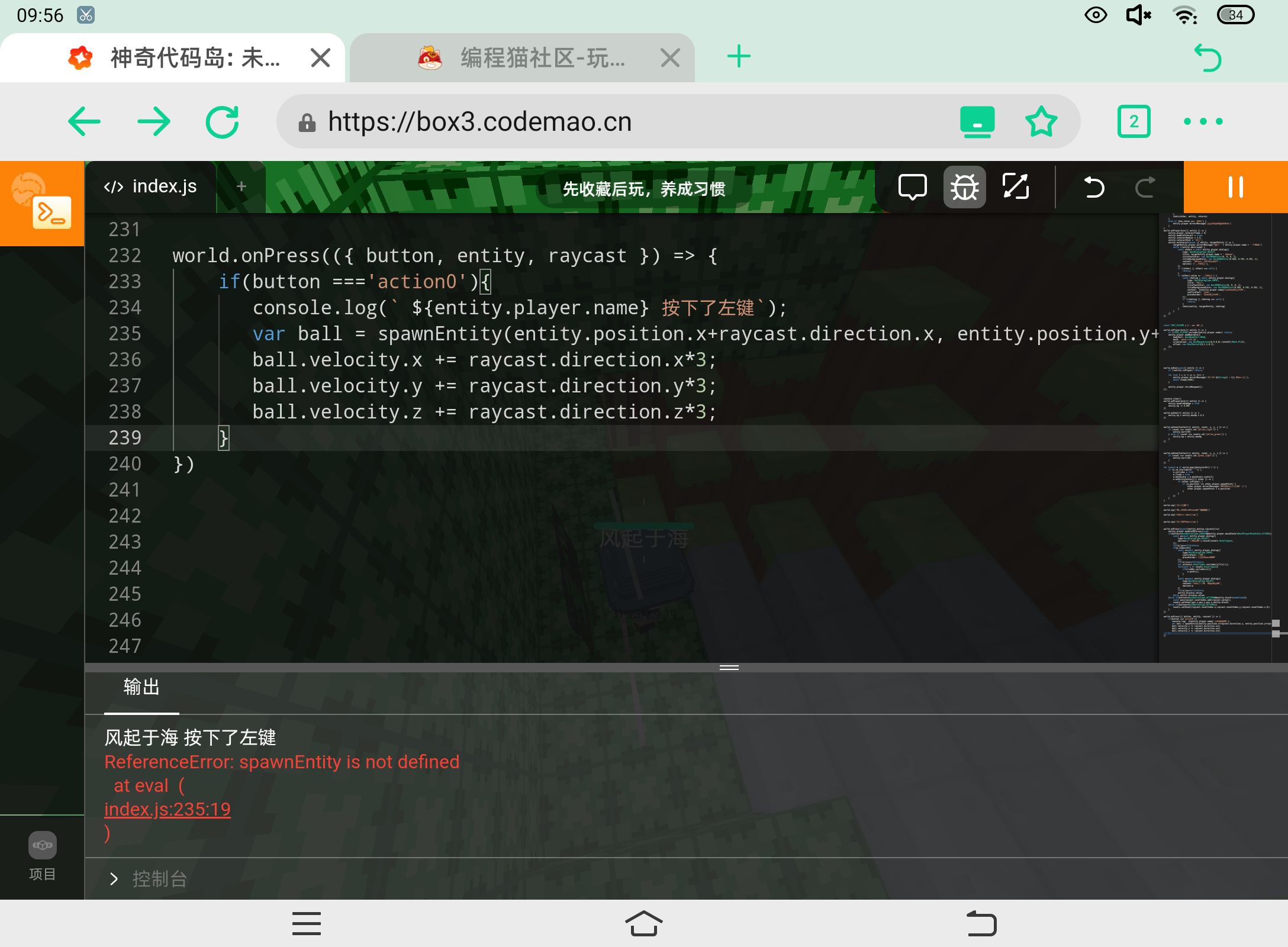
} world.onPress(({ button, entity, raycast }) => { if(button ==='action0'){//判断是否按了左键(action1是右键) console.log(` ${entity.player.name} 按下了左键`); var ball = spawnEntity(entity.position.x+raycast.direction.x, entity.position.y+raycast.direction.y, entity.position.z+raycast.direction.z,"mesh/火球.vb");//发射模型的名称 ball.velocity.x += raycast.direction.x*3; ball.velocity.y += raycast.direction.y*3; ball.velocity.z += raycast.direction.z*3;//把乘数放大可以让实体飞得更快!注意xyz放大的数都要一样!!! } })
高锰酸甲world.onPress(({ button, entity, raycast }) => { if(button ==='action0'){ console.log(` ${entity.player.name} 按下了左键`); var ball = spawnEntity(entity.position.x+raycast.direction.x, entity.position.y+raycast.direction.y, entity.position.z+raycast.direction.z,"mesh/火球.vb"); ball.velocity.x += raycast.direction.x*3; ball.velocity.y += raycast.direction.y*3; ball.velocity.z += raycast.direction.z*3; } }) 上面代码没空行所以重发一下
点赞1
评论
还是不行,大家注意格式就行了
有个代码格式的,你转换一下
报错显示:spawnEntity is not defined
我把spawnEntity定义上后又报错显示:spawnEntity is not a function
很好,我修复成功了
 指令者
指令者for(consteofworld.querySelectorAll('*')){//遍历每个实体e.enableDamage=true//允许这个实体受伤/喵/复活} functionspawnEntity(x,y,z,meshName){ constmeshScale=1/10//默认模型方块大小倍数为地图方块的1/16,看你实体的大小 returnworld.createEntity({ mesh:meshName,//模型名 collides:true,//能碰撞 fixed:false,//固定 gravity:false,//受重力影响 meshScale:[meshScale,meshScale,meshScale],//xyz放大倍数 position:[x,y,z],//位置坐标 }) }world.onPress(({button,entity,raycast})=>{if(button==='action0'){//判断是否按了左键(action1是右键)console.log(`${entity.player.name}按下了左键`);varball=spawnEntity(entity.position.x+raycast.direction.x,entity.position.y+raycast.direction.y,entity.position.z+raycast.direction.z,"mesh/火球.vb");//发射模型的名称ball.velocity.x+=raycast.direction.x*3;ball.velocity.y+=raycast.direction.y*3;ball.velocity.z+=raycast.direction.z*3;//把乘数放大可以让实体飞得更快!注意xyz放大的数都要一样!!!}})
点赞0
评论
 果果1~
果果1~world.onPress(({ button, entity, raycast }) => { if(button ==='action0'){ console.log(` ${entity.player.name} 按下了左键`); var ball = spawnEntity(entity.position.x+raycast.direction.x, entity.position.y+raycast.direction.y, entity.position.z+raycast.direction.z,"mesh/火球.vb"); ball.velocity.x += raycast.direction.x*3; ball.velocity.y += raycast.direction.y*3; ball.velocity.z += raycast.direction.z*3; } }) 点赞0
评论
 薹灣解放再改名
for(consteofworld.querySelectorAll('*')){//遍历每个实体e.enableDamage=true//允许这个实体受伤/喵/复活} functionspawnEntity(x,y,z,meshName){ constmeshScale=1/10//默认模型方块大小倍数为地图方块的1/16,看你实体的大小 returnworld.createEntity({ mesh:meshName,//模型名 collides:true,//能碰撞 fixed:false,//固定 gravity:false,//受重力影响 meshScale:[meshScale,meshScale,meshScale],//xyz放大倍数 position:[x,y,z],//位置坐标 }) }world.onPress(({button,entity,raycast})=>{if(button==='action0'){//判断是否按了左键(action1是右键)console.log(`${entity.player.name}按下了左键`);varball=spawnEntity(entity.position.x+raycast.direction.x,entity.position.y+raycast.direction.y,entity.position.z+raycast.direction.z,"mesh/火球.vb");//发射模型的名称ball.velocity.x+=raycast.direction.x*3;ball.velocity.y+=raycast.direction.y*3;ball.velocity.z+=raycast.direction.z*3;//把乘数放大可以让实体飞得更快!注意xyz放大的数都要一样!!!}})
点赞0
评论
 全能代码师
全能代码师挺不错但是格式…还有用矢量很简单imgsrc="https://static.codemao.cn/emoji/codemao/%E7%BC%96%E7%A8%8B%E7%8C%AB_%E7%82%B9%E8%B5%9E.gif"alt="emotion_编程猫_点赞"
点赞1
评论
功名for (const e of world.querySelectorAll('*')) { //遍历每个实体 e.enableDamage = true //允许这个实体 受伤/喵/复活 } function spawnEntity(x,y,z,meshName){ const meshScale = 1/10 //默认模型方块大小倍数为地图方块的1/16,看你实体的大小 return world.createEntity({ mesh:meshName,//模型名 collides:true,//能碰撞 fixed:false,//固定 gravity:false,//受重力影响 meshScale:[meshScale,meshScale,meshScale],//xyz放大倍数 position:[x,y,z],//位置坐标 }) } world.onPress(({ button, entity, raycast }) => { if(button ==='action0'){//判断是否按了左键(action1是右键) console.log(` ${entity.player.name} 按下了左键`); var ball = spawnEntity(entity.position.x+raycast.direction.x, entity.position.y+raycast.direction.y, entity.position.z+raycast.direction.z,"mesh/火球.vb");//发射模型的名称 ball.velocity.x += raycast.direction.x*3; ball.velocity.y += raycast.direction.y*3; ball.velocity.z += raycast.direction.z*3;//把乘数放大可以让实体飞得更快!注意xyz放大的数都要一样!!! } }) }
点赞0
评论
功名for (const e of world.querySelectorAll('*')) { //遍历每个实体 e.enableDamage = true //允许这个实体 受伤/喵/复活 } function spawnEntity(x,y,z,meshName){ const meshScale = 1/10 //默认模型方块大小倍数为地图方块的1/16,看你实体的大小 return world.createEntity({ mesh:meshName,//模型名 collides:true,//能碰撞 fixed:false,//固定 gravity:false,//受重力影响 meshScale:[meshScale,meshScale,meshScale],//xyz放大倍数 position:[x,y,z],//位置坐标 }) } world.onPress(({ button, entity, raycast }) => { if(button ==='action0'){//判断是否按了左键(action1是右键) console.log(` ${entity.player.name} 按下了左键`); var ball = spawnEntity(entity.position.x+raycast.direction.x, entity.position.y+raycast.direction.y, entity.position.z+raycast.direction.z,"mesh/火球.vb");//发射模型的名称 ball.velocity.x += raycast.direction.x*3; ball.velocity.y += raycast.direction.y*3; ball.velocity.z += raycast.direction.z*3;//把乘数放大可以让实体飞得更快!注意xyz放大的数都要一样!!! } }) }
点赞0
评论
修改了下
 BOSS不爱吃鱼的小鱼
world.onPress(({ button, entity, raycast }) => { if(button ==='action0'){ console.log(` ${entity.player.name} 按下了左键`); var ball = spawnEntity(entity.position.x+raycast.direction.x, entity.position.y+raycast.direction.y, entity.position.z+raycast.direction.z,"mesh/火球.vb"); ball.velocity.x += raycast.direction.x*3; ball.velocity.y += raycast.direction.y*3; ball.velocity.z += raycast.direction.z*3; } })点赞0
评论