 一只小柯基呀查看:53 回复:0 评论:0 创建时间:2021-04-16T21:42:14
用户:一只小柯基呀查看:53 回复:0 评论:0 创建时间:2021-04-16T21:42:14
【作品展示】
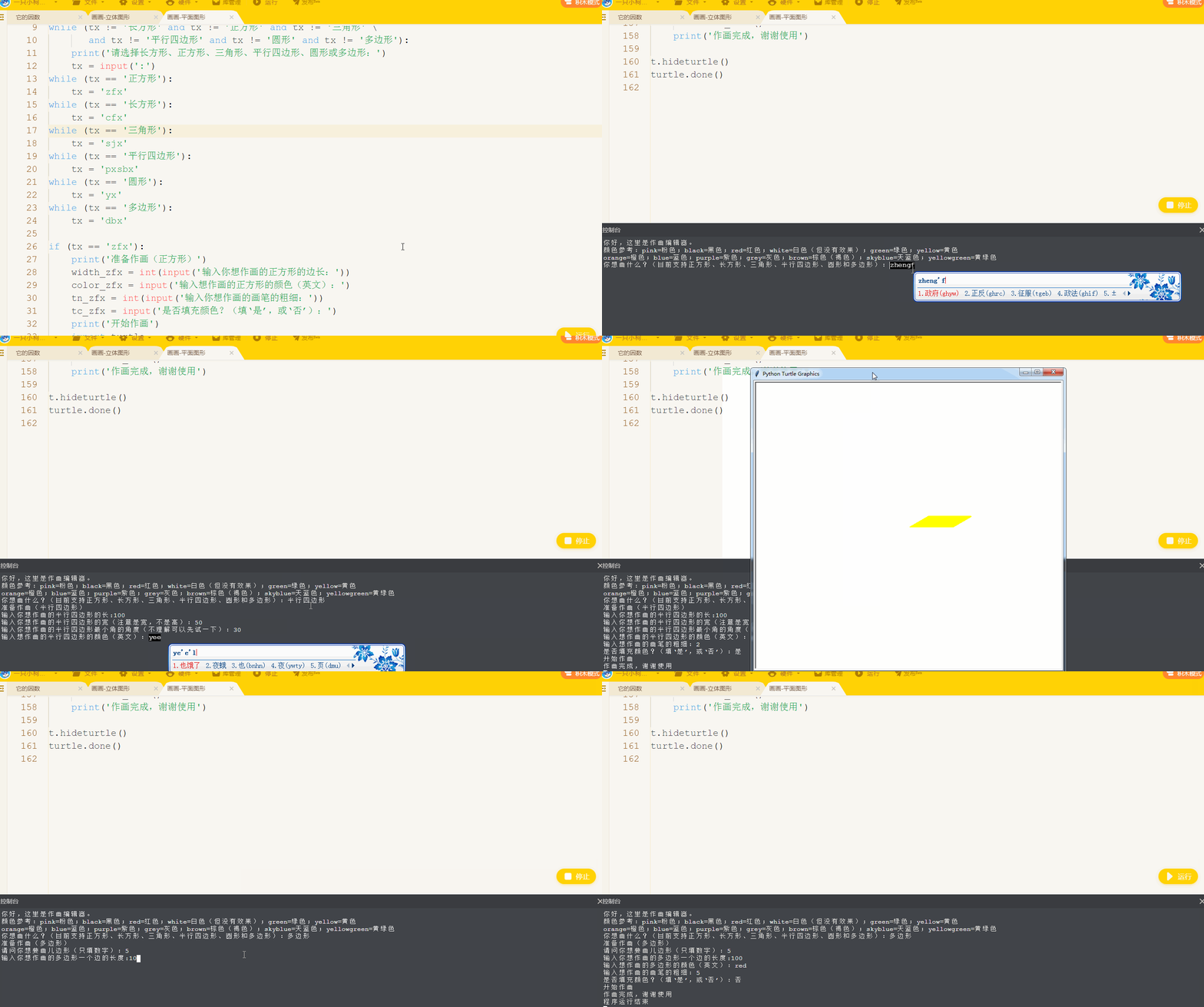
【作品介绍】
劣质平面图形画画代码。往大家见谅
【作品源代码】
import turtle


print('你好,这里是作画编辑器。')
print('颜色参考:pink=粉色;black=黑色;red=红色;white=白色(但没有效果);green=绿色;yellow=黄色')
print('orange=橙色;blue=蓝色;purple=紫色;grey=灰色;brown=棕色(褐色);skyblue=天蓝色;yellowgreen=黄绿色')
tx = ' '
tx = input('你想画什么?(目前支持正方形、长方形、三角形、平行四边形、圆形和多边形):')
while (tx != '长方形' and tx != '正方形' and tx != '三角形' \
       and tx != '平行四边形' and tx != '圆形' and tx != '多边形'):
    print('请选择长方形、正方形、三角形、平行四边形、圆形或多边形:')
    tx = input(':')
while (tx == '正方形'):
    tx = 'zfx'
while (tx == '长方形'):
    tx = 'cfx'
while (tx == '三角形'):
    tx = 'sjx'
while (tx == '平行四边形'):
    tx = 'pxsbx'
while (tx == '圆形'):
    tx = 'yx'
while (tx == '多边形'):
    tx = 'dbx'

if (tx == 'zfx'):
    print('准备作画(正方形)')
    width_zfx = int(input('输入你想作画的正方形的边长:'))
    color_zfx = input('输入想作画的正方形的颜色(英文):')
    tn_zfx = int(input('输入你想作画的画笔的粗细:'))
    tc_zfx = input('是否填充颜色?(填‘是’,或‘否’):')
    print('开始作画')
    import turtle
    t = turtle.Pen()
    t.pensize(tn_zfx)
    t.pencolor(color_zfx)
    t.speed(0)
    t.fillcolor(color_zfx)
    if (tc_zfx == '是'):
        t.begin_fill()
    for i in range(4):
        t.forward(width_zfx)
        t.left(90)
    if (tc_zfx == '是'):
        t.end_fill()
    print('作画完成,谢谢使用')
elif (tx == 'cfx'):
    print('准备作画(长方形)')
    width_cfx = int(input('输入你想作画的长方形的长:'))
    height_cfx = int(input('输入你想作画的长方形的宽:'))
    color_cfx = input('输入想作画的长方形的颜色(英文):')
    tn_cfx = int(input('输入想作画的画笔的粗细:'))
    tc_cfx = input('是否填充颜色?(填‘是’,或‘否’):')
    print('开始作画')
    import turtle
    t = turtle.Pen()
    t.pensize(tn_cfx)
    t.pencolor(color_cfx)
    t.speed(0)
    t.fillcolor(color_cfx)
    if (tc_cfx == '是'):
        t.begin_fill()
    for i in range(2):
        t.forward(width_cfx)
        t.left(90)
        t.forward(height_cfx)
        t.left(90)
    if (tc_cfx == '是'):
        t.end_fill()
    print('作画完成,谢谢使用')
elif (tx == 'sjx'):
    print('准备作画(等边三角形)')
    width_sjx = int(input('输入你想作画的三角形的边长:'))
    color_sjx = input('输入想作画的三角形的颜色(英文):')
    tn_sjx = int(input('输入想作画的画笔的粗细:'))
    tc_sjx = input('是否填充颜色?(填‘是’,或‘否’):')
    print('开始作画')
    import turtle
    t = turtle.Pen()
    t.pensize(tn_sjx)
    t.pencolor(color_sjx)
    t.speed(0)
    t.fillcolor(color_sjx)
    if (tc_sjx == '是'):
        t.begin_fill()
    for i in range(3):
        t.forward(width_sjx)
        t.left(120)
    if (tc_sjx == '是'):
        t.end_fill()
    print('作画完成,谢谢使用')
elif (tx == 'pxsbx'):
    print('准备作画(平行四边形)')
    width_pxsbx = int(input('输入你想作画的平行四边形的长:'))
    length_pxsbx = int(input('输入你想作画的平行四边形的宽(注意是宽,不是高):'))
    height_pxsbx = int(input('输入你想作画的平行四边形最小角的角度(不理解可以先试一下):'))
    while (height_pxsbx == 90):
        print('请注意,这里你画出来的是正方形或长方形,请重新输入')
        height_pxsbx = int(input('输入你想作画的平行四边形的最小角的角度:'))
    color_pxsbx = input('输入想作画的平行四边形的颜色(英文):')
    tn_pxsbx = int(input('输入想作画的画笔的粗细:'))
    tc_pxsbx = input('是否填充颜色?(填‘是’,或‘否’):')
    print('开始作画')
    import turtle
    t = turtle.Pen()
    t.pensize(tn_pxsbx)
    t.pencolor(color_pxsbx)
    t.speed(0)
    t.fillcolor(color_pxsbx)
    if (tc_pxsbx == '是'):
        t.begin_fill()
    for i in range(2):
        t.forward(width_pxsbx)
        t.left(height_pxsbx)
        t.forward(length_pxsbx)
        t.left((180 - height_pxsbx))
    if (tc_pxsbx == '是'):
        t.end_fill()
    print('作画完成,谢谢使用')
elif (tx == 'yx'):
    print('准备作画(圆形)')
    bj_yx = int(input('输入你想作画的圆形的半径:'))
    color_yx = input('输入想作画的圆形的颜色(英文):')
    tn_yx = int(input('输入想作画的画笔的粗细:'))
    tc_yx = input('是否填充颜色?(填‘是’,或‘否’):')
    print('开始作画')
    import turtle
    t = turtle.Pen()
    t.pensize(tn_yx)
    t.pencolor(color_yx)
    t.speed(0)
    t.fillcolor(color_yx)
    if (tc_yx == '是'):
        t.begin_fill()
    t.circle(bj_yx)
    if (tc_yx == '是'):
        t.end_fill()
    print('作画完成,谢谢使用')
elif (tx == 'dbx'):
    print('准备作画(多边形)')
    bs_dbx = int(input('请问你想要画几边形(只填数字):'))
    bj_dbx = int(input('输入你想作画的多边形一个边的长度:'))
    color_dbx = input('输入想作画的多边形的颜色(英文):')
    tn_dbx = int(input('输入想作画的画笔的粗细:'))
    tc_dbx = input('是否填充颜色?(填‘是’,或‘否’):')
    print('开始作画')
    import turtle
    t = turtle.Pen()
    t.pensize(tn_dbx)
    t.pencolor(color_dbx)
    t.speed(0)
    t.fillcolor(color_dbx)
    if (tc_dbx == '是'):
        t.begin_fill()
    t.circle(bj_dbx, steps=bs_dbx)
    if (tc_dbx == '是'):
        t.end_fill()
    print('作画完成,谢谢使用')

t.hideturtle()
turtle.done()
【提示】
部分含有Python第三方库相关内容的作品,在海龟编辑器网页端无法运行哦!如遇到这种情况,可以打开下面的链接,下载海龟编辑器客户端:
https://python.codemao.cn