 L0_0查看:48 回复:3 评论:4 创建时间:2021-02-27T14:04:08
用户:
【作品展示】
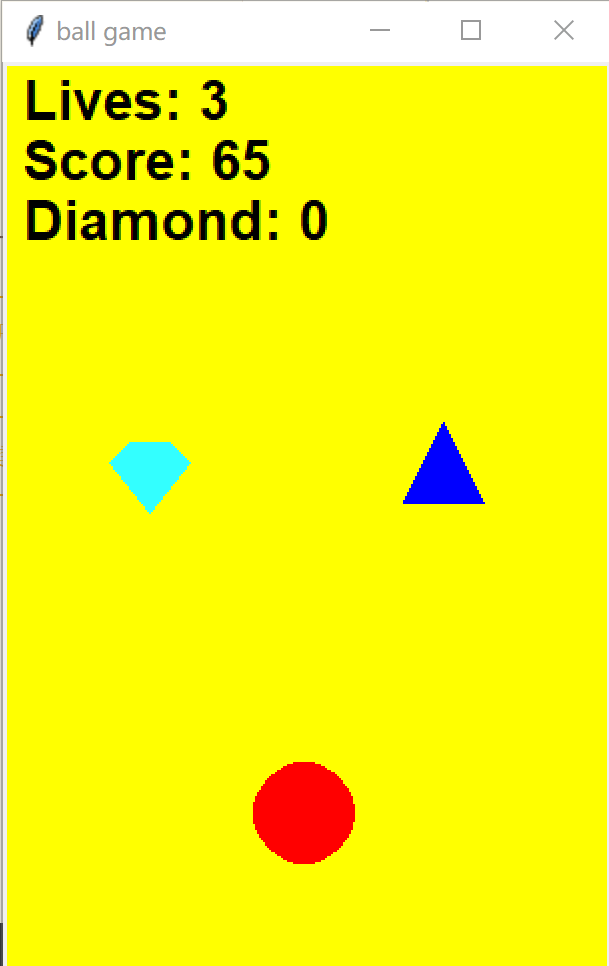
【作品介绍】
我用了Tkinter的Canvas,按下左右键使球移动,碰到障碍物会扣血。
【作品源代码】
from random import randrange
from tkinter import Tk, Canvas, messagebox

root = Tk()
root.title('ball game')

c = Canvas(width=300, height=450, bg='yellow')
c.pack()

ball = c.create_oval(125, 350, 175, 400, fill='red', outline='red')

time_place = 5000
lives = 3
score = 0
diamond = 0
diamond_list = []
obstacle_list = []

lives_text = c.create_text(10, 20, font='Arial 20 bold', anchor='w', text='Lives: ' + str(lives))
score_text = c.create_text(10, 50, font='Arial 20 bold', anchor='w', text='Score: ' + str(score))
diamond_text = c.create_text(10, 80, font='Arial 20 bold', anchor='w', text='Diamond: ' + str(diamond))

def place_diamond():
    x_append = randrange(-40, 220)
    diamond_canvas = c.create_polygon(50, 10, 70, 10, 80, 20, 60, 45, 40, 20, fill='#33ffff', outline='#33ffff')
    c.move(diamond_canvas, x_append, 0)
    diamond_list.append(diamond_canvas)
    root.after(time_place, place_diamond)

def place_obstacle():
    x_append = randrange(0, 260)
    obstacle_canvas = c.create_polygon(20, 0, 0, 40, 40, 40, fill='blue', outline='blue')
    c.move(obstacle_canvas, x_append, 0)
    obstacle_list.append(obstacle_canvas)
    root.after(time_place, place_obstacle)

def current_score():
    global score
    score += 1
    c.itemconfigure(score_text, text='Score: ' + str(score))
    root.after(100, current_score)

def move_diamond():
    global diamond
    for diamond_canvas in diamond_list:
        (x1, y1, x2, y2, x3, y3, x4, y4, x5, y5) = c.coords(diamond_canvas)
        (x6, y6, x7, y7) = c.coords(ball)
        c.move(diamond_canvas, 0, 20)
        if y4 > 450:
            diamond_list.remove(diamond_canvas)
            c.delete(diamond_canvas)
        if x6 < (x5 + x3) / 2 < x7 and y6 < y4 < y7:
            diamond += 1
            c.itemconfigure(diamond_text, text='Diamond: ' + str(diamond))
            diamond_list.remove(diamond_canvas)
            c.delete(diamond_canvas)
    root.after(400, move_diamond)

def move_obstacle():
    global lives
    for obstacle_canvas in obstacle_list:
        (x1, y1, x2, y2, x3, y3) = c.coords(obstacle_canvas)
        (x4, y4, x5, y5) = c.coords(ball)
        c.move(obstacle_canvas, 0, 20)
        if y2 > 450:
            obstacle_list.remove(obstacle_canvas)
            c.delete(obstacle_canvas)
        if x4 < (x2 + x3) / 2 < x5 and y4 < (y1 + y2) / 2 < y5:
            lives -= 1
            c.itemconfigure(lives_text, text='Lives: ' + str(lives))
            obstacle_list.remove(obstacle_canvas)
            c.delete(obstacle_canvas)
            if lives == 0:
                messagebox.showinfo('Game over', 'Score: ' + str(score) + '\nDiamond: ' + str(diamond))
                root.destroy()
    root.after(400, move_obstacle)

def move_left(event):
    (x1, y1, x2, y2) = c.coords(ball)
    if x1 > 0:
        c.move(ball, -10, 0)

def move_right(event):
    (x1, y1, x2, y2) = c.coords(ball)
    if x2 < 300:
        c.move(ball, 10, 0)

c.bind('', move_left)
c.bind('', move_right)
c.focus_set()
root.after(3000, place_diamond)
root.after(3400, move_diamond)
root.after(100, current_score)
root.after(3000, place_obstacle)
root.after(3400, move_obstacle)
root.mainloop()
【提示】
部分含有Python第三方库相关内容的作品,在海龟编辑器网页端无法运行哦!如遇到这种情况,可以打开下面的链接,下载海龟编辑器客户端:
https://python.codemao.cn BZIClawLYNEY
Traceback (most recent call last):
File "/Users/Jacob/Desktop/a.py", line 88, in <module>
c.bind('', move_left)
File "/Library/Frameworks/Python.framework/Versions/3.8/lib/python3.8/tkinter/__init__.py", line 1383, in bind
return self._bind(('bind', self._w), sequence, func, a喵)
File "/Library/Frameworks/Python.framework/Versions/3.8/lib/python3.8/tkinter/__init__.py", line 1337, in _bind
self.tk.call(what + (sequence, cmd))
_tkinter.TclError: no events specified in binding啊欧!不行哟!小兄弟!
点赞0
评论
那里没显示出来,c.bind('Left', move_left)那个大写字母L左边要有小于号,Left单词后面加上大于号
看看上面的图片
改过来就可以了
