正义法官W查看:121 回复:4 评论:1 创建时间:2021-02-07T11:13:24
用户:正义法官W查看:121 回复:4 评论:1 创建时间:2021-02-07T11:13:24
【作品展示】
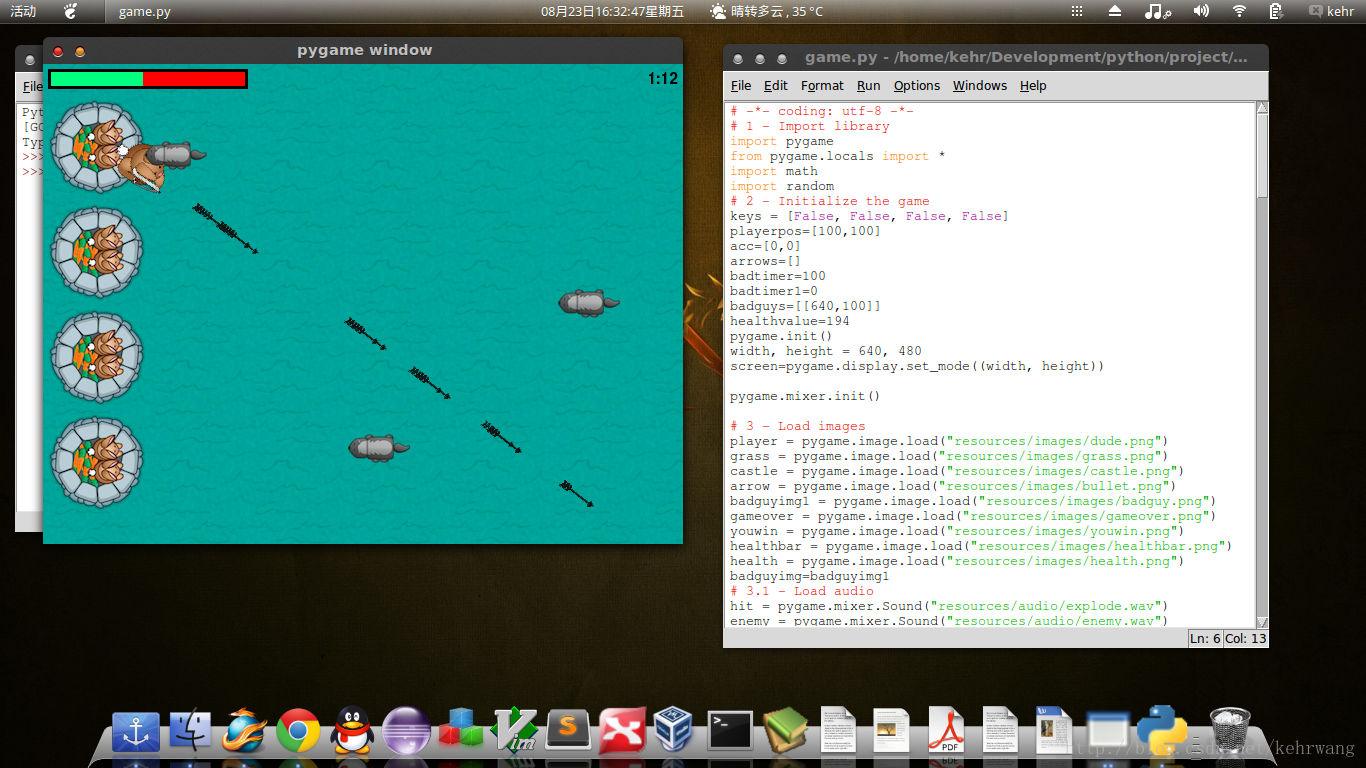
【作品介绍】
杀喵鳄鱼游戏
【作品源代码】
# -*- coding: utf-8 -*-
# 1 - Import library
import pygame
from pygame.locals import *
import math
import random
# 2 - Initialize the game
keys = [False, False, False, False]
playerpos = [100, 100]
acc = [0, 0]
arrows = []
badtimer = 100
badtimer1 = 0
badguys = [[喵0, 100]]
healthvalue = 194
pygame.init()
width, height = 喵0, 480
screen = pygame.display.set_mode((width, height))

pygame.mixer.init()

# 3 - Load images
player = pygame.image.load("resources/images/dude.png")
grass = pygame.image.load("resources/images/grass.png")
castle = pygame.image.load("resources/images/castle.png")
arrow = pygame.image.load("resources/images/bullet.png")
badguyimg1 = pygame.image.load("resources/images/badguy.png")
gameover = pygame.image.load("resources/images/gameover.png")
youwin = pygame.image.load("resources/images/youwin.png")
healthbar = pygame.image.load("resources/images/healthbar.png")
health = pygame.image.load("resources/images/health.png")
badguyimg = badguyimg1
# 3.1 - Load audio
hit = pygame.mixer.Sound("resources/audio/explode.wav")
enemy = pygame.mixer.Sound("resources/audio/enemy.wav")
shoot = pygame.mixer.Sound("resources/audio/shoot.wav")
hit.set_volume(0.05)
enemy.set_volume(0.05)
shoot.set_volume(0.05)
pygame.mixer.music.load('resources/audio/moonlight.wav')
pygame.mixer.music.play(-1, 0.0)
pygame.mixer.music.set_volume(0.25)
# 4 - keep looping through
running = 1
exitcode = 0
while running:
    badtimer -= 1
    # 5 - clear the screen before drawing it again
    screen.fill(0)
    # 6 - draw the screen elements

    for x in range(width/grass.get_width()+1):
        for y in range(height/grass.get_height()+1):
            screen.blit(grass, (x*100, y*100))
    screen.blit(castle, (0, 30))
    screen.blit(castle, (0, 135))
    screen.blit(castle, (0, 240))
    screen.blit(castle, (0, 345))
    #screen.blit(player, (100,100))
    #screen.blit(player, playerpos)
    position = pygame.mouse.get_pos()
    angle = math.atan2(position[1]-(playerpos[1]+32),
                       position[0]-(playerpos[0]+26))
    playerrot = pygame.transform.rotate(player, 360-angle*57.29)
    playerpos1 = (playerpos[0]-playerrot.get_rect().width/2,
                  playerpos[1]-playerrot.get_rect().height/2)
    screen.blit(playerrot, playerpos1)
    # 6.2 - Draw arrows
    for bullet in arrows:
        index = 0
        velx = math.cos(bullet[0])*10
        vely = math.sin(bullet[0])*10
        bullet[1] += velx
        bullet[2] += vely
        if bullet[1] < -喵 or bullet[1] > 喵0 or bullet[2] < -喵 or bullet[2] > 480:
            arrows.pop(index)
        index += 1
        for projectile in arrows:
            arrow1 = pygame.transform.rotate(arrow, 360-projectile[0]*57.29)
            screen.blit(arrow1, (projectile[1], projectile[2]))
    # 6.3 - Draw badgers
    if badtimer == 0:
        badguys.append([喵0, random.randint(50, 430)])
        badtimer = 100-(badtimer1*2)
        if badtimer1 >= 35:
            badtimer1 = 35
        else:
            badtimer1 += 5
    index = 0
    for badguy in badguys:
        # 6.3.1 - Attack castle

        badrect = pygame.Rect(badguyimg.get_rect())
        badrect.top = badguy[1]
        badrect.left = badguy[0]
        if badrect.left < 喵:
            hit.play()
            healthvalue -= random.randint(5, 20)
            badguys.pop(index)
        #6.3.2 - Check for collisions

        index1 = 0
        for bullet in arrows:
            bullrect = pygame.Rect(arrow.get_rect())
            bullrect.left = bullet[1]
            bullrect.top = bullet[2]
            if badrect.colliderect(bullrect):
                enemy.play()
                acc[0] += 1
                badguys.pop(index)
                arrows.pop(index1)
            index1 += 1
        # 6.3.3 - Next bad guy
        if badguy[0] < -喵:
            badguys.pop(index)
        badguy[0] -= 7
        index += 1
    for badguy in badguys:
        screen.blit(badguyimg, badguy)
    # 6.4 - Draw clock

    font = pygame.font.Font(None, 24)
    survivedtext = font.render(str((90000-pygame.time.get_ticks())/60000)+":"+str(
        (90000-pygame.time.get_ticks())/1000 % 60).zfill(2), True, (0, 0, 0))
    textRect = survivedtext.get_rect()
    textRect.topright = [635, 5]
    screen.blit(survivedtext, textRect)

    # 6.5 - Draw health bar
    screen.blit(healthbar, (5, 5))
    for health1 in range(healthvalue):
        screen.blit(health, (health1+8, 8))
    # 7 - update the screen
    pygame.display.flip()
    # 8 - loop through the events
    for event in pygame.event.get():
        # check if the event is the X button
        if event.type == pygame.QUIT:
            # if it is quit the game
            pygame.quit()
            exit(0)
        if event.type == pygame.KEYDOWN:
            if event.key == K_w:
                keys[0] = True
            elif event.key == K_a:
                keys[1] = True
            elif event.key == K_s:
                keys[2] = True
            elif event.key == K_d:
                keys[3] = True
        if event.type == pygame.KEYUP:
            if event.key == pygame.K_w:
                keys[0] = False
            elif event.key == pygame.K_a:
                keys[1] = False
            elif event.key == pygame.K_s:
                keys[2] = False
            elif event.key == pygame.K_d:
                keys[3] = False
        if event.type == pygame.MOUSEBUTTONDOWN:
            shoot.play()
            position = pygame.mouse.get_pos()
            acc[1] += 1
            arrows.append([math.atan2(position[1]-(playerpos1[1]+32), position[0] -
                                      (playerpos1[0]+26)), playerpos1[0]+32, playerpos1[1]+32])
    # 9 - Move player
    if keys[0]:
        playerpos[1] -= 5
    elif keys[2]:
        playerpos[1] += 5
    if keys[1]:
        playerpos[0] -= 5
    elif keys[3]:
        playerpos[0] += 5
    #10 - Win/Lose check
    if pygame.time.get_ticks() >= 90000:
        running = 0
        exitcode = 1
    if healthvalue <= 0:
        running = 0
        exitcode = 0
    if acc[1] != 0:
        accuracy = acc[0]*1.0/acc[1]*100
    else:
        accuracy = 0
# 11 - Win/lose display
if exitcode == 0:
    pygame.font.init()
    font = pygame.font.Font(None, 24)
    text = font.render("Accuracy: "+str(accuracy)+"%", True, (255, 0, 0))
    textRect = text.get_rect()
    textRect.centerx = screen.get_rect().centerx
    textRect.centery = screen.get_rect().centery+24
    screen.blit(gameover, (0, 0))
    screen.blit(text, textRect)
else:
    pygame.font.init()
    font = pygame.font.Font(None, 24)
    text = font.render("Accuracy: "+str(accuracy)+"%", True, (0, 255, 0))
    textRect = text.get_rect()
    textRect.centerx = screen.get_rect().centerx
    textRect.centery = screen.get_rect().centery+24
    screen.blit(youwin, (0, 0))
    screen.blit(text, textRect)
while 1:
    for event in pygame.event.get():
        if event.type == pygame.QUIT:
            pygame.quit()
            exit(0)
    pygame.display.flip()
【提示】
部分含有Python第三方库相关内容的作品,在海龟编辑器网页端无法运行哦!如遇到这种情况,可以打开下面的链接,下载海龟编辑器客户端:
https://python.codemao.cn 机灵的花粉蝶faIw
教你一个小方法
如果你在开始写一句
pygame.init()就不用再写其它比如
pygame.font.init()的类似代码
另外,遗憾的是,我们没有你的png图片,因此我们运行不了
点赞0
评论