 x博查看:35 回复:0 评论:0 创建时间:2021-01-31T13:25:54
用户:x博查看:35 回复:0 评论:0 创建时间:2021-01-31T13:25:54
【作品展示】
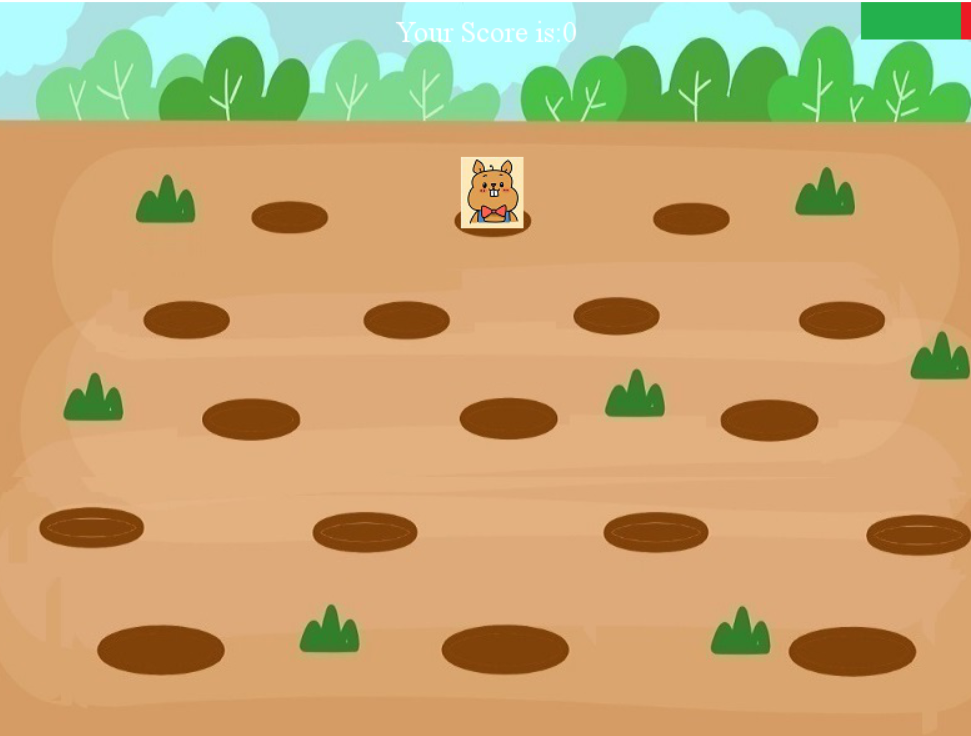
【作品介绍】
开始选择模式,模式选择完开始打地鼠,鼠标点一下即可,当错过一个地鼠,进度条会减少,看看你能得多少分吧!,
记得点个赞+关注哦~
【作品源代码】
# -*- coding: utf-8 -*-
# beatDiglettwhole.py  by wangzhenshi

import pygame                #导入pygame游戏设置库
from pygame.locals import *  #导入鼠标和键盘事件的定义
import time                  #导入sleep()函数所在的库
from random import *         #导入random库,使用randint()函数

####屏幕、颜色等进行初始化###########
pygame.init()            #初始化pygamge
pygame.display.set_caption('打地鼠游戏')
                         #设置屏幕的标题
screen = pygame.display.set_mode([800,600])
                         #初始化屏幕大小

WHITE=(255,255,255)          #白色背景
GREEN=(0,255,0)
RED=(255,0,0)
screen.fill(WHITE)           #将背景初始化为白色
####难度选择##################
choicepic = pygame.image.load("res/hardchoice.jpg")           #载入难度选择图片
primarypic = pygame.image.load("res/hardchoiceprimary.jpg")   #载入初级水平图片
middlepic =  pygame.image.load("res/hardchoicemiddle.jpg")    #载入中级水平图片
advancedpic =  pygame.image.load("res/hardchoiceadvanced.jpg")#载入高级水平图片

screen.blit(choicepic, (100,100)) #呈现用户选择界面

pygame.display.update()      #更新屏幕,显示图片

makechoice=True              #判断是否完成难度选择

hardchoice=1                 #难度选择初始值为一

while  makechoice:           #等待用户选择

        for event in pygame.event.get():
                             # 获取键盘或者鼠标事件

            if event.type ==MOUSEBUTTONDOWN:   #如果鼠标被按下
                cx=event.pos[0]                #记录按下鼠标时光标的位置
                cy=event.pos[1]
                print (cx,cy)
                if cx>=300 and cx<=550:        #检测光标位置,水平位置进入范围
                    if  cy>=160 and cy<=190:   #检测垂直位置是否在初级水平处
                        screen.blit(primarypic, (100,100))  #将初级水平图片放置相应位置
                        hardchoice=1                        #记录用户的选择,用户选择为1
                    if  cy>=195 and cy<=225:   #检测垂直位置是否在中级水平处
                        screen.blit(middlepic, (100,100))   #将中级水平图片放置相应位置
                        hardchoice=2                        #记录用户的选择,用户选择为2
                    if  cy>=230 and cy<=260:   #检测垂直位置是否在高级水平处
                        screen.blit(advancedpic, (100,100)) #将高级水平图片放置相应位置
                        hardchoice=3                        #记录用户的选择,用户选择为3
                pygame.display.update()        #更新屏幕,显示图片
                makechoice=False

print (hardchoice)

####载入游戏初始画面##################

bg = pygame.image.load("res/Diglettbg.jpg")
                         #设置打地鼠的背景图片
screen.blit(bg, (0,0))   #把背景图片放在屏幕的指定位置上
pic = pygame.image.load("res/diglett.jpg")  #载入地鼠图片
hpic = pygame.image.load("res/hole.jpg")    #载入洞口图片
scalepic=pygame.transform.scale(pic, (50,25))

####载入游戏音效##################
pygame.mixer.init()          #增加声音特效
beatsound=pygame.mixer.Sound("res/beatdiglette.wav")  #击打时的声音
pygame.mixer.music.load('res/bgdig.mp3')  # 加载背景音乐文件
pygame.mixer.music.play(-1, 0.0)
        # 播放背景音乐,第一个参数为播放的次数(-1表示无限循环),
        # 第二个参数是设置播放的起点(单位为秒)

####17个洞口位置序列##################
holes_position = [(218, 120), (380, 124), (540, 124),     #洞口位置序列
                  (140, 204), (310, 204), (480, 204),
                  (656, 204), (190, 287), (395, 287),
                  (600, 287), (60, 375), (280,375),
                  (510, 374), (719, 374), (105, 470),
                  (384, 470), (660, 470)
                  ]


####载入计分模块##################
scoredig=0    # 游戏分值初始值

score_string="Your Score is:"+str(scoredig)
font = pygame.font.SysFont("Times", 24)
textdig = font.render(score_string, True, WHITE)
textdig_rect = textdig.get_rect()
textdig_rect.centerx = screen.get_rect().centerx
textdig_rect.y = 10
screen.blit(textdig, textdig_rect)
pygame.display.update()      #更新屏幕,显示图片

####载入进度条模块##################
lives=100

livesprg = pygame.image.load("res/greenprogress.jpg")  #载入绿色进度条图片
deathprg= pygame.image.load("res/redprogress.jpg")
screen.blit(livesprg, (700,0))
pygame.display.update()      #更新屏幕,显示图片
####进入循环体变量初始化######
keep_going = True        #游戏的主循环体是否持续的标志
i=0

t= pygame.time.Clock()    #将Clock()对象赋予t
nothit=True
isfirsttime=True

while keep_going:        # 程序主循环

#####捕获键盘和鼠标事件#######
    for event in pygame.event.get():  #获取键盘或者鼠标事件
        x=holes_position[i][0]        #将当前洞口的位置记录下来
        y=holes_position[i][1]

        if event.type ==MOUSEBUTTONDOWN: #如果鼠标被按下
            #判断鼠标的位置是否在出现的地鼠范围内
            locd=pygame.mouse.get_pos()  #记录按下鼠标时光标的位置
            isxhit=(locd[0]>=x) and  (locd[0]<=x+60)   #是否在x的范围内
            isyhit=(locd[1]>=y) and  (locd[1]<=y+60)   #是否在y的范围内
            if  isxhit and isyhit :      #如果鼠标击中地鼠
                print ('第',i+1,'号地鼠被击中')
                screen.blit(hpic,(x-15,y-7))    #覆盖正常地鼠
                screen.blit(scalepic,(x,y+20))  #把地鼠图片放在屏幕的指定位置上
                nothit=False
                scoredig+=10                    #击中后,游戏分值增加10分
                beatsound.play()                #播放打中地鼠的声音
                pygame.display.update()      #更新屏幕,显示图片

                pygame.time.delay(200)          #延迟200ms


        if event.type == KEYDOWN:    #如果鼠标被按下
            if event.key==K_ESCAPE:  # 按下键盘的Esc键退出
                print("退出")
                keep_going=False    #不玩了,用户要退出

####如果没有打中地鼠,生命值减少######
    if isfirsttime==False:
        if nothit==True:
            lives-=10
    print (nothit,lives)

#####每次循环1次更新屏幕,地鼠在随机位置出现#######
    screen.blit(bg, (0,0))              #把背景图片放在屏幕的指定位置上
    i=randint(0,16)                     #生成0,1,...16的随机数
    nothit=True
    isfirsttime=False
    screen.blit(pic,holes_position[i])  #把地鼠图片放在屏幕的指定位置上
###重新绘制分值######
    score_string="Your Score is:"+str(scoredig)
    font = pygame.font.SysFont("Times", 24)
    textdig = font.render(score_string, True, WHITE)
    textdig_rect = textdig.get_rect()
    textdig_rect.centerx = screen.get_rect().centerx
    textdig_rect.y = 10
    screen.blit(textdig, textdig_rect)
####重新刷新生命值进度条和喵亡值进度条######
    livesprogress=pygame.transform.scale(livesprg, (lives,30))
    deathprogress=pygame.transform.scale(deathprg, (100-lives,30))
    screen.blit(livesprogress, (700,0))
    screen.blit(deathprogress, (700+lives,0))
#生命值小于0时,退出循环
    if lives<=0:
        keep_going=False
        print ('你的游戏分值为:',scoredig)

    pygame.display.update()      #更新屏幕,显示图片

    t.tick(hardchoice)       #1秒更新1次

#画面停留2秒后退出
time.sleep(2)
pygame.quit()
【提示】
部分含有Python第三方库相关内容的作品,在海龟编辑器网页端无法运行哦!如遇到这种情况,可以打开下面的链接,下载海龟编辑器客户端:
https://python.codemao.cn