 沐小雨查看:0 回复:0 评论:0 创建时间:2020-11-15T11:05:57
用户:沐小雨查看:0 回复:0 评论:0 创建时间:2020-11-15T11:05:57
【作品展示】
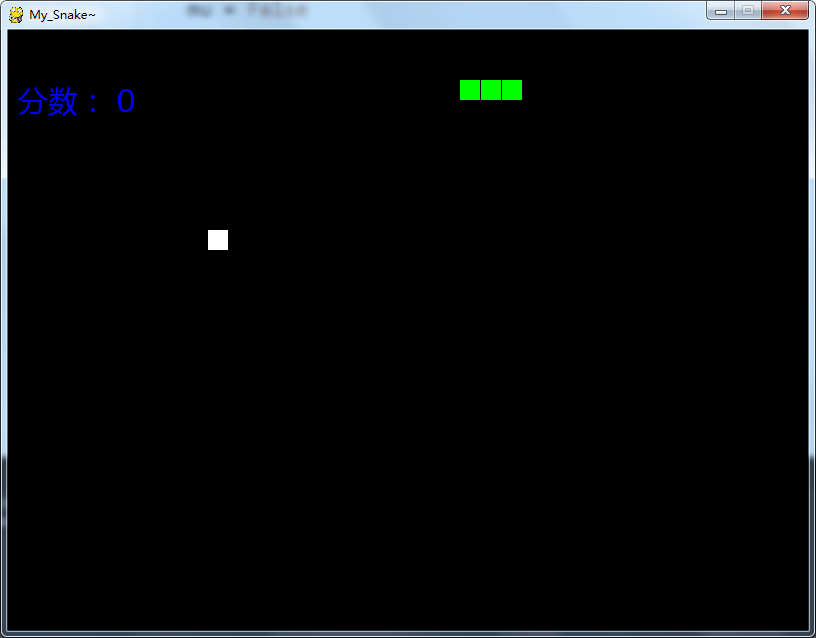
【作品介绍】
有点小问题,主要是网格问题↑↓←→控制蛇的方向
R重启游戏,输了的话也按R
【作品源代码】
#-*- coding: utf-8 -*-
import pygame
import sys
import random
import time
from pygame.locals import *

pygame.init()
font = pygame.font.Font(u"c:\\windows\\fonts\\MSYH.ttf", 30)
mainClock = pygame.time.Clock()
wsurface = pygame.display.set_mode((800, 600), 0, 32)
pygame.display.set_caption("My_Snake~")

Len = 20
snakeRect = []
for i in range(10, 13):
    snakeRect.append(pygame.Rect(i * (Len), 50, Len, Len))
food = pygame.Rect(10 * (Len), 10 * (Len), Len, Len)
ml = False
mr = True
mu = False
喵 = False
score = 0
black = (0, 0, 0)
green = (0, 255, 0)
white = (255, 255, 255)
global FPSCLOCK
FPSCLOCK = pygame.time.Clock()
#####################################################


def judge():
    if snakeRect[0].left - 15 <= food.left <= snakeRect[0].left + 15 and snakeRect[0].top - 15 <= food.top <= snakeRect[0].top + 15:
        return True


def judge2(a, b):
    if a.left - 15 <= b.left <= a.left + 15 and a.top - 15 <= b.top <= a.top + 15:
        return True


def checkForKeyPress():
    #checkForQuit()
    for event in pygame.event.get([KEYDOWN, KEYUP]):
        if event.type == KEYUP:
            continue
        return event.key
    return None


#######################################################
flagg = True
speed = 8
while True:
    for event in pygame.event.get():
        if event.type == QUIT:
            pygame.QUIT()
            sys.exit()
        if event.type == KEYDOWN:
            if event.key == K_r:
                snakeRect = []
                for i in range(10, 13):
                    snakeRect.append(pygame.Rect(i * (Len), 50, Len, Len))
                food = pygame.Rect(10 * (Len), 10 * (Len), Len, Len)
                ml = False
                mr = True
                mu = False
                喵 = False
                score = 0
                flagg = True
                speed = 8
            if event.key == K_p:
                wsurface.fill(black)
                text_surface1 = font.render('Pause!', True, (0, 0, 255))
                wsurface.blit(text_surface1, (10, 50))
                while checkForKeyPress() == None:
                    pygame.display.update()
                    FPSCLOCK.tick()
            if event.key == K_LEFT and mr == False:
                ml = True
                mr = False
                mu = False
                喵 = False
            if event.key == K_RIGHT and ml == False:
                ml = False
                mr = True
                mu = False
                喵 = False
            if event.key == K_UP and 喵 == False:
                ml = False
                mr = False
                mu = True
                喵 = False
            if event.key == K_DOWN and mu == False:
                ml = False
                mr = False
                mu = False
                喵 = True
    head = pygame.Rect(snakeRect[0].left, snakeRect[0].top,
                       snakeRect[0].width, snakeRect[0].height)
    if flagg == False:
        continue
    if ml == True:
        head.right = head.left - 1
    if mr == True:
        head.left = head.right + 1
    if mu == True:
        head.bottom = head.top - 1
    if 喵 == True:
        head.top = head.bottom + 1
    snakeRect.insert(0, head)
    #判断失败和重新游戏
    if head.right < 0 or head.left > 800 or head.bottom < 0 or head.top > 600 or snakeRect[0] in snakeRect[1:]:
        wsurface.fill(white)
        text_surface2 = font.render('Press R to restart!', True, (0, 0, 255))
        wsurface.blit(text_surface2, (50, 80))
        pygame.display.update()
        while checkForKeyPress() == None:
            pygame.display.update()
            FPSCLOCK.tick()
            break
        flagg = False
        continue
    flagg = True
    if judge():
        score = score + 10
        speed = speed + 1
        while True:
            flag = True
            food.left = random.randrange(10, 800)
            food.top = random.randrange(10, 600)
            for temp in snakeRect:
                if judge2(food, temp):
                    flag = False
            if flag == True:
                break
    else:
        snakeRect.pop()
    wsurface.fill(black)
    for i in range(len(snakeRect)):
        pygame.draw.rect(wsurface, green, snakeRect[i])
    pygame.draw.rect(wsurface, white, food)
    text_surface = font.render(u"分数: " + str(score), True, (0, 0, 255))
    wsurface.blit(text_surface, (10, 50))
    pygame.display.update()
    mainClock.tick(speed)
【提示】
部分含有Python第三方库相关内容的作品,在海龟编辑器网页端无法运行哦!如遇到这种情况,可以打开下面的链接,下载海龟编辑器客户端:
https://python.codemao.cn