 孤僻的木叶龙982查看:63 回复:0 评论:0 创建时间:2020-10-16T23:04:34
用户:孤僻的木叶龙982查看:63 回复:0 评论:0 创建时间:2020-10-16T23:04:34
【作品展示】
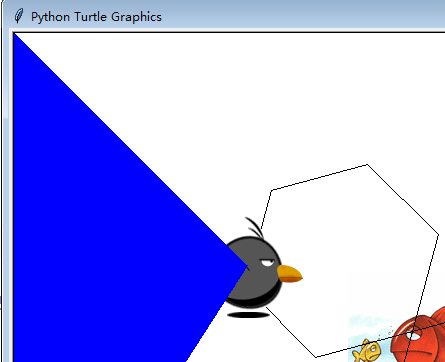
【作品介绍】
画板进阶功能:贴图,动画,鼠标侦测
【作品源代码】
import turtle
import random
import time
import math

# 获取屏幕
s = turtle.Screen()
#设置屏幕
#s = turtle.getscreen()
s.setup(width=800, height=600, startx=450, starty=300)
# 背景图片
turtle.bgpic("3.gif")
# 前景图片
s.addshape("4.gif")
#加速绘制


# turtle.bgcolor("green")


t = turtle.Pen()
t.shape("4.gif")
t.speed(100)
t.setheading(75)
for i in range(6):
    t.forward(100)
    t.left(60)

for i in range(6):
    t.backward(100)
    t.left(60)

#turtle.tracer(0)
t.shape("4.gif")
#t.shapesize(10,10)
#turtle.resizemode("user")

t2 = turtle.Pen()

drawing = 0

turtle.tracer(20)
t.up()
def redraw1(event):
    global drawing
    if(drawing == 0):
        drawing = 1
        x = event.x - 400
        y = 300 - event.y

        sx = sy = ex = ey = 0
        color = ""
        d = abs(x/2)-abs(y)
        if d<0:
            if x<0:
                (sx, sy, ex, ey) = (-400, 300, 400, 300)
                color = "red"
            else:
                (sx, sy, ex, ey) = (-400, -300, 400, -300)
                color = "yellow"
        else:
            if y<0:
                (sx, sy, ex, ey) = (400, 300, 400, -300)
                color = "green"
            else:
                (sx, sy, ex, ey) = (-400, -300, -400, 300)
                color = "blue"
        turtle.tracer(10)
        t.goto(x, y)
        t2.clear()
        t2.up()
        t2.pencolor(color)
        t2.fillcolor(color)
        t2.goto(x, y)
        t2.down()
        t2.begin_fill()
        t2.goto(sx, sy)
        t2.goto(ex, ey)

        t2.end_fill()
        drawing = 0

def redraw2(x,y):
    global drawing
    if(drawing == 0):
        drawing = 1


        sx = sy = ex = ey = 0
        color = ""
        d = abs(x/2)-abs(y)
        if d>0:
            if x<0:
                (sx, sy, ex, ey) = (-400, 300, -400, -300)
                color = "red"
            else:
                (sx, sy, ex, ey) = (400, 300, 400, -300)
                color = "yellow"
        else:
            if y<0:
                (sx, sy, ex, ey) = (400, -300, -400, -300)
                color = "green"
            else:
                (sx, sy, ex, ey) = (400, 300, -400, 300)
                color = "blue"
        t.goto(x, y)
        t2.clear()
        t2.up()
        t2.pencolor(color)
        t2.fillcolor(color)
        t2.goto(x, y)
        t2.down()
        t2.begin_fill()
        t2.goto(sx, sy)
        t2.goto(ex, ey)

        t2.end_fill()
        drawing = 0

#s.onclick(redraw2)
s.cv.bind("", redraw1)
#t.ondrag(redraw)
#while True:
#    pass
    #turtle.goto(random.randint(0, 200), random.randint(0, 100))
    #print(turtle.pos())
    #time.sleep(0.5)


turtle.mainloop()
【提示】
部分含有Python第三方库相关内容的作品,在海龟编辑器网页端无法运行哦!如遇到这种情况,可以打开下面的链接,下载海龟编辑器客户端:
https://python.codemao.cn