用户:查看:86 回复:4 评论:1 创建时间:2020-10-09T20:31:31
————————————————————————————————————————————————————————白嫖勿入————————————————————————————————————————————
在社区里,有许多JS编程小白。
但不是真正的小白(因为会看API啊)
所以,我管这群叫小白2级(毕竟他们看不懂代码,只知道看发布者对这代码的解释。。。)
所以,你们总会碰到一些问题——————
API不是万能的!!!
有些时候,要制作一些复杂的代码,API的代码不是不够用就是会显示错误。。。
比如下面这种情况。。。👇
// 先在场景中放置一个名称为 NPC 的实体。
const npc = world.querySelector('#NPC');
npc.enableInteract = true; // 允许进行互动
npc.interactRadius = 16;   // 实体的互动范围
npc.interactHint = npc.id; // 互动提示框显示实体的名称
npc.interactColor = new Box3RGBColor(1,1,1);  // 互动提示的文字颜色

// 玩家与实体进行交互时触发
npc.onInteract(async({entity}) => {
    const result = await entity.player.dialog({
        type: Box3DialogType.TEXT,   // 对话框的类型,TEXT是文本框。
        title: npc.id,               // 对话框标题为NPC名字,表示正在说话的是NPC
        lookEye: entity,             // 将相机放在玩家位置
        lookTarget: npc,             // 相机镜头对准NPC
        content: `你好,${entity.player.name},很高兴认识你。`,
    });
});
很明显,这是API的对话框代码。
但是。。。再看这种情况👇
许多小白2级想在地图里制造两个可以互动的实体,代码就成了这样👇
// 先在场景中放置一个名称为 NPC 的实体。
const npc = world.querySelector('#NPC');
npc.enableInteract = true; // 允许进行互动
npc.interactRadius = 16;   // 实体的互动范围
npc.interactHint = npc.id; // 互动提示框显示实体的名称
npc.interactColor = new Box3RGBColor(1,1,1);  // 互动提示的文字颜色

// 玩家与实体进行交互时触发
npc.onInteract(async({entity}) => {
    const result = await entity.player.dialog({
        type: Box3DialogType.TEXT,   // 对话框的类型,TEXT是文本框。
        title: npc.id,               // 对话框标题为NPC名字,表示正在说话的是NPC
        lookEye: entity,             // 将相机放在玩家位置
        lookTarget: npc,             // 相机镜头对准NPC
        content: `你好,${entity.player.name},很高兴认识你。`,
    });
});
// 先在场景中放置一个名称为 NPC 的实体。
const npc = world.querySelector('#NPC1');
npc.enableInteract = true; // 允许进行互动
npc.interactRadius = 16;   // 实体的互动范围
npc.interactHint = npc.id; // 互动提示框显示实体的名称
npc.interactColor = new Box3RGBColor(1,1,1);  // 互动提示的文字颜色

// 玩家与实体进行交互时触发
npc.onInteract(async({entity}) => {
    const result = await entity.player.dialog({
        type: Box3DialogType.TEXT,   // 对话框的类型,TEXT是文本框。
        title: npc.id,               // 对话框标题为NPC名字,表示正在说话的是NPC
        lookEye: entity,             // 将相机放在玩家位置
        lookTarget: npc,             // 相机镜头对准NPC
        content: `你好,${entity.player.name},很高兴认识你。`,
    });
});
//我管第二个实体叫NPC1
于是,控制台就发生了化学反应。。。👇
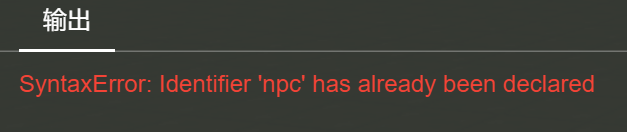
啊啊啊!代码错误!!!

于是,只能嘤嘤嘤了。。。

互动泡汤。。。
不过,今天觉得应该把这个问题给大家解决了(毕竟,我也是过来人。。。)
代码走起

const npc1 = world.querySelector('.椰子树的标签');
npc1.enableInteract=true; // 允许进行互动
npc1.interactRadius = 8;   // 实体的互动范围
npc1.interactHint=npc1.id; // 互动提示框显示实体的名称
npc1.interactColor = new Box3RGBColor(1,1,1);  // 互动提示的文字颜色
npc1.onInteract(async({entity}) => {
    const result = await entity.player.dialog({
        type: Box3DialogType.TEXT,   // 对话框的类型,TEXT是文本框。
        title: npc1.id,               // 对话框标题为NPC名字,表示正在说话的是NPC
        lookEye: entity,             // 将相机放在玩家位置
        lookTarget: npc1,             // 相机镜头对准NPC
        content: `${entity.player.name},这是一个植物研究所,据说,这里有一个地下室,或许,旁边那个传送门可以下去。`,
    });
});
const npc2 = world.querySelector('.停车场牌');
npc2.enableInteract=true; // 允许进行互动
npc2.interactRadius = 3;   // 实体的互动范围
npc2.interactHint=npc2.id; // 互动提示框显示实体的名称
npc2.interactColor = new Box3RGBColor(1,1,1);  // 互动提示的文字颜色
npc2.onInteract(async({entity}) => {
    const result = await entity.player.dialog({
        type: Box3DialogType.TEXT,   // 对话框的类型,TEXT是文本框。
        title: npc2.id,               // 对话框标题为NPC名字,表示正在说话的是NPC
        lookEye: entity,             // 将相机放在玩家位置
        lookTarget: npc2,             // 相机镜头对准NPC
        content: `${entity.player.name},这里是一个停车场,在这里,你可以坐车(碰到你想坐的车子)想下车就说“下车”就可以了。(在操作里你应该知道了吧)`,
    });
});
const npc3 = world.querySelector('.告示牌1');
npc3.enableInteract=true; // 允许进行互动
npc3.interactRadius = 3;   // 实体的互动范围
npc3.interactHint=npc3.id; // 互动提示框显示实体的名称
npc3.interactColor = new Box3RGBColor(1,1,1);  // 互动提示的文字颜色
npc3.onInteract(async({entity}) => {
    const result = await entity.player.dialog({
        type: Box3DialogType.TEXT,   // 对话框的类型,TEXT是文本框。
        title: npc3.id,               // 对话框标题为NPC名字,表示正在说话的是NPC
        lookEye: entity,             // 将相机放在玩家位置
        lookTarget: npc3,             // 相机镜头对准NPC
        content: `${entity.player.name},这里是一片森林,我也不知道里面有什么。。。`,
    });
});
const npc4 = world.querySelector('.商店门');
npc4.enableInteract = true; // 允许进行互动
npc4.interactRadius = 3;   // 实体的互动范围
npc4.interactHint = npc4.id; // 互动提示框显示实体的名称
npc4.interactColor = new Box3RGBColor(1,1,1);  // 互动提示的文字颜色
npc4.onInteract(async({entity}) => {
    const result = await entity.player.dialog({
        type: Box3DialogType.SELECT,
        title: npc4.id,
        titleTextColor: new Box3RGBAColor(0, 0, 0, 1),
        titleBackgroundColor: new Box3RGBAColor(0.968, 0.702, 0.392, 1),
        content: `${entity.player.name},你要进去吗?`,
        options: ['要', '下次吧','不,我要出去'],   // 将提供玩家选择的选项放入数组里。
        contentTextColor:  new Box3RGBAColor(0, 0, 0, 1),
        contentBackgroundColor: new Box3RGBAColor(1, 1, 1, 1),
        lookEye: entity.position.add(entity.player.facingDirection.scale(5)),
        lookTarget: entity,
    });
    switch (result.index) {
        case 0:
            entity.player.directMessage('进去啦~');
            entity.position.set(113,10, 50);
            break;
        case 1:
            entity.player.directMessage('好吧。。。');
            break;
        case 2:
            entity.player.directMessage('下次再来~');
            entity.position.set(103,10, 50);
            break;
        default:
    }

});
看懂了吗?
我解释一下上面的代码和下面的代码的区别:
上面的代码 const 的参数都是NPC,就等于 const 了两个NPC
下面的代码分别 const 了npc1、npc2、npc3、npc4四个参数
你认为设置两个一样的参数却干不同的事代码会正确吗???

希望大家懂了。。。
好了,今天的小白致信结束了,
禁止白嫖发表,负责——
正道的光~~~~~~~~~~~~~~~~~~~~
懂了吗???
(帖主不容易,把自己地图的代码贡献出来了。。。)