直率的彗星猫28pB查看:68 回复:2 评论:12 创建时间:2020-09-27T21:35:00
用户:
【作品展示】
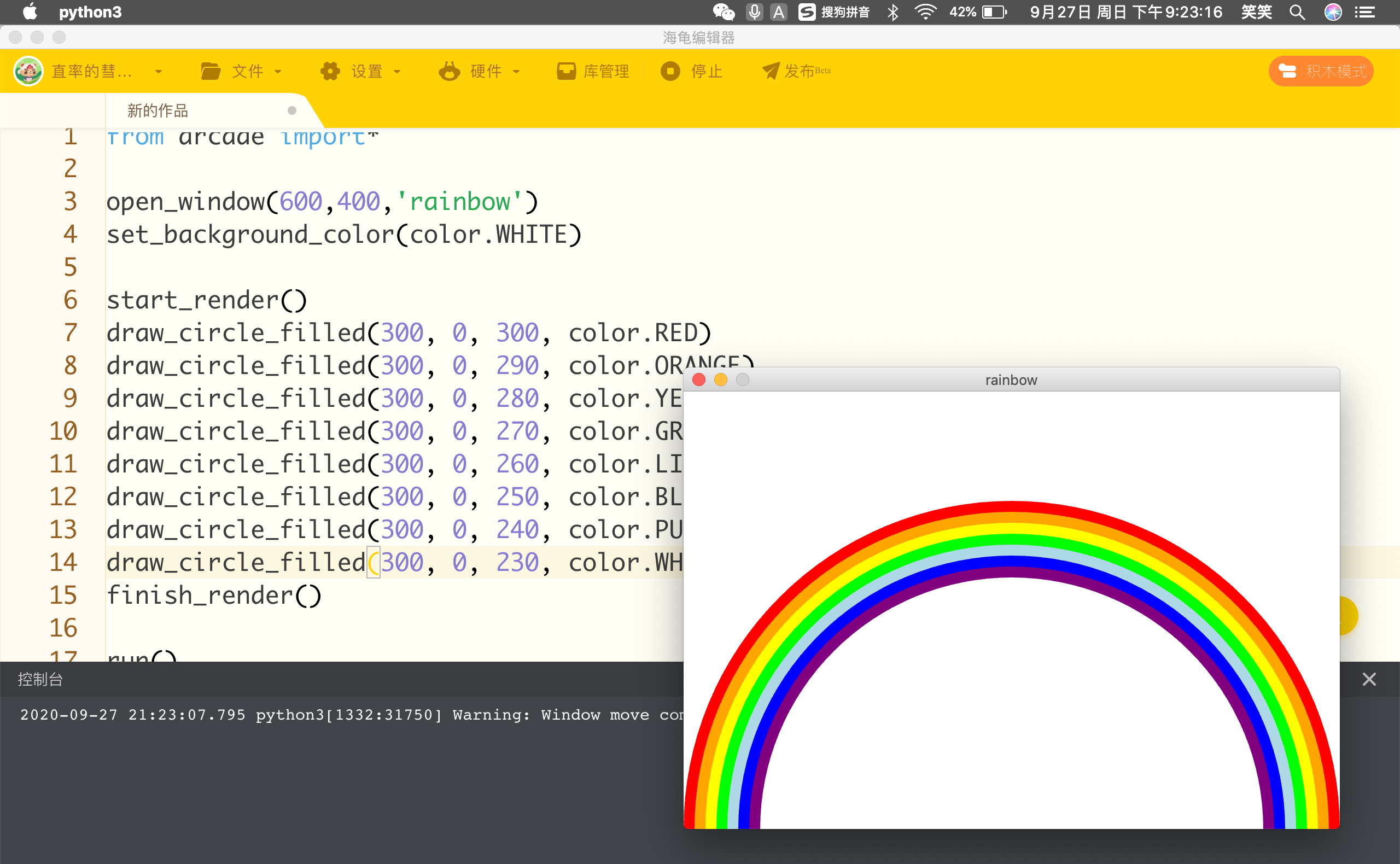
【作品介绍】
这个是我画的彩虹🌈~·挺简单哒
1 打开工具箱 from arcade import*
2 打开画板,将背景设成白色open_window(600,400,'rainbow')
set_background_color(color.WHITE)
3 开始编程 start_render()
4 告诉电脑写一下你要编的东西 draw_circle_filled(300,0,300,color.RED)
5 接下来就是改一下半径(依次减小10)和颜色(红,橙,黄,绿,青,蓝,紫)
6 结束编程 finish_render()
7 开始运行 run()
然后就可以看到彩虹🌈啦~
by直率的彗星猫
【作品源代码】
from arcade import*

open_window(600,400,'rainbow')
set_background_color(color.WHITE)

start_render()
draw_circle_filled(300, 0, 300, color.RED)
draw_circle_filled(300, 0, 290, color.ORANGE)
draw_circle_filled(300, 0, 280, color.YELLOW)
draw_circle_filled(300, 0, 270, color.GREEN)
draw_circle_filled(300, 0, 260, color.LIGHT_BLUE)
draw_circle_filled(300, 0, 250, color.BLUE)
draw_circle_filled(300, 0, 240, color.PURPLE)
draw_circle_filled(300, 0, 230, color.WHITE)
finish_render()

run()
【提示】
部分含有Python第三方库相关内容的作品,在海龟编辑器网页端无法运行哦!如遇到这种情况,可以打开下面的链接,下载海龟编辑器客户端:
https://python.codemao.cn 呵嘿哈
呵嘿哈PURPLE建议改成VIOLET
点赞0
评论
你也在?我今天是因为感冒不去上学
我落枕了 痛死了,上不了学
az
要不去玩会岛三?
我想肝作品,顺便给你点个赞吧
好吧……岛三的世界里无人
我得了腮腺炎上不了学😂
LIGHT—BLUE改成CYAN会更好看一点
呵呵,是的,CYAN是什么就不用说了吧(青色)
你也没上学呀😂
看最上面的第二句话
谢谢你们的建议😋