 Laical查看:44 回复:2 评论:1 创建时间:2020-09-15T17:26:15
用户:
网络爬虫通过程序模拟浏览器请求站点的行为,把网站返回的数据爬到本地,提取自己需要的数据,存储起来使用。
爬虫构成1、确定目标网站
2、解析目标网站的数据信息
3、程序模拟用户发出http请求获取数据
4、从获取的数据中保存到本地,删选需要的相关数据
5、对获取到的数据根据自己的需求使用
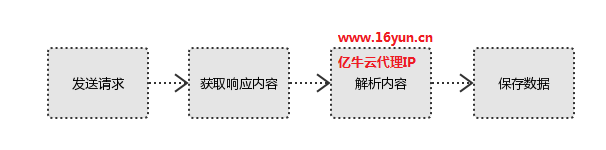
一般做爬虫都会加上请求头
User-agent:请求头中如果没有user-agent,目标网站可能将你当做一个非法用户
cookies:cookie用来保存登录信息
爬虫实践以下是关于网络爬虫采集数据的实践操作,通过爬虫程序模拟用户分析网站采集数据解析数据保存数据。代码仅供参考:
import org.json.JSONException;
import org.json.JSONObject;
import org.openqa.selenium.Platform;
import org.openqa.selenium.Proxy;
import org.openqa.selenium.firefox.FirefoxDriver;
import org.openqa.selenium.firefox.FirefoxProfile;
import org.openqa.selenium.htmlunit.HtmlUnitDriver;
import org.openqa.selenium.remote.CapabilityType;
import org.openqa.selenium.remote.DesiredCapabilities;

import com.gargoylesoftware.htmlunit.DefaultCredentialsProvider;
import com.gargoylesoftware.htmlunit.WebClient;

public class FirefoxDriverProxyDemo
{
    // 代理隧道验证信息
    final static String proxyUser = "username";
    final static String proxyPass = "password";

    // 代理服务器
    final static String proxyHost = "t.16yun.cn";
    final static int proxyPort = 31111;

    final static String firefoxBin = "C:/Program Files/Mozilla Firefox/firefox.exe";

    public static void main(String[] args) throws JSONException
    {
        System.setProperty("webdriver.firefox.bin", firefoxBin);

        FirefoxProfile profile = new FirefoxProfile();

        profile.setPreference("network.proxy.type", 1);


        profile.setPreference("network.proxy.http", proxyHost);
        profile.setPreference("network.proxy.http_port", proxyPort);

        profile.setPreference("network.proxy.ssl", proxyHost);
        profile.setPreference("network.proxy.ssl_port", proxyPort);

        profile.setPreference("username", proxyUser);
        profile.setPreference("password", proxyPass);


        profile.setPreference("network.proxy.share_proxy_settings", true);


        profile.setPreference("network.proxy.no_proxies_on", "localhost");


        FirefoxDriver driver = new FirefoxDriver(profile);
    }
}