 务实的呆鲤鱼izou查看:34 回复:1 评论:0 创建时间:2020-08-23T17:56:49
用户:务实的呆鲤鱼izou查看:34 回复:1 评论:0 创建时间:2020-08-23T17:56:49
【作品展示】
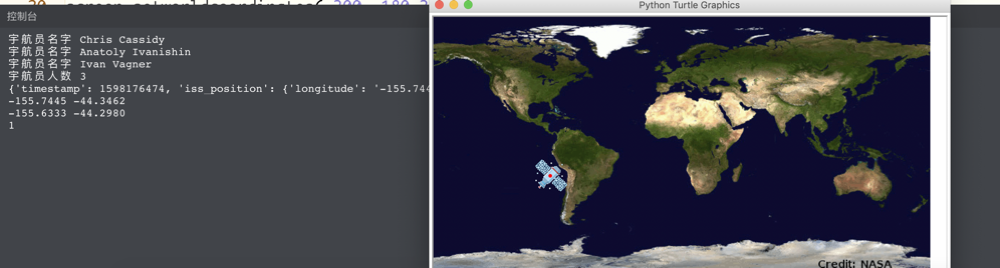
【作品介绍】
作业
【作品源代码】
# 结合本节课的学习内容,请打印空间站内的人数和姓名
import requests
import turtle
response_astros = requests.get('http://api.open-notify.org/astros.json')
response_astros = response_astros.json()
people = response_astros['people']
for i in range(len(people)):
    shu = people[i]
    name = shu['name']
    print('宇航员名字',name)
print('宇航员人数',len(people))
response_iss = requests.get('http://api.open-notify.org/iss-now.json')
result_iss = response_iss.json()
print(result_iss)
location = result_iss['iss_position']
lon = location['longitude']
lat = location['latitude']
print(lon,lat)
screen = turtle.Screen()
screen.setup(720,360)
screen.setworldcoordinates(-300,-180,360,180)
screen.bgpic('map.gif')
screen.register_shape('iss.gif')
pen = turtle.Pen()
pen.shape('iss.gif')
pen.up()
pen.goto(float(lon),float(lat))
pen.pensize(5)
pen.color('red')
pen.down()
flag = 1

def self_exit(x,y):
    global flag
    flag = 0
    print(flag)

while flag:
    response_iss = requests.get('http://api.open-notify.org/iss-now.json')
    result_iss = response_iss.json()
    location = result_iss['iss_position']
    lon = location['longitude']
    lat = location['latitude']
    print(lon,lat)
    pen.goto(float(lon), float(lat))
    screen.onclick(self_exit)
    print(flag)
【提示】
部分含有Python第三方库相关内容的作品,在海龟编辑器网页端无法运行哦!如遇到这种情况,可以打开下面的链接,下载海龟编辑器客户端:
https://python.codemao.cn