 反比例函数查看:0 回复:1 评论:0 创建时间:2020-07-05T21:30:40
用户:
【作品展示】
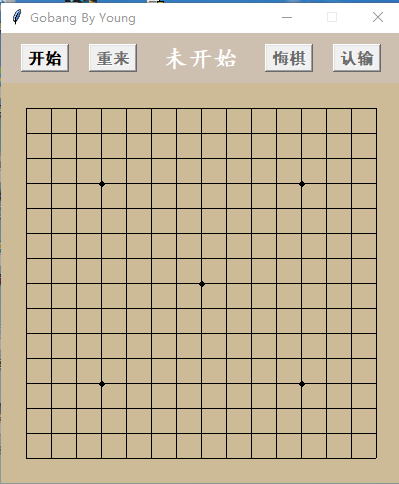
【作品介绍】
五子棋
【作品源代码】
import random
import sys
import pygame
from  pygame.locals import  *
import easygui


easygui.ynbox('进入游戏')
# 用数组定义一个棋盘,棋盘大小为 15×15
# 数组索引代表位置,
# 元素值代表该位置的状态:0代表没有棋子,1代表有黑棋,-1代表有白棋。
from tkinter import *
from tkinter.messagebox import *


class Chess(object):

    def __init__(self):
        #############
        #   param   #
        #######################################
        self.row, self.column = 15, 15
        self.mesh = 25
        self.ratio = 0.9
        self.board_color = "#CDBA96"
        self.header_bg = "#CDC0B0"
        self.btn_font = ("黑体", 12, "bold")
        self.step = self.mesh / 2
        self.chess_r = self.step * self.ratio
        self.point_r = self.step * 0.2
        self.matrix = [[0 for y in range(self.column)] for x in range(self.row)]
        self.is_start = False
        self.is_black = True
        self.last_p = None

        ###########
        #   GUI   #
        #######################################
        self.root = Tk()
        self.root.title("Gobang By Young")
        self.root.resizable(width=False, height=False)

        self.f_header = Frame(self.root, highlightthickness=0, bg=self.header_bg)
        self.f_header.pack(fill=BOTH, ipadx=10)

        self.b_start = Button(self.f_header, text="开始", command=self.bf_start, font=self.btn_font)
        self.b_restart = Button(self.f_header, text="重来", command=self.bf_restart, state=DISABLED, font=self.btn_font)
        self.l_info = Label(self.f_header, text="未开始", bg=self.header_bg, font=("楷体", 18, "bold"), fg="white")
        self.b_regret = Button(self.f_header, text="悔棋", command=self.bf_regret, state=DISABLED, font=self.btn_font)
        self.b_lose = Button(self.f_header, text="认输", command=self.bf_lose, state=DISABLED, font=self.btn_font)

        self.b_start.pack(side=LEFT, padx=20)
        self.b_restart.pack(side=LEFT)
        self.l_info.pack(side=LEFT, expand=YES, fill=BOTH, pady=10)
        self.b_lose.pack(side=RIGHT, padx=20)
        self.b_regret.pack(side=RIGHT)

        self.c_chess = Canvas(self.root, bg=self.board_color, width=(self.column + 1) * self.mesh,
                              height=(self.row + 1) * self.mesh, highlightthickness=0)
        self.draw_board()
        self.c_chess.bind("", self.cf_board)
        self.c_chess.pack()

        self.root.mainloop()

    # 画x行y列处的网格
    def draw_mesh(self, x, y):
        # 一个倍率,由于tkinter的GUI,如果不加倍率,悔棋的时候会有一点痕迹
        ratio = (1 - self.ratio) * 0.99 + 1
        center_x, center_y = self.mesh * (x + 1), self.mesh * (y + 1)
        # 先画背景色
        self.c_chess.create_rectangle(center_y - self.step, center_x - self.step,
    center_y + self.step, center_x + self.step,
                                      fill=self.board_color, outline=self.board_color)
        # 再画网格线,这里面a b c d是不同的系数,根据x,y不同位置确定,需要一定推导。
        a, b = [0, ratio] if y == 0 else [-ratio, 0] if y == self.row - 1 else [-ratio, ratio]
        c, d = [0, ratio] if x == 0 else [-ratio, 0] if x == self.column - 1 else [-ratio, ratio]
        self.c_chess.create_line(center_y + a * self.step, center_x, center_y + b * self.step, center_x)
        self.c_chess.create_line(center_y, center_x + c * self.step, center_y, center_x + d * self.step)

        # 有一些特殊的点要画小黑点
        if ((x == 3 or x == 11) and (y == 3 or y == 11)) or (x == 7 and y == 7):
            self.c_chess.create_oval(center_y - self.point_r, center_x - self.point_r,
                                     center_y + self.point_r, center_x + self.point_r, fill="black")

    # 画x行y列处的棋子,color指定棋子颜色
    def draw_chess(self, x, y, color):
        center_x, center_y = self.mesh * (x + 1), self.mesh * (y + 1)
        # 就是画个圆
        self.c_chess.create_oval(center_y - self.chess_r, center_x - self.chess_r,
                                 center_y + self.chess_r, center_x + self.chess_r,
                                 fill=color)

    # 画整个棋盘
    def draw_board(self):
        [self.draw_mesh(x, y) for y in range(self.column) for x in range(self.row)]

    # 在正中间显示文字
    def center_show(self, text):
        width, height = int(self.c_chess['width']), int(self.c_chess['height'])
        self.c_chess.create_text(int(width / 2), int(height / 2), text=text, font=("楷体", 30, "bold"), fill="red")

    # 开始的时候设置各个组件,变量的状态,初始化matrix矩阵,初始化棋盘,初始化信息
    def bf_start(self):
        self.set_btn_state("start")
        self.is_start = True
        self.is_black = True
        self.matrix = [[0 for y in range(self.column)] for x in range(self.row)]
        self.draw_board()
        self.l_info.config(text="黑方下棋")

    # 重来跟开始的效果一样
    def bf_restart(self):
        self.bf_start()

    # 用last_p来标识上一步的位置。先用网格覆盖掉棋子,操作相应的变量,matrix[x][y]要置空,只能悔一次棋
    def bf_regret(self):
        if not self.last_p:
            showinfo("提示", "现在不能悔棋")
            return
        x, y = self.last_p
        self.draw_mesh(x, y)
        self.matrix[x][y] = 0
        self.last_p = None
        self.trans_identify()

    # 几个状态改变,还有显示文字,没什么说的
    def bf_lose(self):
        self.set_btn_state("init")
        self.is_start = False
        text = self.ternary_operator("黑方认输", "白方认输")
        self.l_info.config(text=text)
        self.center_show("以认输")

   # Canvas的click事件
    def cf_board(self, e):
        # 找到离点击点最近的坐标
        x, y = int((e.y - self.step) / self.mesh), int((e.x - self.step) / self.mesh)
        # 找到该坐标的中心点位置
        center_x, center_y = self.mesh * (x + 1), self.mesh * (y + 1)
        # 计算点击点到中心的距离
        distance = ((center_x - e.y) ** 2 + (center_y - e.x) ** 2) ** 0.5
        # 如果距离不在规定的圆内,退出//如果这个位置已经有棋子,退出//如果游戏还没开始,退出
        if distance > self.step * 0.95 or self.matrix[x][y] != 0 or not self.is_start:
            return
        # 此时棋子的颜色,和matrix中该棋子的标识。
        color = self.ternary_operator("black", "white")
        tag = self.ternary_operator(1, -1)
        # 先画棋子,在修改matrix相应点的值,用last_p记录本次操作点
        self.draw_chess(x, y, color)
        self.matrix[x][y] = tag
        self.last_p = [x, y]
        # 如果赢了,则游戏结束,修改状态,中心显示某方获胜
        if self.is_win(x, y, tag):
            self.is_start = False
            self.set_btn_state("init")
            text = self.ternary_operator("黑方获胜", "白方获胜")
            self.center_show(text)
            return
        # 如果游戏继续,则交换棋手
        self.trans_identify()

    def is_win(self, x, y, tag):
        # 获取斜方向的列表
        def direction(i, j, di, dj, row, column, matrix):
            temp = []
            while 0 <= i < row and 0 <= j < column:
                i, j = i + di, j + dj
            i, j = i - di, j - dj
            while 0 <= i < row and 0 <= j < column:
                temp.append(matrix[i][j])
                i, j = i - di, j - dj
            return temp

        four_direction = []
        # 获取水平和竖直方向的列表
        four_direction.append([self.matrix[i][y] for i in range(self.row)])
        four_direction.append([self.matrix[x][j] for j in range(self.column)])
        # 获取斜方向的列表
        four_direction.append(direction(x, y, 1, 1, self.row, self.column, self.matrix))
        four_direction.append(direction(x, y, 1, -1, self.row, self.column, self.matrix))

        # 一一查看这四个方向,有没有满足五子连珠
        for v_list in four_direction:
            count = 0
            for v in v_list:
                if v == tag:
                    count += 1
                    if count == 5:
                        return True
                else:
                    count = 0
        return False

    # 设置四个按钮是否可以点击
    def set_btn_state(self, state):
        state_list = [NORMAL, DISABLED, DISABLED, DISABLED] if state == "init" else [DISABLED, NORMAL, NORMAL, NORMAL]
        self.b_start.config(state=state_list[0])
        self.b_restart.config(state=state_list[1])
        self.b_regret.config(state=state_list[2])
        self.b_lose.config(state=state_list[3])

    # 因为有很多和self.black相关的三元操作,所以就提取出来
    def ternary_operator(self, true, false):
        return true if self.is_black else false
    # 交换棋手
    def trans_identify(self):
        self.is_black = not self.is_black
        text = self.ternary_operator("黑方下棋", "白方下棋")
        self.l_info.config(text=text)


if __name__ == '__main__':
    Chess()
【提示】
部分含有Python第三方库相关内容的作品,在海龟编辑器网页端无法运行哦!如遇到这种情况,可以打开下面的链接,下载海龟编辑器客户端:
https://python.codemao.cn