 未来的星空少年查看:29 回复:4 评论:1 创建时间:2020-06-30T20:15:08
用户:
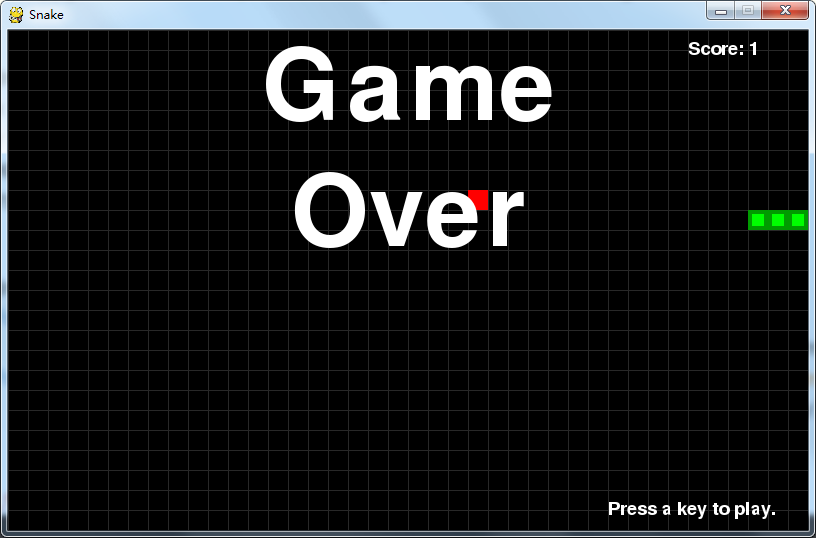
【作品展示】
【作品介绍】
一个贪吃蛇
【作品源代码】
import random
import pygame
import sys
from pygame.locals import *

Snakespeed = 10
Window_Width = 800
Window_Height = 500
Cell_Size = 20  # Width and height of the cells
# Ensuring that the cells fit perfectly in the window. eg if cell size was
# 10     and window width or windowheight were 15 only 1.5 cells would
# fit.
assert Window_Width % Cell_Size == 0, "Window width must be a multiple of cell size."
# Ensuring that only whole integer number of cells fit perfectly in the window.
assert Window_Height % Cell_Size == 0, "Window height must be a multiple of cell size."
Cell_W = int(Window_Width / Cell_Size)  # Cell Width
Cell_H = int(Window_Height / Cell_Size)  # Cellc Height


White = (255, 255, 255)
Black = (0, 0, 0)
Red = (255, 0, 0)  # Defining element colors for the program.
Green = (0, 255, 0)
DARKGreen = (0, 155, 0)
DARKGRAY = (40, 40, 40)
YELLOW = (255, 255, 0)
Red_DARK = (150, 0, 0)
BLUE = (0, 0, 255)
BLUE_DARK = (0, 0, 150)


BGCOLOR = Black  # Background color


UP = 'up'
DOWN = 'down'      # Defining keyboard keys.
LEFT = 'left'
RIGHT = 'right'

HEAD = 0  # Syntactic sugar: index of the snake's head


def main():
    global SnakespeedCLOCK, DISPLAYSURF, BASICFONT

    pygame.init()
    SnakespeedCLOCK = pygame.time.Clock()
    DISPLAYSURF = pygame.display.set_mode((Window_Width, Window_Height))
    BASICFONT = pygame.font.Font('freesansbold.ttf', 18)
    pygame.display.set_caption('Snake')

    showStartScreen()
    while True:
        runGame()
        showGameOverScreen()


def runGame():
    # Set a random start point.
    startx = random.randint(5, Cell_W - 6)
    starty = random.randint(5, Cell_H - 6)
    wormCoords = [{'x': startx, 'y': starty},
                  {'x': startx - 1, 'y': starty},
                  {'x': startx - 2, 'y': starty}]
    direction = RIGHT

    # Start the apple in a random place.
    apple = getRandomLocation()

    while True:  # main game loop
        for event in pygame.event.get():  # event handling loop
            if event.type == QUIT:
                terminate()
            elif event.type == KEYDOWN:
                if (event.key == K_LEFT) and direction != RIGHT:
                    direction = LEFT
                elif (event.key == K_RIGHT) and direction != LEFT:
                    direction = RIGHT
                elif (event.key == K_UP) and direction != DOWN:
                    direction = UP
                elif (event.key == K_DOWN) and direction != UP:
                    direction = DOWN
                elif event.key == K_ESCAPE:
                    terminate()

        # check if the Snake has hit itself or the edge
        if wormCoords[HEAD]['x'] == -1 or wormCoords[HEAD]['x'] == Cell_W or wormCoords[HEAD]['y'] == -1 or wormCoords[HEAD]['y'] == Cell_H:
            return  # game over
        for wormBody in wormCoords[1:]:
            if wormBody['x'] == wormCoords[HEAD]['x'] and wormBody['y'] == wormCoords[HEAD]['y']:
                return  # game over

        # check if Snake has eaten an apply
        if wormCoords[HEAD]['x'] == apple['x'] and wormCoords[HEAD]['y'] == apple['y']:
            # don't remove worm's tail segment
            apple = getRandomLocation()  # set a new apple somewhere
        else:
            del wormCoords[-1]  # remove worm's tail segment

        # move the worm by adding a segment in the direction it is moving
        if direction == UP:
            newHead = {'x': wormCoords[HEAD]['x'],
                       'y': wormCoords[HEAD]['y'] - 1}
        elif direction == DOWN:
            newHead = {'x': wormCoords[HEAD]['x'],
                       'y': wormCoords[HEAD]['y'] + 1}
        elif direction == LEFT:
            newHead = {'x': wormCoords[HEAD][
                'x'] - 1, 'y': wormCoords[HEAD]['y']}
        elif direction == RIGHT:
            newHead = {'x': wormCoords[HEAD][
                'x'] + 1, 'y': wormCoords[HEAD]['y']}
        wormCoords.insert(0, newHead)
        DISPLAYSURF.fill(BGCOLOR)
        drawGrid()
        drawWorm(wormCoords)
        drawApple(apple)
        drawScore(len(wormCoords) - 3)
        pygame.display.update()
        SnakespeedCLOCK.tick(Snakespeed)


def drawPressKeyMsg():
    pressKeySurf = BASICFONT.render('Press a key to play.', True, White)
    pressKeyRect = pressKeySurf.get_rect()
    pressKeyRect.topleft = (Window_Width - 200, Window_Height - 30)
    DISPLAYSURF.blit(pressKeySurf, pressKeyRect)


def checkForKeyPress():
    if len(pygame.event.get(QUIT)) > 0:
        terminate()
    keyUpEvents = pygame.event.get(KEYUP)
    if len(keyUpEvents) == 0:
        return None
    if keyUpEvents[0].key == K_ESCAPE:
        terminate()
    return keyUpEvents[0].key


def showStartScreen():
    titleFont = pygame.font.Font('freesansbold.ttf', 100)
    titleSurf1 = titleFont.render('Snake!', True, White, DARKGreen)
    degrees1 = 0
    degrees2 = 0
    while True:
        DISPLAYSURF.fill(BGCOLOR)
        rotatedSurf1 = pygame.transform.rotate(titleSurf1, degrees1)
        rotatedRect1 = rotatedSurf1.get_rect()
        rotatedRect1.center = (Window_Width / 2, Window_Height / 2)
        DISPLAYSURF.blit(rotatedSurf1, rotatedRect1)

        drawPressKeyMsg()

        if checkForKeyPress():
            pygame.event.get()  # clear event queue
            return
        pygame.display.update()
        SnakespeedCLOCK.tick(Snakespeed)
        degrees1 += 3  # rotate by 3 degrees each frame
        degrees2 += 7  # rotate by 7 degrees each frame


def terminate():
    pygame.quit()
    sys.exit()


def getRandomLocation():
    return {'x': random.randint(0, Cell_W - 1), 'y': random.randint(0, Cell_H - 1)}


def showGameOverScreen():
    gameOverFont = pygame.font.Font('freesansbold.ttf', 100)
    gameSurf = gameOverFont.render('Game', True, White)
    overSurf = gameOverFont.render('Over', True, White)
    gameRect = gameSurf.get_rect()
    overRect = overSurf.get_rect()
    gameRect.midtop = (Window_Width / 2, 10)
    overRect.midtop = (Window_Width / 2, gameRect.height + 10 + 25)

    DISPLAYSURF.blit(gameSurf, gameRect)
    DISPLAYSURF.blit(overSurf, overRect)
    drawPressKeyMsg()
    pygame.display.update()
    pygame.time.wait(500)
    checkForKeyPress()  # clear out any key presses in the event queue

    while True:
        if checkForKeyPress():
            pygame.event.get()  # clear event queue
            return


def drawScore(score):
    scoreSurf = BASICFONT.render('Score: %s' % (score), True, White)
    scoreRect = scoreSurf.get_rect()
    scoreRect.topleft = (Window_Width - 120, 10)
    DISPLAYSURF.blit(scoreSurf, scoreRect)


def drawWorm(wormCoords):
    for coord in wormCoords:
        x = coord['x'] * Cell_Size
        y = coord['y'] * Cell_Size
        wormSegmentRect = pygame.Rect(x, y, Cell_Size, Cell_Size)
        pygame.draw.rect(DISPLAYSURF, DARKGreen, wormSegmentRect)
        wormInnerSegmentRect = pygame.Rect(
            x + 4, y + 4, Cell_Size - 8, Cell_Size - 8)
        pygame.draw.rect(DISPLAYSURF, Green, wormInnerSegmentRect)


def drawApple(coord):
    x = coord['x'] * Cell_Size
    y = coord['y'] * Cell_Size
    appleRect = pygame.Rect(x, y, Cell_Size, Cell_Size)
    pygame.draw.rect(DISPLAYSURF, Red, appleRect)


def drawGrid():
    for x in range(0, Window_Width, Cell_Size):  # draw vertical lines
        pygame.draw.line(DISPLAYSURF, DARKGRAY, (x, 0), (x, Window_Height))
    for y in range(0, Window_Height, Cell_Size):  # draw horizontal lines
        pygame.draw.line(DISPLAYSURF, DARKGRAY, (0, y), (Window_Width, y))


if __name__ == '__main__':
    try:
        main()
    except SystemExit:
        pass
【提示】
部分含有Python第三方库相关内容的作品,在海龟编辑器网页端无法运行哦!如遇到这种情况,可以打开下面的链接,下载海龟编辑器客户端:
https://python.codemao.cn 不起眼的账号
#pygame游戏库,sys操控python运行的环境
import pygame
import sys
import random
#这个模块包含所有pygame所使用的常亮
from pygame.locals import *
#1,定义颜色变量
#0-255 0黑色 255白色
redColor = pygame.Color(255, 0, 0)
#背景为黑色
blackColor = pygame.Color(0, 0, 0)
#贪吃蛇为白色
whiteColor = pygame.Color(255, 255, 255)
#定义游戏结束的函数
def gameover():
pygame.quit()
sys.exit()
#定义main函数--》定义我们的入口函数
def main():
#初始化pygame
pygame.init()
#定义一个变量来控制速度
fpsClock = pygame.time.Clock()
#创建pygame显示层,创建一个界面
playsurface = pygame.display.set_mode((喵0, 480))
pygame.display.set_caption('贪吃蛇')
#初始化变量
#贪吃蛇初始坐标位置 (先以100,100为基准)
snakePosition = [100, 100]
#初始化贪吃蛇的长度列表中有个元素就代表有几段身体
snakeBody = [[100, 100], [80, 100], [60, 100]]
#初始化目标方向额位置
targetPosition = [300, 300]
#目标方块的标记 目的:判断是否吃掉了这个目标方块1 就是没有吃 0就是吃掉
targetflag = 1
#初始化方向 --》往右
direction = 'right'
#定义一个方向变量(人为控制 按键)
changeDirection = direction
while True:
for event in pygame.event.get(): # 从队列中获取事件
if event.type == QUIT:
pygame.quit()
sys.exit()
elif event.type == KEYDOWN:
if event.key == K_d:
changeDirection = 'right'
if event.key == K_a:
changeDirection = 'left'
if event.key == K_w:
changeDirection = 'up'
if event.key == K_s:
changeDirection = 'down'
#对应键盘上的esc文件
if event.key == K_ESCAPE:
pygame.event.post(pygame.event.Event(QUIT))
#确定方向
if changeDirection == 'left' and not direction == 'right':
direction = changeDirection
if changeDirection == 'right' and not direction == 'left':
direction = changeDirection
if changeDirection == 'up' and not direction == 'down':
direction = changeDirection
if changeDirection == 'down' and not direction == 'up':
direction = changeDirection
#根据方向移动蛇头
if direction == 'right':
snakePosition[0] += 20
if direction == 'left':
snakePosition[0] -= 20
if direction == 'up':
snakePosition[1] -= 20
if direction == 'down':
snakePosition[1] += 20
#增加蛇的长度
snakeBody.insert(0, list(snakePosition))
#如果贪吃蛇和目标方块的位置重合
if snakePosition[0] == targetPosition[0] and snakePosition[1] == targetPosition[1]:
targetflag = 0
else:
snakeBody.pop()
if targetflag == 0:
x = random.randrange(1, 32)
y = random.randrange(1, 24)
targetPosition = [int(x*20), int(y*20)]
targetflag = 1
#填充背景颜色
playsurface.fill(blackColor)
for position in snakeBody:
#第一个参数serface指定一个serface编辑区,在这个区域内绘制
#第二个参数color:颜色
#第三个参数:rect:返回一个矩形(xy),(width,height)
#第四个参数:width:表示线条的粗细 width0填充 实心
#化蛇
pygame.draw.rect(playsurface, redColor, Rect(
position[0], position[1], 20, 20))
pygame.draw.rect(playsurface, whiteColor, Rect(
targetPosition[0], targetPosition[1], 20, 20))
#更新显示到屏幕表面
pygame.display.flip()
#判断是否游戏结束
if snakePosition[0] > 620 or snakePosition[0] < 0:
gameover()
elif snakePosition[1] > 460 or snakePosition[1] < 0:
gameover()
#控制游戏速度
fpsClock.tick(2)
# 启动入口函数
if __name__ == '__main__':
try:
main()
except SystemExit:
pass
点赞0
评论