 Mr.Python查看:61 回复:1 评论:0 创建时间:2020-05-17T23:00:08
用户:Mr.Python查看:61 回复:1 评论:0 创建时间:2020-05-17T23:00:08
【作品展示】
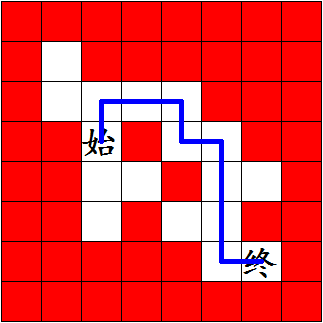
【作品介绍】
通过读取Excel表格绘制迷宫,并走出迷宫!设计迷宫的方法:
1.新建一个Excel表格,将其保存在与Python源文件相同位置;
2.根据需求绘制表格,具体操作如下:
墙是1,路是0,起点是20,终点是30。图中所示的表格请见评论区(评论的同学少说几句,别盖过去了)
3.将表格保存;
4.根据注释修改程序。
注意:
1.迷宫外面必须有一层墙,不然会报错;
2.不得无解,不然会进入喵循环哦!
3.结果不一定是最短路径(如果该题有多个解法)
【作品源代码】
import turtle
import xlrd
import numpy as np

__Pen = turtle.Pen()


book = xlrd.open_workbook("Book1.xlsx")    #根据自己的表格名称修改引号里的内容
book_names = book.sheet_names()
sheet1 = book.sheet_by_name(book_names[0])
ec = np.empty((sheet1.nrows, sheet1.ncols))
__Pen.speed(0)
for x in range(sheet1.nrows):
    for y in range(sheet1.ncols):
        if ((str(sheet1.cell(x, y)).split(':'))[1] == "''"):
            ec[x, y] = 1
        else:
            ec[x, y] = int(float((str(sheet1.cell(x, y)).split(':'))[1]))

        if ('0.0' in str(sheet1.cell(x, y))):
            __Pen.fillcolor("#FFFFFF")
        else:
            __Pen.fillcolor("#FF0000")
        __Pen.begin_fill()
        for __count in range(4):
            __Pen.forward(40)
            __Pen.right(90)
        __Pen.end_fill()
        if (('0.0' in str(sheet1.cell(x, y))) and ('20.0' in str(sheet1.cell(x, y)))):
            __Pen.sety(__Pen.ycor() - 40)
            __Pen.write('始', font=('楷体', 28, 'bold'))
            __Pen.sety((__Pen.ycor() + 40))
        elif (('0.0' in str(sheet1.cell(x, y))) and ('30.0' in str(sheet1.cell(x, y)))):
            __Pen.sety((__Pen.ycor() - 40))
            __Pen.write('终', font=('楷体', 28, 'bold'))
            __Pen.sety((__Pen.ycor() + 40))
        __Pen.forward(40)
    __Pen.backward(((y + 1) * 40))
    __Pen.right(90)
    __Pen.forward(40)
    __Pen.left(90)


def nextpos(curpos, way, ec):
    if way == 1:
        return [[curpos[0], curpos[1]+1], ec[curpos[0], curpos[1]+1]]
    elif way == 2:
        return [[curpos[0]+1, curpos[1]], ec[curpos[0]+1, curpos[1]]]
    elif way == 3:
        return [[curpos[0], curpos[1]-1], ec[curpos[0], curpos[1]-1]]
    else:
        return [[curpos[0]-1, curpos[1]], ec[curpos[0]-1, curpos[1]]]


def go(ec, start, end):
    zhan = []
    footprint = []
    road = ec
    curpos = start
    curstep = 1
    curvalue = 0.0
    while True:
        if int(np.float(curvalue)) in [0, 30, 20] and footprint.count(curpos) == 0:
            e = [curvalue, curpos, 1, curstep]
            zhan.append(e)
            footprint.append(curpos)
            if curpos == end:
                return zhan
            list_temp = nextpos(curpos, 1, road)
            curpos = list_temp[0]
            curvalue = list_temp[1]
            curstep += 1
        else:
            if len(zhan) > 0:
                e = zhan.pop()
                while e[2] == 4 and len(zhan) > 0:
                    road[curpos[0], curpos[1]] = 1
                    print(0)
                    e = zhan.pop()
            if e[2] < 4:
               e[2] += 1
               zhan.append(e)
               list_temp = nextpos(e[1], e[2], road)
               curpos = list_temp[0]
               e[2] += 1
               curvalue = list_temp[1]


def np_matrix_find(ec, n):
    num = ec.tolist()
    for x in num:
        for y in x:
            if y == n:
                return [num.index(x), x.index(y)]


move = go(ec, np_matrix_find(ec, 20), np_matrix_find(ec, 30))


__Pen.pensize(5)
__Pen.color('#0000FF')
__Pen.penup()
for i in move:
    __Pen.goto((i[1][1]+1)*(40)-20, (i[1][0]+1)*(-40)+20)
    __Pen.pendown()
__Pen.hideturtle()
turtle.done()
【提示】
部分含有Python第三方库相关内容的作品,在海龟编辑器网页端无法运行哦!如遇到这种情况,可以打开下面的链接,下载海龟编辑器客户端:
https://python.codemao.cn