 AbnormalLOG查看:42 回复:1 评论:0 创建时间:2020-05-08T09:56:30
用户:AbnormalLOG查看:42 回复:1 评论:0 创建时间:2020-05-08T09:56:30
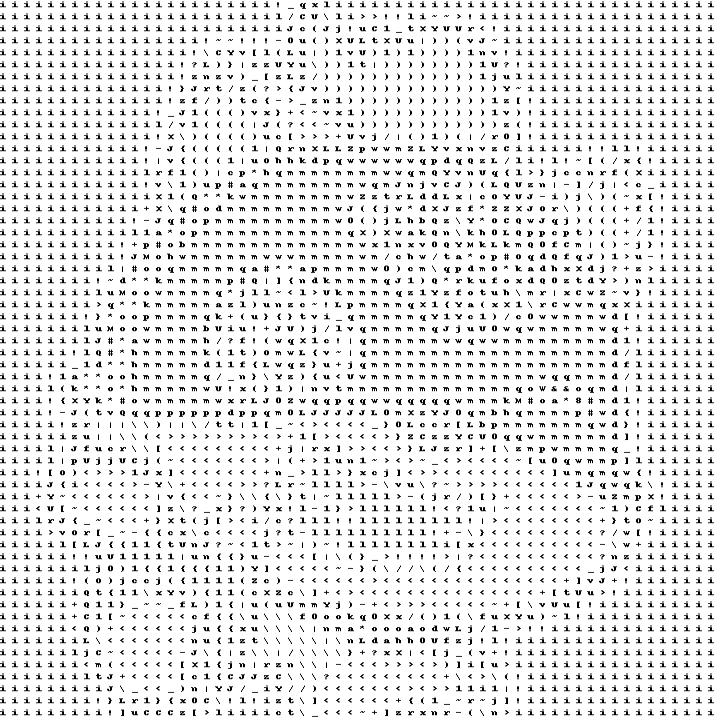
【作品展示】
【作品介绍】
编程猫字符画
【作品源代码】
from PIL import Image,ImageDraw
import matplotlib.pyplot as ma
width,heigth=(60,60)
ma.rcParams['image.cmap'] = 'gray'
img = Image.open('bcm.jpg').convert('L').resize((width, heigth))
# ma.imshow(img)
# ma.show()
ASCII_HIGH='''$@B%8&WM#*oahkbdpqwmZO0QLCJUYXzcvunxrjft/\|()1{}[]?-_+~<>i!lI;:,\"^`'. '''
txt=''
for y in range(heigth):
    for x in range(width):
        pos = (x, y)
        gray=img.getpixel(pos)
        index=int(gray/256*60)
        txt+=ASCII_HIGH[index]+' '
    txt += '\n'
# print(txt)
# with open ('zfh.txt','w') as f:
#     f.write(txt)
img_new = Image.new('RGB', (width*12, heigth*15),'white')
draw=ImageDraw.Draw(img_new)
draw.text((0,0),txt,fill='black')
# ma.imshow(img_new)
# ma.show()
img_new.resize((width*12, width*12)).save('bcm_char.jpg')
【提示】
部分含有Python第三方库相关内容的作品,在海龟编辑器网页端无法运行哦!如遇到这种情况,可以打开下面的链接,下载海龟编辑器客户端:
https://python.codemao.cn