 Python小伙lp查看:17 回复:1 评论:0 创建时间:2020-04-25T12:00:57
用户:
【作品展示】
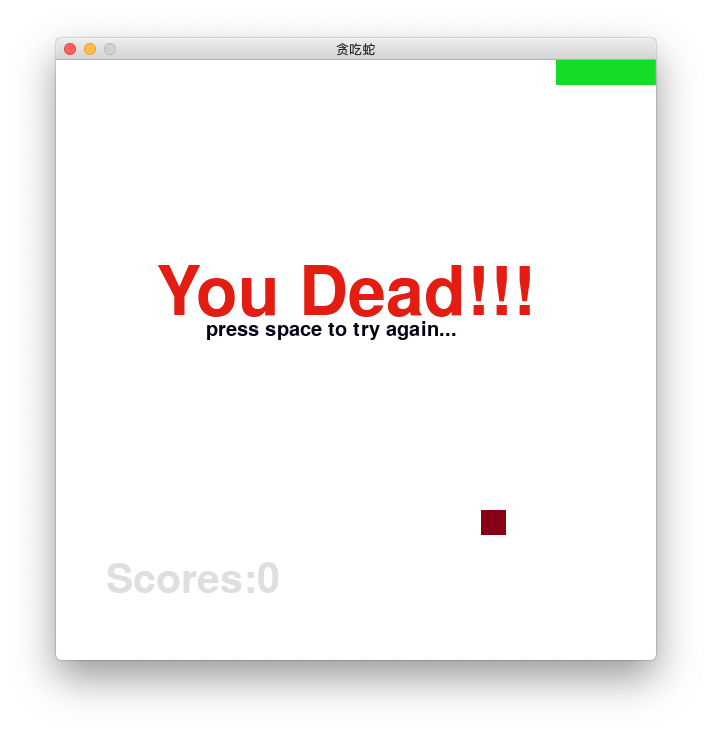
【作品介绍】
艰难。。。最后的变量名错了,弄了20分钟,最后幸亏“星空之忆awa"帮忙找到错误,感谢🙏
【作品源代码】
import sys
import random
import pygame


# 面向对象

# 蛇
# 25为一个单位
class Snake(object):
    # 属性:1.初始化的长度、2.头的方向
    def __init__(self):
        self.dirtion = pygame.K_RIGHT
        self.body = []

        for x in range(5):
            self.addnode()

    # 方法:1.吃、2.喵亡、3.移动、4.方向
    def addnode(self):
        left, top = (0, 0)
        if self.body:
            left, top = (self.body[0].left, self.body[0].top)
        node = pygame.Rect(left, top, 25, 25)
        if self.dirtion == pygame.K_LEFT:
            node.left -= 25
        elif self.dirtion == pygame.K_RIGHT:
            node.left += 25
        elif self.dirtion == pygame.K_UP:
            node.top -= 25
        elif self.dirtion == pygame.K_DOWN:
            node.top += 25
        self.body.insert(0, node)

    # 删除
    def delnode(self):
        self.body.pop()

    # 喵亡判断
    def isdead(self):
        # 撞墙
        if self.body[0].x not in range(SCREEN_X):
            return True
        if self.body[0].y not in range(SCREEN_Y):
            return True
        # 撞自己
        if self.body[0] in self.body[1:]:
            return True
        return False

    # 移动(move)
    def move(self):
        self.addnode()
        self.delnode()

    # 改变方向
    def changedirection(self, curkey):
        LR = [pygame.K_LEFT, pygame.K_RIGHT]
        UD = [pygame.K_UP, pygame.K_DOWN]
        if curkey in LR + UD:
            if (curkey in LR) and (self.dirtion in LR):
                return
            if (curkey in UD) and (self.dirtion in UD):
                return
            self.dirtion = curkey


# 食物
class Food:
    def __init__(self):
        self.rect = pygame.Rect(-25, 0, 25, 25)

    def remove(self):
        self.rect.x = -25

    def set(self):
        if self.rect.x == -25:
            allpos = []
            # 不能靠墙太近
            for pos in range(25, SCREEN_X - 25, 25):
                allpos.append(pos)
            self.rect.left = random.choice(allpos)
            self.rect.top = random.choice(allpos)
            print(self.rect)


# 全局定义
SCREEN_X = 600
SCREEN_Y = 600


def show_text(screen, pos, text, color, font_bold=False, font_size=60, font_italic=False):
    cur_font = pygame.font.SysFont('宋体', font_size)
    cur_font.set_bold(font_bold)
    cur_font.set_italic(font_italic)
    text_fmt = cur_font.render(text, 1, color)
    screen.blit(text_fmt, pos)


def main():
    # 初始化
    pygame.init()
    screen_size = (SCREEN_X, SCREEN_Y)
    screen = pygame.display.set_mode(screen_size)
    pygame.display.set_caption('贪吃蛇')  # 窗口标题
    clock = pygame.time.Clock()
    scores = 0
    isdead = False

    snake = Snake()
    food = Food()

    while True:
        for event in pygame.event.get():
            if event.type == pygame.QUIT:
                sys.exit()
            if event.type == pygame.KEYDOWN:
                snake.changedirection(event.key)
                if event.key == pygame.K_SPACE and isdead:
                    return main()

        screen.fill((255, 255, 255))

        # 画蛇身
        if not isdead:
            snake.move()
        for rect in snake.body:
            pygame.draw.rect(screen, (20, 220, 39), rect)

        # 显示喵亡文字
        isdead = snake.isdead()

        if isdead:
            show_text(screen, (100, 200), 'You Dead!!!',
                      (227, 29, 18), False, 100)
            show_text(screen, (150, 260),
                      'press space to try again...', (0, 0, 22), False, 30)
        # 食物的处理
        if food.rect == snake.body[0]:
            scores += 50
            food.remove()
            snake.addnode()

        food.set()
        pygame.draw.rect(screen, (136, 0, 21), food.rect)

        # 显示分数
        show_text(screen, (50, 500), 'Scores:' + str(scores), (223, 223, 223))

        pygame.display.update()  # 更新
        clock.tick(10)


main()
【提示】
部分含有Python第三方库相关内容的作品,在海龟编辑器网页端无法运行哦!如遇到这种情况,可以打开下面的链接,下载海龟编辑器客户端:
https://python.codemao.cn