 啊喵喵查看:16 回复:1 评论:0 创建时间:2020-04-06T16:19:44
用户:啊喵喵查看:16 回复:1 评论:0 创建时间:2020-04-06T16:19:44
【作品展示】
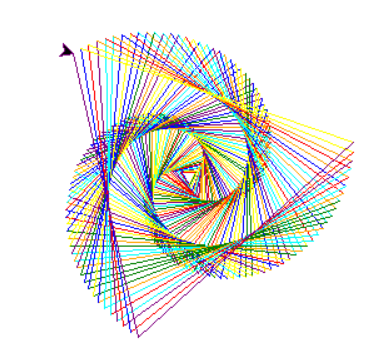
【作品介绍】
发呆专用
【作品源代码】
# 第一步:导入海归库,随机库
import turtle as t
import random

# 第二步:画笔设置
pen_colors=['red','orange','yellow','green','cyan','blue','purple']
# 设置画笔的颜色
t.pencolor("red")
# 设置画笔的速度
t.speed(500000)
# 定义初始的边长
x = 10
# 定义旋转的角度,random.randint(90,180)
y = random.randint(90, 180)
# 100 138 115 99 118 111
print(y)

# 第三步:绘画
# 重复执行绘画过程
while True:
    for i in range(500):
        # 画一条线
        t.forward(x)
        # 进行旋转
        t.right(y)
        x = x+1
        t.pencolor(pen_colors[random.randint(0,6)])
    t.clear()
    t.penup()
    t.goto(0,0)
    t.pendown()
    x = 10
    y = random.randint(90, 180)
t.done()
【提示】
部分含有Python第三方库相关内容的作品,在海龟编辑器网页端无法运行哦!如遇到这种情况,可以打开下面的链接,下载海龟编辑器客户端:
https://python.codemao.cn# 第一步:导入海归库,随机库
import turtle as t
import random
# 第二步:画笔设置
pen_colors=['red','orange','yellow','green','cyan','blue','purple']
# 设置画笔的颜色
t.pencolor("red")
# 设置画笔的速度
t.speed(500000)
# 定义初始的边长
x = 10
# 定义旋转的角度,random.randint(90,180)
y = random.randint(90, 180)
# 100 138 115 99 118 111
print(y)
# 第三步:绘画
# 重复执行绘画过程
while True:
for i in range(500):
# 画一条线
t.forward(x)
# 进行旋转
t.right(y)
x = x+1
t.pencolor(pen_colors[random.randint(0,6)])
t.clear()
t.penup()
t.goto(0,0)
t.pendown()
x = 10
y = random.randint(90, 180)
t.done()点赞0
评论