查看:188 回复:10 评论:4 创建时间:2020-03-30T21:08:45
用户:
【作品展示】
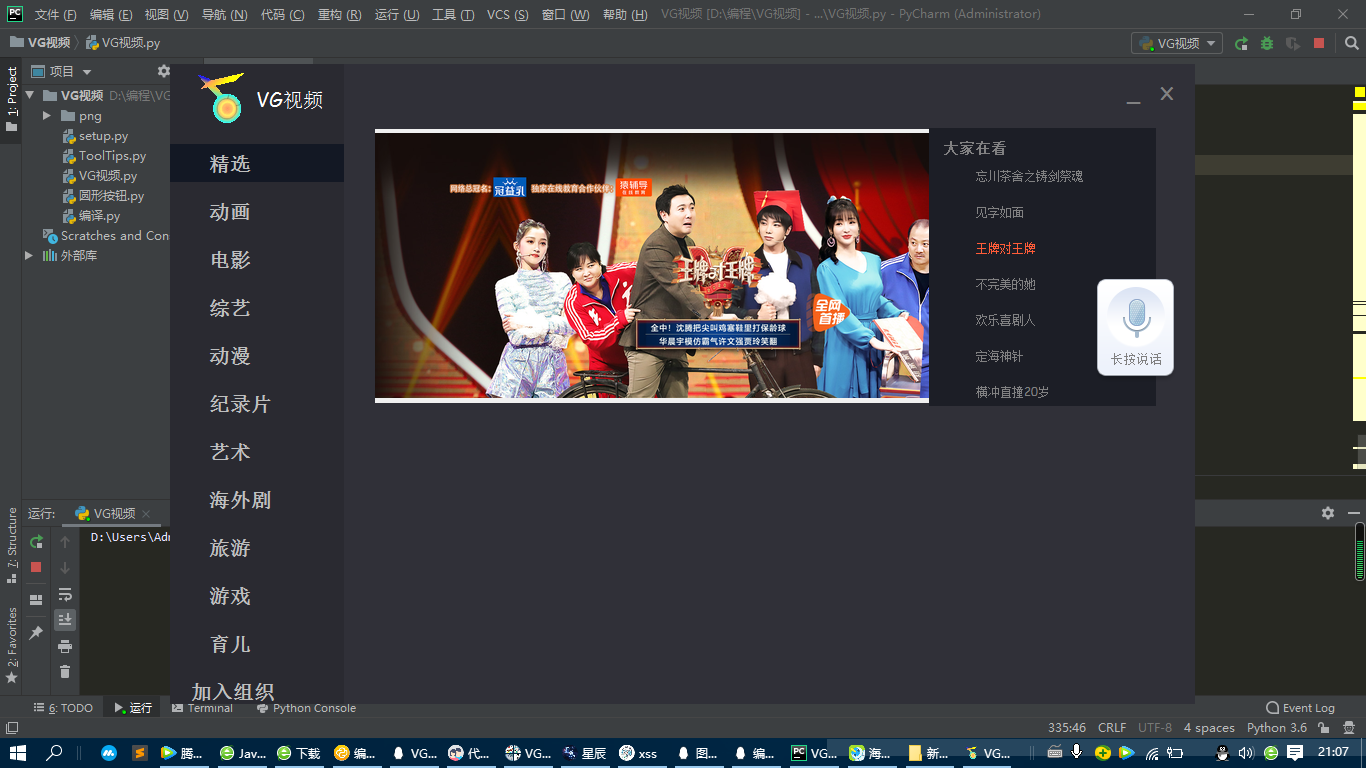
【作品介绍】
tk开发,只是tk小白而已,介绍一下tk属于自带的框架,其中调用了一个库,安装的办法在这里安装的办法在这里:https://blog.csdn.net/dcz1994/article/details/71喵2979/,目前只是做了一半一半,如果完全做完了就不可以公开了,但是目前属于可以公开的,就公开出来给大家,学习学习
【作品源代码】
#coding:utf-8
from tkinter import*
from tkinter import ttk
from ctypes import windll
from PIL import Image, ImageTk
from time import time, localtime, strftime
import os
import time
import urllib
import ToolTips
import threading
import urllib.request
import webbrowser
Kill=0
frequency=1#轮播图验证参数
frequency_2=1
GWL_EXSTYLE=-20#恢复指令
left_message_Image="0"#提前设置,类型设置全局变量就不会报错
WS_EX_APPWINDOW=0x00040000#系统变量引导
WS_EX_TOOLWINDOW=0x00000080#系统变量引导
def Picture_transcoding(w, h, w_box, h_box, pil_image):#图片自适应算法
      f1 = 1.0*w_box/w#先化成浮点数再除以当前的高
      f2 = 1.0*h_box/h#先化成浮点数再除以当前的高
      factor = min([f1, f2])#创建设定对象
      width = int(w*factor)#化为整数
      height = int(h*factor)#化为整数
      return pil_image.resize((width, height), Image.ANTIALIAS)#转换
class VG_video():#启动页面的类
    def main(s):
        global left_message_Image,style#x,y交通全局让他接收,left_message_Image是因为图片管理器必须是全局
        global Left_option_1
        global Left_option_2
        global Left_option_3
        global Left_option_4
        global Left_option_5
        global Left_option_6
        global Left_option_7
        global Left_option_8
        global Left_option_9
        global Left_option_10
        global Left_option_11
        global Left_option_12
        s.Set_thes=1
        style="#303038"
        s.window=Tk()
        s.window.overrideredirect(True)#去掉标准控件边框以及任务栏
        s.window.after(1, lambda: s.taskbar(s.window))#调用系统变量调用恢复任务栏
        s.window.title("VG视频")#设置标题名
        s.window.geometry(f'{(s.window.winfo_screenwidth()-s.window.winfo_screenwidth()//4)}x{(s.window.winfo_screenheight()-s.window.winfo_screenheight()//6)}+{(s.window.winfo_screenwidth()-(s.window.winfo_screenwidth()-s.window.winfo_screenwidth()//4))//2}+{(s.window.winfo_screenheight()-(s.window.winfo_screenheight()-s.window.winfo_screenheight()//6))//2}')
        s.window.configure(background = style)#更改背景颜色
        s.window.iconbitmap(os.getcwd()+'\\png\\vg.ico')#获取本地文件夹中的png文件夹内部的图片,并作为软件图标
        move=Label(s.window,width=s.window.winfo_screenwidth()-s.window.winfo_screenwidth()//4,height=(s.window.winfo_screenheight()-s.window.winfo_screenheight()//6)//9.1,bg = style,highlightthickness=0,image=PhotoImage(file=''))
        move.pack()
        move.bind("",s.mobile_1)#绑定移动函数
        move.bind("",s.mobile_2)#绑定移动函数
        left_message_1=Label(s.window,width=(s.window.winfo_screenwidth()-s.window.winfo_screenwidth()//4)//6,height=(s.window.winfo_screenheight()-s.window.winfo_screenheight()//6),bg="#2A2A31",image=PhotoImage(file=''))
        left_message_1.place(x=0,y=0)
        left_message_Image=PhotoImage(file=(os.getcwd()+'\\png\\vg.gif'))#获取当前文件夹下png内部图片的图片位置,并载入管理器
        left_message_2=Label(s.window,text="VG视频",width=(s.window.winfo_screenwidth()-s.window.winfo_screenwidth()//4)//6.1,height=(s.window.winfo_screenheight()-s.window.winfo_screenheight()//6)//10,image=left_message_Image,compound='left',bg="#2A2A31",font=("Comic Sans MS",-20),fg="#FFFFFF")#这里是右上角那个图片和字
        left_message_2.place(x=0,y=0)
        left_message_2.bind("",s.mobile_1)#绑定移动函数
        left_message_2.bind("",s.mobile_2)#绑定移动函数
        minimizenoy=(s.window.winfo_screenheight()-s.window.winfo_screenheight()//6)//10//5
        minimize=Label(s.window, text='_',width=(s.window.winfo_screenwidth()-s.window.winfo_screenwidth()//4)//600, height=(s.window.winfo_screenwidth()-s.window.winfo_screenwidth()//4)//1000,bg=style,fg="#818182",font=("Comic Sans MS",-20))#设置最小化按钮使用标签输入文字实现所以把背景调成当前颜色背景字体调整#FFFFFF
        minimize.place(x=(s.window.winfo_screenwidth()-s.window.winfo_screenwidth()//4)-(((s.window.winfo_screenwidth()-s.window.winfo_screenwidth()//4)//600)*2)*35, y=minimizenoy, anchor='nw')
        minimize.bind("",lambda *minimizevg: s.window.withdraw())#隐藏窗口
        minimize.bind("",lambda *minimizevg: s.window.overrideredirect(False),"+")#恢复边框
        minimize.bind("",lambda *minimizevg: s.window.iconify(),"+")#最小化
        minimize.bind("",lambda *minimizevg:s.Set_the(2),"+")#去一次点击下面可以显示主窗口的机会
        minimize.bind("",lambda *minimizevg:minimize.configure(fg="#818182"))#离开时候变回
        minimize.bind("",lambda *minimizevg:minimize.configure(fg="#FF5C38"))#进入时变色
        s.window.bind('',lambda *minimizevg:s.Set_the(1))#显示主窗口,因为点击一下其实会触发很多次,所以才需要有一个判断
        no=Label(s.window, text='×',width=(s.window.winfo_screenwidth()-s.window.winfo_screenwidth()//4)//600*2, height=(s.window.winfo_screenwidth()-s.window.winfo_screenwidth()//4)//600,fg="#818182",bg=style,font=("PMingLiU-ExtB",-25,"bold"))#设置删除按钮使用标签输入文字实现所以把背景调成当前颜色背景字体调整#FFFFFF
        no.place(x=(s.window.winfo_screenwidth()-s.window.winfo_screenwidth()//4)-(((s.window.winfo_screenwidth()-s.window.winfo_screenwidth()//4)//600)*45), y=minimizenoy, anchor='nw')
        no.bind("",lambda *no: exec("global Kill\nKill=1"))#自己定义的杀喵机制杀喵所有线程
        no.bind("",lambda *no: s.window.destroy(),"+")#关闭窗口destroy代表关闭
        no.bind("",lambda *novg:no.configure(fg="#818182"))#离开时候变回
        no.bind("",lambda *novg:no.configure(fg="#FF5C38"))#进入时变色
        ToolTips.ToolTip(minimize, msg="最小化", msgFunc=3, follow=True, delay=0)#这是一个本地导入的包,同文件夹里面有,用于最小化按钮提示
        ToolTips.ToolTip(no, msg="关闭", msgFunc=3, follow=True, delay=0)#这是一个本地导入的包,同文件夹里面有,用于删除按钮提示
        Left_option_1=Label(s.window,text='    精选',width=(s.window.winfo_screenwidth()-s.window.winfo_screenwidth()//4)//6.1,height=(s.window.winfo_screenheight()-s.window.winfo_screenheight()//6)//20,bg="#131824",fg="#BEBFBF",image=PhotoImage(file=''),compound=CENTER,font=("Comic Sans MS",-20,"bold"),anchor = 'w')
        Left_option_1.place(x=0,y=(s.window.winfo_screenheight()-s.window.winfo_screenheight()//6)//20*2.5)
        Left_option_1.bind("",lambda *Left_option_1vg:exec("if frequency_2!=1:\n       Left_option_1.configure(bg='#2A2A31',image=PhotoImage(file=''))"))#离开时候变回,如果当前选中就是这个,那就不变
        Left_option_1.bind("",lambda *Left_option_1vg:Left_option_1.configure(bg='#131824',image=PhotoImage(file='')))#进入时变色
        Left_option_1.bind("",lambda *Left_option_1vg:exec("global frequency,Kill\nif frequency_2!=1:\n  frequency=1\n  Kill=1"))#最初创建的先执行
        Left_option_1.bind("",lambda *Left_option_1vg:Left_option_1.configure(bg='#131824',image=PhotoImage(file='')),"+")#最初创建的先执行
        Left_option_1.bind("",s.Page_switching,"+")#后来创建的后执行
        Left_option_1.bind("",lambda *Left_option_1vg:Left_option_1.configure(bg='#131824',image=PhotoImage(file='')),'+')#点击变色
        Left_option_1.bind("",lambda *Left_option_1vg:exec('if frequency_2!=1:\n       eval("Left_option_"+str(frequency_2)).configure(bg="#2A2A31",image=PhotoImage(file=""))'),'+')#把上一个变色的变回原来的色
        Left_option_2=Label(s.window,text='    动画',width=(s.window.winfo_screenwidth()-s.window.winfo_screenwidth()//4)//6.1,height=(s.window.winfo_screenheight()-s.window.winfo_screenheight()//6)//20,bg="#2A2A31",fg="#BEBFBF",image=PhotoImage(''),compound=CENTER,font=("Comic Sans MS",-20,"bold"),anchor = 'w')
        Left_option_2.place(x=0,y=(s.window.winfo_screenheight()-s.window.winfo_screenheight()//6)//20*4)
        Left_option_2.bind("",lambda *Left_option_2vg:exec("if frequency_2!=2:\n       Left_option_2.configure(bg='#2A2A31',image=PhotoImage(file=''))"))#离开时候变回,如果当前选中就是这个,那就不变
        Left_option_2.bind("",lambda *Left_option_2vg:Left_option_2.configure(bg='#131824',image=PhotoImage(file='')))#进入时变色
        Left_option_2.bind("",lambda *Left_option_2vg:exec("global frequency,Kill\nif frequency_2!=2:\n  frequency=2\n  Kill=1"))#最初创建的先执行
        Left_option_2.bind("",lambda *Left_option_2vg:Left_option_2.configure(bg='#131824',image=PhotoImage(file='')),"+")
        Left_option_2.bind("",s.Page_switching,"+")#后来创建的后执行
        Left_option_2.bind("",lambda *Left_option_2vg:Left_option_2.configure(bg='#131824',image=PhotoImage(file='')),'+')#点击变色
        Left_option_2.bind("",lambda *Left_option_2vg:exec('if frequency_2!=3:\n       eval("Left_option_"+str(frequency_2)).configure(bg="#2A2A31",image=PhotoImage(file=""))'),'+')#把上一个变色的变回原来的色
        Left_option_3=Label(s.window,text='    电影',width=(s.window.winfo_screenwidth()-s.window.winfo_screenwidth()//4)//6.1,height=(s.window.winfo_screenheight()-s.window.winfo_screenheight()//6)//20,bg="#2A2A31",fg="#BEBFBF",image=PhotoImage(''),compound=CENTER,font=("Comic Sans MS",-20,"bold"),anchor = 'w')
        Left_option_3.place(x=0,y=(s.window.winfo_screenheight()-s.window.winfo_screenheight()//6)//20*5.5)
        Left_option_3.bind("",lambda *Left_option_3vg:exec("if frequency_2!=3:\n       Left_option_3.configure(bg='#2A2A31',image=PhotoImage(file=''))"))#离开时候变回,如果当前选中就是这个,那就不变
        Left_option_3.bind("",lambda *Left_option_3vg:Left_option_3.configure(bg='#131824',image=PhotoImage(file='')))#进入时变色
        Left_option_3.bind("",lambda *Left_option_3vg:exec("global frequency,Kill\nif frequency_2!=3:\n  frequency=3\n  Kill=1"))#最初创建的先执行
        Left_option_3.bind("",lambda *Left_option_3vg:Left_option_3.configure(bg='#131824',image=PhotoImage(file='')),"+")
        Left_option_3.bind("",s.Page_switching,"+")#后来创建的后执行
        Left_option_3.bind("",lambda *Left_option_3vg:Left_option_3.configure(bg='#131824',image=PhotoImage(file='')),'+')#点击变色
        Left_option_3.bind("",lambda *Left_option_3vg:exec('if frequency_2!=3:\n       eval("Left_option_"+str(frequency_2)).configure(bg="#2A2A31",image=PhotoImage(file=""))'),'+')#把上一个变色的变回原来的色
        Left_option_4=Label(s.window,text='    综艺',width=(s.window.winfo_screenwidth()-s.window.winfo_screenwidth()//4)//6.1,height=(s.window.winfo_screenheight()-s.window.winfo_screenheight()//6)//20,bg="#2A2A31",fg="#BEBFBF",image=PhotoImage(''),compound=CENTER,font=("Comic Sans MS",-20,"bold"),anchor = 'w')
        Left_option_4.place(x=0,y=(s.window.winfo_screenheight()-s.window.winfo_screenheight()//6)//20*7)
        Left_option_4.bind("",lambda *Left_option_4vg:exec("if frequency_2!=4:\n       Left_option_4.configure(bg='#2A2A31',image=PhotoImage(file=''))"))#离开时候变回,如果当前选中就是这个,那就不变
        Left_option_4.bind("",lambda *Left_option_4vg:Left_option_4.configure(bg='#131824',image=PhotoImage(file='')))#进入时变色
        Left_option_4.bind("",lambda *Left_option_4vg:exec("global frequency,Kill\nif frequency_2!=4:\n  frequency=4\n  Kill=1"))#最初创建的先执行
        Left_option_4.bind("",lambda *Left_option_4vg:Left_option_4.configure(bg='#131824',image=PhotoImage(file='')),"+")
        Left_option_4.bind("",s.Page_switching,"+")#后来创建的后执行
        Left_option_4.bind("",lambda *Left_option_4vg:Left_option_4.configure(bg='#131824',image=PhotoImage(file='')),'+')#点击变色
        Left_option_4.bind("",lambda *Left_option_4vg:exec('if frequency_2!=4:\n       eval("Left_option_"+str(frequency_2)).configure(bg="#2A2A31",image=PhotoImage(file=""))'),'+')#把上一个变色的变回原来的色
        Left_option_5=Label(s.window,text='    动漫',width=(s.window.winfo_screenwidth()-s.window.winfo_screenwidth()//4)//6.1,height=(s.window.winfo_screenheight()-s.window.winfo_screenheight()//6)//20,bg="#2A2A31",fg="#BEBFBF",image=PhotoImage(''),compound=CENTER,font=("Comic Sans MS",-20,"bold"),anchor = 'w')
        Left_option_5.place(x=0,y=(s.window.winfo_screenheight()-s.window.winfo_screenheight()//6)//20*8.5)
        Left_option_5.bind("",lambda *Left_option_5vg:exec("if frequency_2!=5:\n       Left_option_5.configure(bg='#2A2A31',image=PhotoImage(file=''))"))#离开时候变回,如果当前选中就是这个,那就不变
        Left_option_5.bind("",lambda *Left_option_5vg:Left_option_5.configure(bg='#131824',image=PhotoImage(file='')))#进入时变色
        Left_option_5.bind("",lambda *Left_option_5vg:exec("global frequency,Kill\nif frequency_2!=5:\n  frequency=5\n  Kill=1"))#最初创建的先执行
        Left_option_5.bind("",lambda *Left_option_5vg:Left_option_5.configure(bg='#131824',image=PhotoImage(file='')),"+")
        Left_option_5.bind("",s.Page_switching,"+")#后来创建的后执行
        Left_option_5.bind("",lambda *Left_option_5vg:Left_option_5.configure(bg='#131824',image=PhotoImage(file='')),'+')#点击变色
        Left_option_5.bind("",lambda *Left_option_5vg:exec('if frequency_2!=5:\n       eval("Left_option_"+str(frequency_2)).configure(bg="#2A2A31",image=PhotoImage(file=""))'),'+')#把上一个变色的变回原来的色
        Left_option_6=Label(s.window,text='    纪录片',width=(s.window.winfo_screenwidth()-s.window.winfo_screenwidth()//4)//6.1,height=(s.window.winfo_screenheight()-s.window.winfo_screenheight()//6)//20,bg="#2A2A31",fg="#BEBFBF",image=PhotoImage(''),compound=CENTER,font=("Comic Sans MS",-20,"bold"),anchor = 'w')
        Left_option_6.place(x=0,y=(s.window.winfo_screenheight()-s.window.winfo_screenheight()//6)//20*10)
        Left_option_6.bind("",lambda *Left_option_6vg:exec("if frequency_2!=6:\n       Left_option_6.configure(bg='#2A2A31',image=PhotoImage(file=''))"))#离开时候变回,如果当前选中就是这个,那就不变
        Left_option_6.bind("",lambda *Left_option_6vg:Left_option_6.configure(bg='#131824',image=PhotoImage(file='')))#进入时变色
        Left_option_6.bind("",lambda *Left_option_6vg:exec("global frequency,Kill\nif frequency_2!=6:\n  frequency=6\n  Kill=1"))#最初创建的先执行
        Left_option_6.bind("",lambda *Left_option_6vg:Left_option_6.configure(bg='#131824',image=PhotoImage(file='')),"+")
        Left_option_6.bind("",s.Page_switching,"+")#后来创建的后执行
        Left_option_6.bind("",lambda *Left_option_6vg:Left_option_6.configure(bg='#131824',image=PhotoImage(file='')),'+')#点击变色
        Left_option_6.bind("",lambda *Left_option_6vg:exec('if frequency_2!=6:\n       eval("Left_option_"+str(frequency_2)).configure(bg="#2A2A31",image=PhotoImage(file=""))'),'+')#把上一个变色的变回原来的色
        Left_option_7=Label(s.window,text='    艺术',width=(s.window.winfo_screenwidth()-s.window.winfo_screenwidth()//4)//6.1,height=(s.window.winfo_screenheight()-s.window.winfo_screenheight()//6)//20,bg="#2A2A31",fg="#BEBFBF",image=PhotoImage(''),compound=CENTER,font=("Comic Sans MS",-20,"bold"),anchor = 'w')
        Left_option_7.place(x=0,y=(s.window.winfo_screenheight()-s.window.winfo_screenheight()//6)//20*11.5)
        Left_option_7.bind("",lambda *Left_option_7vg:exec("if frequency_2!=7:\n       Left_option_7.configure(bg='#2A2A31',image=PhotoImage(file=''))"))#离开时候变回,如果当前选中就是这个,那就不变
        Left_option_7.bind("",lambda *Left_option_7vg:Left_option_7.configure(bg='#131824',image=PhotoImage(file='')))#进入时变色
        Left_option_7.bind("",lambda *Left_option_7vg:exec("global frequency,Kill\nif frequency_2!=7:\n  frequency=7\n  Kill=1"))#最初创建的先执行
        Left_option_7.bind("",lambda *Left_option_7vg:Left_option_7.configure(bg='#131824',image=PhotoImage(file='')),"+")
        Left_option_7.bind("",s.Page_switching,"+")#后来创建的后执行
        Left_option_7.bind("",lambda *Left_option_7vg:Left_option_7.configure(bg='#131824',image=PhotoImage(file='')),'+')#点击变色
        Left_option_7.bind("",lambda *Left_option_7vg:exec('if frequency_2!=7:\n       eval("Left_option_"+str(frequency_2)).configure(bg="#2A2A31",image=PhotoImage(file=""))'),'+')#把上一个变色的变回原来的色
        Left_option_8=Label(s.window,text='    海外剧',width=(s.window.winfo_screenwidth()-s.window.winfo_screenwidth()//4)//6.1,height=(s.window.winfo_screenheight()-s.window.winfo_screenheight()//6)//20,bg="#2A2A31",fg="#BEBFBF",image=PhotoImage(''),compound=CENTER,font=("Comic Sans MS",-20,"bold"),anchor = 'w')
        Left_option_8.place(x=0,y=(s.window.winfo_screenheight()-s.window.winfo_screenheight()//6)//20*13)
        Left_option_8.bind("",lambda *Left_option_8vg:exec("if frequency_2!=8:\n       Left_option_8.configure(bg='#2A2A31',image=PhotoImage(file=''))"))#离开时候变回,如果当前选中就是这个,那就不变
        Left_option_8.bind("",lambda *Left_option_8vg:Left_option_8.configure(bg='#131824',image=PhotoImage(file='')))#进入时变色
        Left_option_8.bind("",lambda *Left_option_8vg:exec("global frequency,Kill\nif frequency_2!=8:\n  frequency=8\n  Kill=1"))#最初创建的先执行
        Left_option_8.bind("",lambda *Left_option_6vg:Left_option_8.configure(bg='#131824',image=PhotoImage(file='')),"+")
        Left_option_8.bind("",s.Page_switching,"+")#后来创建的后执行
        Left_option_8.bind("",lambda *Left_option_8vg:Left_option_8.configure(bg='#131824',image=PhotoImage(file='')),'+')#点击变色
        Left_option_8.bind("",lambda *Left_option_8vg:exec('if frequency_2!=8:\n       eval("Left_option_"+str(frequency_2)).configure(bg="#2A2A31",image=PhotoImage(file=""))'),'+')#把上一个变色的变回原来的色
        Left_option_9=Label(s.window,text='    旅游',width=(s.window.winfo_screenwidth()-s.window.winfo_screenwidth()//4)//6.1,height=(s.window.winfo_screenheight()-s.window.winfo_screenheight()//6)//20,bg="#2A2A31",fg="#BEBFBF",image=PhotoImage(file=''),compound=CENTER,font=("Comic Sans MS",-20,"bold"),anchor = 'w')
        Left_option_9.place(x=0,y=(s.window.winfo_screenheight()-s.window.winfo_screenheight()//6)//20*14.5)
        Left_option_9.bind("",lambda *Left_option_9vg:exec("if frequency_2!=9:\n       Left_option_9.configure(bg='#2A2A31',image=PhotoImage(file=''))"))#离开时候变回,如果当前选中就是这个,那就不变
        Left_option_9.bind("",lambda *Left_option_9vg:Left_option_9.configure(bg='#131824',image=PhotoImage(file='')))#进入时变色
        Left_option_9.bind("",lambda *Left_option_9vg:exec("global frequency,Kill\nif frequency_2!=9:\n  frequency=9\n  Kill=1"))#最初创建的先执行
        Left_option_9.bind("",lambda *Left_option_9vg:Left_option_9.configure(bg='#131824',image=PhotoImage(file='')),"+")#最初创建的先执行
        Left_option_9.bind("",s.Page_switching,"+")#后来创建的后执行
        Left_option_9.bind("",lambda *Left_option_9vg:Left_option_9.configure(bg='#131824',image=PhotoImage(file='')),'+')#点击变色
        Left_option_9.bind("",lambda *Left_option_9vg:exec('if frequency_2!=9:\n       eval("Left_option_"+str(frequency_2)).configure(bg="#2A2A31",image=PhotoImage(file=""))'),'+')#把上一个变色的变回原来的色
        Left_option_10=Label(s.window,text='    游戏',width=(s.window.winfo_screenwidth()-s.window.winfo_screenwidth()//4)//6.1,height=(s.window.winfo_screenheight()-s.window.winfo_screenheight()//6)//20,bg="#2A2A31",fg="#BEBFBF",image=PhotoImage(file=''),compound=CENTER,font=("Comic Sans MS",-20,"bold"),anchor = 'w')
        Left_option_10.place(x=0,y=(s.window.winfo_screenheight()-s.window.winfo_screenheight()//6)//20*16)
        Left_option_10.bind("",lambda *Left_option_10vg:exec("if frequency_2!=10:\n       Left_option_10.configure(bg='#2A2A31',image=PhotoImage(file=''))"))#离开时候变回,如果当前选中就是这个,那就不变
        Left_option_10.bind("",lambda *Left_option_10vg:Left_option_10.configure(bg='#131824',image=PhotoImage(file='')))#进入时变色
        Left_option_10.bind("",lambda *Left_option_10vg:exec("global frequency,Kill\nif frequency_2!=10:\n  frequency=10\n  Kill=1"))#最初创建的先执行
        Left_option_10.bind("",lambda *Left_option_10vg:Left_option_10.configure(bg='#131824',image=PhotoImage(file='')),"+")#最初创建的先执行
        Left_option_10.bind("",s.Page_switching,"+")#后来创建的后执行
        Left_option_10.bind("",lambda *Left_option_10vg:Left_option_10.configure(bg='#131824',image=PhotoImage(file='')),'+')#点击变色
        Left_option_10.bind("",lambda *Left_option_10vg:exec('if frequency_2!=10:\n       eval("Left_option_"+str(frequency_2)).configure(bg="#2A2A31",image=PhotoImage(file=""))'),'+')#把上一个变色的变回原来的色
        Left_option_11=Label(s.window,text='    育儿',width=(s.window.winfo_screenwidth()-s.window.winfo_screenwidth()//4)//6.1,height=(s.window.winfo_screenheight()-s.window.winfo_screenheight()//6)//20,bg="#2A2A31",fg="#BEBFBF",image=PhotoImage(file=''),compound=CENTER,font=("Comic Sans MS",-20,"bold"),anchor = 'w')
        Left_option_11.place(x=0,y=(s.window.winfo_screenheight()-s.window.winfo_screenheight()//6)//20*17.5)
        Left_option_11.bind("",lambda *Left_option_11vg:exec("if frequency_2!=11:\n       Left_option_11.configure(bg='#2A2A31',image=PhotoImage(file=''))"))#离开时候变回,如果当前选中就是这个,那就不变
        Left_option_11.bind("",lambda *Left_option_11vg:Left_option_11.configure(bg='#131824',image=PhotoImage(file='')))#进入时变色
        Left_option_11.bind("",lambda *Left_option_11vg:exec("global frequency,Kill\nif frequency_2!=11:\n  frequency=11\n  Kill=1"))#最初创建的先执行
        Left_option_11.bind("",lambda *Left_option_11vg:Left_option_11.configure(bg='#131824',image=PhotoImage(file='')),"+")#最初创建的先执行
        Left_option_11.bind("",s.Page_switching,"+")#后来创建的后执行
        Left_option_11.bind("",lambda *Left_option_11vg:Left_option_11.configure(bg='#131824',image=PhotoImage(file='')),'+')#点击变色
        Left_option_11.bind("",lambda *Left_option_11vg:exec('if frequency_2!=11:\n       eval("Left_option_"+str(frequency_2)).configure(bg="#2A2A31",image=PhotoImage(file=""))'),'+')#把上一个变色的变回原来的色
        Left_option_12=Label(s.window,text='  加入组织',width=(s.window.winfo_screenwidth()-s.window.winfo_screenwidth()//4)//6.1,height=(s.window.winfo_screenheight()-s.window.winfo_screenheight()//6)//20,bg="#2A2A31",fg="#BEBFBF",image=PhotoImage(file=''),compound=CENTER,font=("Comic Sans MS",-20,"bold"),anchor = 'w')
        Left_option_12.place(x=0,y=(s.window.winfo_screenheight()-s.window.winfo_screenheight()//6)//20*19)
        Left_option_12.bind("",lambda *Left_option_12vg:webbrowser.open_new("https://jq.喵?_wv=1027&k=5RwAwmV"))
        Left_option_12.bind("",lambda *Left_option_12vg:Left_option_12.configure(bg='#2A2A31',image=PhotoImage(file='')))#离开时候变回
        Left_option_12.bind("",lambda *Left_option_12vg:Left_option_12.configure(bg='#131824',image=PhotoImage(file='')))#进入时变色
        s.vgFrame=Frame(s.window,width=f"{((s.window.winfo_screenwidth()-s.window.winfo_screenwidth()//4)//46)*35.5}",height=f"{(s.window.winfo_screenheight()-s.window.winfo_screenheight()//6)//30*27.3}")
        s.vgFrame.place(x=(s.window.winfo_screenwidth()-s.window.winfo_screenwidth()//4)//5, y=(s.window.winfo_screenheight()-s.window.winfo_screenheight()//6)//10, anchor='nw')
        vgFrames(s.vgFrame,style,1)
        s.window.mainloop()
    def mobile_1(s,event):#mobile_1用于无边框移动因为特殊原因必须写在里面
        new_x = (event.x-s.x)+s.window.winfo_x()
        new_y = (event.y-s.y)+s.window.winfo_y()
        e= f"{s.window.winfo_screenwidth()-s.window.winfo_screenwidth()//4}x{s.window.winfo_screenheight()-s.window.winfo_screenheight()//6}+" + str(new_x)+"+" + str(new_y)
        s.window.geometry(e)

    def mobile_2(s,event):#mobile_2用于无边框移动因为特殊原因必须写在里面
          s.x,s.y = event.x,event.y

    def Page_switching(s,*Page_switching):
        if frequency!=frequency_2:
            s.vgFrame.destroy()
            s.vgFrame=Frame(s.window,width=f"{((s.window.winfo_screenwidth()-s.window.winfo_screenwidth()//4)//46)*35.5}",height=f"{(s.window.winfo_screenheight()-s.window.winfo_screenheight()//6)//30*27.3}")
            s.vgFrame.place(x=(s.window.winfo_screenwidth()-s.window.winfo_screenwidth()//4)//5, y=(s.window.winfo_screenheight()-s.window.winfo_screenheight()//6)//10, anchor='nw')
            vgFrames(s.vgFrame,style,frequency)

    def Set_the(s,Set_the):
        if s.Set_thes==1:#设定只可以循环一次
            s.window.after(1, lambda: s.taskbar(s.window))#调用系统变量调用恢复任务栏
            s.Set_thes=0#设定只可以循环一次
        elif Set_the==2:#得到一次机会进行下一次
            s.Set_thes=1#得到一次机会进行下一次

    def taskbar(s,window):
        window.overrideredirect(True)#去掉标准控件边框以及任务栏
        hwnd = windll.user32.GetParent(window.winfo_id())
        style = windll.user32.GetWindowLongW(hwnd, GWL_EXSTYLE)
        style = style & ~WS_EX_TOOLWINDOW
        style = style | WS_EX_APPWINDOW
        res = windll.user32.SetWindowLongW(hwnd, GWL_EXSTYLE, style)
        window.wm_withdraw()
        window.wm_deiconify()

class vgFrames(object):
    def __init__(self,vgFrames,style,frequency):
        global Rotation_number
        global image_1
        global image_2
        global image_3
        global image_4
        global image_5
        global image_6
        global image_7
        global Rotation
        global Home_rotation_right_Label_1
        global Home_rotation_right_Label_2
        global Home_rotation_right_Label_3
        global Home_rotation_right_Label_4
        global Home_rotation_right_Label_5
        global Home_rotation_right_Label_6
        global Home_rotation_right_Label_7
        global Rotation_data_1
        if frequency==1:
            Choices喵bk/channel/choice.html"
        elif frequency==2:
            Choices喵channel/child"
        elif frequency==3:
            Choices喵channel/movie"
        elif frequency==4:
            Choices喵channel/variety"
        elif frequency==5:
            Choices喵channel/cartoon"
        elif frequency==6:
            Choices喵channel/doco"
        elif frequency==7:
            Choices喵channel/art"
        elif frequency==8:
            Choices喵channel/usuk"
        elif frequency==9:
            Choices喵channel/travel"
        elif frequency==10:
            Choices喵channel/auto"
        elif frequency==11:
            Choices喵channel/baby"
        Rotation_data=urllib.request.urlopen(Choicest).read().decode()
        Rotation_data=Rotation_data.split('\n ')[0] Rotation_data_1=[] Rotation_data_2=[] for i in range(2,9): Rotation_data_1.append('http:'+Rotation_data.split('data-bgimage="')[i].split('"')[0])#图片链接获取 Rotation_data_2.append(Rotation_data.split('"title_text">')[i-1].split('<')[0])#获取标题 del Rotation_data#删除这个变量,以防影响以后内存 self.vgFrames=vgFrames self.vgFrames.configure(background=style)#更改背景颜色 Rotation=Label(self.vgFrames,text="等待加载... ",compound=CENTER,width=self.vgFrames["width"]-int(self.vgFrames["width"]//120*6),height=int(self.vgFrames["height"]//120*67.5),image=PhotoImage(file=''),font=("Comic Sans MS",-30,"bold"))#image=PhotoImage(file='')这一行在代码中很常出现很多人搞不懂为什么,其实用了图片的标签跟不用图片的标签是不一样的,不用图片100就能达到的长度,用了图片需要1000才可以达到,这也使得程序更加精细,所以我加入的原因就是因为这个 Rotation.place(x=0,y=1) Home_rotation_right=Label(self.vgFrames,width=int(self.vgFrames["width"]//120*5.39),height=int(self.vgFrames["height"]//120*4.1),bg="#1C1E26") Home_rotation_right.place(x=self.vgFrames["width"]-Home_rotation_right["width"]*3.5,y=0,anchor='n') Home_rotation_right_Label=Label(self.vgFrames,text=" 大家在看",width=int(self.vgFrames["width"]//120*4.1),height=int(self.vgFrames["height"]//120*4.1//10),bg="#1C1E26",fg="#818182",font=("Comic Sans MS",-15,"bold"),anchor = 'w')#这里设置主题标签 Home_rotation_right_Label.place(x=self.vgFrames["width"]-Home_rotation_right["width"]*3.5,y=Home_rotation_right["height"]//7*3,anchor='n') #由于特殊原因省下内存之类的需要用标签直接搞 Home_rotation_right_Label_1=Label(self.vgFrames,text=Rotation_data_2[0],width=int(self.vgFrames["width"]//120*5.39),fg="#818182",bg="#1C1E26",font=("Comic Sans MS",-12),anchor = 'w') Home_rotation_right_Label_1.configure(text=" "+Home_rotation_right_Label_1["text"]) Home_rotation_right_Label_1.place(x=self.vgFrames["width"]-Home_rotation_right["width"]*3,y=Home_rotation_right["height"]//7*18,anchor='n') Home_rotation_right_Label_2=Label(self.vgFrames,text=Rotation_data_2[1],width=int(self.vgFrames["width"]//120*5.39),fg="#818182",bg="#1C1E26",font=("Comic Sans MS",-12),anchor = 'w') Home_rotation_right_Label_2.configure(text=" "+Home_rotation_right_Label_2["text"]) Home_rotation_right_Label_2.place(x=self.vgFrames["width"]-Home_rotation_right["width"]*3,y=Home_rotation_right["height"]//7*36,anchor='n') Home_rotation_right_Label_3=Label(self.vgFrames,text=Rotation_data_2[2],width=int(self.vgFrames["width"]//120*5.39),fg="#818182",bg="#1C1E26",font=("Comic Sans MS",-12),anchor = 'w') Home_rotation_right_Label_3.configure(text=" "+Home_rotation_right_Label_3["text"]) Home_rotation_right_Label_3.place(x=self.vgFrames["width"]-Home_rotation_right["width"]*3,y=Home_rotation_right["height"]//7*54,anchor='n') Home_rotation_right_Label_4=Label(self.vgFrames,text=Rotation_data_2[3],width=int(self.vgFrames["width"]//120*5.39),fg="#818182",bg="#1C1E26",font=("Comic Sans MS",-12),anchor = 'w') Home_rotation_right_Label_4.configure(text=" "+Home_rotation_right_Label_4["text"])#" "4.3 Home_rotation_right_Label_4.place(x=self.vgFrames["width"]-Home_rotation_right["width"]*3,y=Home_rotation_right["height"]//7*72,anchor='n') Home_rotation_right_Label_5=Label(self.vgFrames,text=Rotation_data_2[4],width=int(self.vgFrames["width"]//120*5.39),fg="#818182",bg="#1C1E26",font=("Comic Sans MS",-12),anchor = 'w') Home_rotation_right_Label_5.configure(text=" "+Home_rotation_right_Label_5["text"]) Home_rotation_right_Label_5.place(x=self.vgFrames["width"]-Home_rotation_right["width"]*3,y=Home_rotation_right["height"]//7*90,anchor='n') Home_rotation_right_Label_6=Label(self.vgFrames,text=Rotation_data_2[5],width=int(self.vgFrames["width"]//120*5.39),fg="#818182",bg="#1C1E26",font=("Comic Sans MS",-12),anchor = 'w') Home_rotation_right_Label_6.configure(text=" "+Home_rotation_right_Label_6["text"]) Home_rotation_right_Label_6.place(x=self.vgFrames["width"]-Home_rotation_right["width"]*3,y=Home_rotation_right["height"]//7*108,anchor='n') Home_rotation_right_Label_7=Label(self.vgFrames,text=Rotation_data_2[6],width=int(self.vgFrames["width"]//120*5.39),fg="#818182",bg="#1C1E26",font=("Comic Sans MS",-12),anchor = 'w') Home_rotation_right_Label_7.configure(text=" "+Home_rotation_right_Label_7["text"]) Home_rotation_right_Label_7.place(x=self.vgFrames["width"]-Home_rotation_right["width"]*3,y=Home_rotation_right["height"]//7*126,anchor='n') del Rotation_data_2#变量删除释放内存 threading.Thread(target=lambda:exec(''' global Counting,frequency_2,Kill frequency_2=frequency#这里记录一下,当前运行的是第几个页面,如果运行的页面不一样,那就关闭 vgFrames={}#图方便,不改名,直接创建字典,再传入数据,然后加进去 vgFrames["width"]='''+str(self.vgFrames["width"])+''' vgFrames["height"]='''+str(self.vgFrames["height"])+''' Rotation_number=0#循环的时候给他添加,适用于判断当前哪张图片 Counting=[0,1,2,3,4,5,6]#创建一个列表,之后把图片放进去,就不用二次转换了 Twice=1#记录一下,将图片列入列表的是否已经完成 time.sleep(1) try: while True: Delete_color=Rotation_number#记录一个数,再经过一些处理得到上一个变红色的是多少,然后把它变回原来的颜色 if Twice<9: Twice=Twice+1 if Rotation_number==7:#如果已经循环一次了,那么就把要改变的数,变成第一个 Rotation_number=0#如果已经循环一次了,那么就把要改变的数,变成第一个 if Delete_color==0:#如果已经循环一次了,那么就把要改字体的数,变成循环的最后一个 Delete_color=7#如果已经循环一次了,那么就把要改字体的数,变成循环的最后一个 if Kill==1:#判断杀喵机制,是否启动如果启动就把图片清空,然后把颜色调回,最后杀喵本线程(关闭) Kill=0 Rotation.configure(text="等待加载... ",image=PhotoImage(file=''))#清空当前图片,并恢复文字 eval("Home_rotation_right_Label_"+str(Delete_color)).configure(fg="#818182")#颜色调回 break#关闭 if Twice<9: image_data=Image.open(urllib.request.urlopen(Rotation_data_1[Rotation_number]))#导入网络图片 w, h = image_data.size#获取当前宽高 image_data=Picture_transcoding(w, h, vgFrames["width"]//100*110, int(vgFrames["height"]//120*68), image_data)#将图片大小转化为可适应当前大小的尺寸 image=ImageTk.PhotoImage(image_data)#转化为控件使用对象 Counting[Rotation_number]=image#数据列入列表,以防每次都访问 time.sleep(0.7)#等待0.7秒之后再开始切换 else:#从网络获取图片需要时间,所以上面不需要等待太久下面需要,至于上面,虽然说比下面慢,但是时间还是挺快的,所以也需要一个等待 time.sleep(1.1)#等待1.1秒之后再开始切换 try: Rotation.configure(image=Counting[Rotation_number])#由于有一个等待加载的原因,所以要把文字变空,并且抽出列表类数据显示 Rotation.configure(text="") eval("Home_rotation_right_Label_"+str(Rotation_number+1)).configure(fg="#FF5C38")#将跟当前轮播图片对应的文字变成红色 eval("Home_rotation_right_Label_"+str(Delete_color)).configure(fg="#818182")#把跟当前轮播图片对应的上一个变回原来的颜色 except: pass Rotation_number=Rotation_number+1#给轮播数加一 except: pass ''')).start()#主要是因为定时器有bug不可以直接用,不然也不会开这个来运行切换轮播图 if __name__ == '__main__': VG = VG_video() VG.main()
【提示】
部分含有Python第三方库相关内容的作品,在海龟编辑器网页端无法运行哦!如遇到这种情况,可以打开下面的链接,下载海龟编辑器客户端:
https://python.codemao.cn