 山SC ̄へ ̄查看:16 回复:0 评论:0 创建时间:2020-03-23T22:31:54
用户:
【作品展示】
【作品介绍】
3.23更新;1.将崩溃界面进行改句。
【作品源代码】
import easygui
import codemao
import time


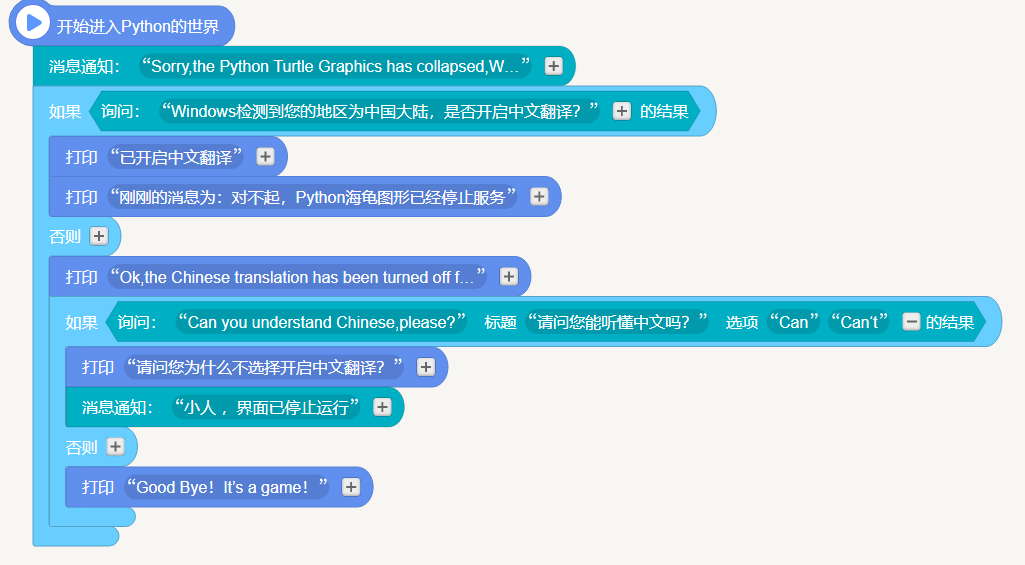
#开始进入Python的世界
easygui.msgbox('Sorry,the file not found.We are working on it.', "Game's Notice.")
if easygui.ynbox('Windows检测到您的地区为中国大陆,是否开启中文翻译?', '消息提醒'):
    print('已开启中文翻译')
    print('刚刚的消息为:对不起,Python海龟图形已经停止服务')
else:
    print('Ok,the Chinese translation has been turned off for you.')
    if easygui.ynbox('Can you understand Chinese,please?', '请问您能听懂中文吗?', ('Can', 'Can‘t')):
        print('请问您为什么不选择开启中文翻译?')
        codemao.Image("D:\\存储类\\图片\\积木源代码.png").open_image()
        print('这是编程猫的积木编程源代码。')
        time.sleep(4)
        codemao.Image("D:\\存储类\\图片\\Python源代码.png").open_image()
        print('这是Python的源代码。')
        print('现在将为您保存图片。')
        codemao.Image("D:\\存储类\\图片\\积木源代码.png").save_to_desktop()
        codemao.Image("D:\\存储类\\图片\\Python源代码.png").save_to_desktop()
        print('这是一个游戏,恭喜你,有着超强的英语翻译能力,你赢了。')
        easygui.msgbox('本游戏已经结束。', '消息通知')
        time.sleep(2)
        easygui.msgbox('版本号:0.1 版权归本人', '本游戏详细信息')
    else:
        print('Good Bye!It’s a game!')
        codemao.Image("D:\\存储类\\图片\\积木源代码.png").open_image()
        print("This is the Codemao's Building Block Code.")
        time.sleep(20)
        codemao.Image("D:\\存储类\\图片\\Python源代码.png").open_image()
        print('And this is a Python code.')
        print('The picture will now be saved for you。')
        codemao.Image("D:\\存储类\\图片\\积木源代码.png").save_to_desktop()
        codemao.Image("D:\\存储类\\图片\\Python源代码.png").save_to_desktop()
        easygui.msgbox("Game's version:0.1  The copyright belongs to me。", 'Game‘s Detalls.')
        time.sleep(2)
        easygui.msgbox('Game over.', "Game's Notice.")
【提示】
部分含有Python第三方库相关内容的作品,在海龟编辑器网页端无法运行哦!如遇到这种情况,可以打开下面的链接,下载海龟编辑器客户端:
https://python.codemao.cn