 NyanCat_233查看:49 回复:2 评论:12 创建时间:2020-03-08T21:51:57
用户:NyanCat_233查看:49 回复:2 评论:12 创建时间:2020-03-08T21:51:57
【作品展示】
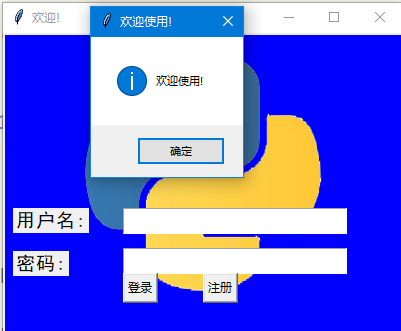
【作品介绍】
呵呵,目前只有登录界面等我学会做真正的聊天室再见~
5-30个月后再见~
【作品源代码】
import tkinter as tk
import tkinter.messagebox
import pickle

window = tk.Tk()

window.title('欢迎!')

window.geometry('400x300')

canvas = tk.Canvas(window, width=400, height=300, bg='blue')
image_file = tk.PhotoImage(file='Python.png')
image = canvas.create_image(200, 0, anchor='n', image=image_file)
canvas.pack(side='top')

tk.Label(window, text='用户名:', font=('黑体', 14)).place(x=10, y=175)
tk.Label(window, text='密码:', font=('黑体', 14)).place(x=10, y=218)


var_usr_name = tk.StringVar()
var_usr_name.set('')
entry_usr_name = tk.Entry(
    window, textvariable=var_usr_name, font=('Arial', 14))
entry_usr_name.place(x=120, y=175)

var_usr_pwd = tk.StringVar()
entry_usr_pwd = tk.Entry(window, textvariable=var_usr_pwd,
                         font=('Arial', 14), show='*')
entry_usr_pwd.place(x=120, y=215)


def usr_login():
    usr_name = var_usr_name.get()
    usr_pwd = var_usr_pwd.get()
    try:
        with open('usrs_info.pickle', 'rb') as usr_file:
            usrs_info = pickle.load(usr_file)
    except FileNotFoundError:
        with open('usrs_info.pickle', 'wb') as usr_file:
            usrs_info = {'admin': 'admin'}
            pickle.dump(usrs_info, usr_file)
            usr_file.close()
    if usr_name in usrs_info:
        if usr_pwd == usrs_info[usr_name]:
            tkinter.messagebox.showinfo(
                title='欢迎使用!', message='欢迎使用! ' + usr_name)
        else:
            tkinter.messagebox.showerror(
                title='密码错误!',message='密码错误,请重新输入')
    else:
        is_sign_up=tkinter.messagebox.showerror(
            title='未找到此用户名。',message='未找到此用户名。')
        if is_sign_up:
            usr_sign_up()


def usr_sign_up():
    def sign_to_Hongwei_Website():
        np = new_pwd.get()
        npf = new_pwd_confirm.get()
        nn = new_name.get()

        with open('usrs_info.pickle', 'rb') as usr_file:
            exist_usr_info = pickle.load(usr_file)
        if np != npf:
            tkinter.messagebox.showerror(
                'Error', '密码不一致!')

        elif nn in exist_usr_info:
            tkinter.messagebox.showerror(
                'Error', '此用户已经注册了!')

        else:
            exist_usr_info[nn] = np
            with open('usrs_info.pickle', 'wb') as usr_file:
                pickle.dump(exist_usr_info, usr_file)
            tkinter.messagebox.showinfo(
                '欢迎使用!', '你可以登入、创造了!')
            window_sign_up.destroy()
    window_sign_up = tk.Toplevel(window)
    window_sign_up.geometry('300x200')
    window_sign_up.title('注册一个账户')

    new_name = tk.StringVar()
    new_name.set('')
    tk.Label(window_sign_up, text='用户名:').place(
        x=10, y=10)
    entry_new_name = tk.Entry(window_sign_up, textvariable=new_name)
    entry_new_name.place(x=130, y=10)
    new_pwd = tk.StringVar()
    tk.Label(window_sign_up, text='密码:').place(x=10, y=50)
    entry_usr_pwd = tk.Entry(window_sign_up, textvariable=new_pwd, show='*')
    entry_usr_pwd.place(x=130, y=50)

    new_pwd_confirm = tk.StringVar()
    tk.Label(window_sign_up, text='再次确认密码: ').place(x=10, y=90)
    entry_usr_pwd_confirm = tk.Entry(
        window_sign_up, textvariable=new_pwd_confirm, show='*')
    entry_usr_pwd_confirm.place(x=130, y=90)

    btn_comfirm_sign_up = tk.Button(
        window_sign_up, text='注册', command=sign_to_Hongwei_Website)
    btn_comfirm_sign_up.place(x=180, y=120)


btn_login = tk.Button(window, text='登录', command=usr_login)
btn_login.place(x=120, y=240)
btn_sign_up = tk.Button(window, text='注册', command=usr_sign_up)
btn_sign_up.place(x=200, y=240)

window.mainloop()
【提示】
部分含有Python第三方库相关内容的作品,在海龟编辑器网页端无法运行哦!如遇到这种情况,可以打开下面的链接,下载海龟编辑器客户端:
https://python.codemao.cn ********
额/。。。
点赞0
评论
咋地了?我是作者的大号~
所以你啥时候能编出来???
大概5年吧。。。因為這個比較難。。。
不难吧
用socket就行了呀
哦~
5年。。。孩子你想多了
好像……是的吶……
那时候估计你都不记得了,就算你记得,我们也不记得了