 七小鹿很奈斯查看:0 回复:0 评论:0 创建时间:2020-02-12T14:37:37
用户:
【作品展示】
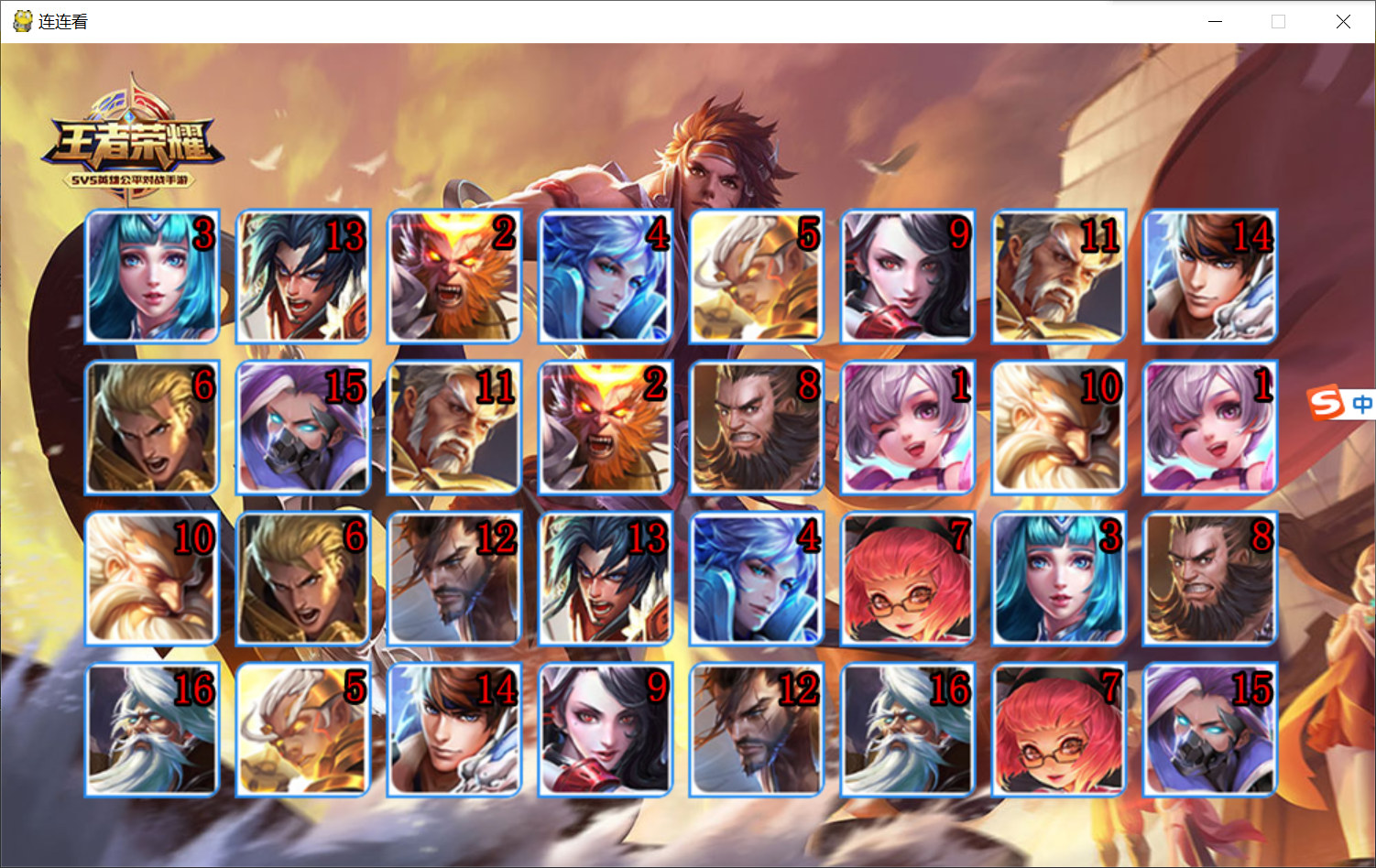
【作品介绍】
半成品,目前不能连连看。。。然后你们可以自己修改一下代码,然后发布,不过发布的时候得感谢我哟。
-----------快手:编程@七小鹿(孤独)
【作品源代码】
# coding:utf-8
import pygame, sys, random, time, easygui
from pygame.locals import *
# 初始化pygame环境
pygame.init()
# 创建窗口
canvas = pygame.display.set_mode((1000, 600))
# 加载图片
bg = pygame.image.load("imgs/bg.jpg")
win = pygame.image.load("imgs/win.png")
# 设置标题
pygame.display.set_caption("连连看")
# 图片位置数组
p = [[60, 120], [170, 120], [280, 120], [390, 120], [500, 120], [610, 120], [720, 120], [830, 120],
     [60, 230], [170, 230], [280, 230], [390, 230], [500, 230], [610, 230], [720, 230], [830, 230],
     [60, 340], [170, 340], [280, 340], [390, 340], [500, 340], [610, 340], [720, 340], [830, 340],
     [60, 450], [170, 450], [280, 450], [390, 450], [500, 450], [610, 450], [720, 450], [830, 450]]

# 创建handleEvent方法
def handleEvent():
    for event in pygame.event.get():
        if event.type == pygame.QUIT or event.type == KEYDOWN and event.key == K_ESCAPE:
            sys.exit()
            pygame.quit()
        # 判断点击鼠标左键
        if event.type == MOUSEBUTTONDOWN and event.button == 1:
            print('当前点击左键')
            if Click(mouse_x,mouse_y):
                sec_num=Click(mouse_x,mouse_y)[0]
                sec_x=Click(mouse_x,mouse_y)[1]
                sec_y=Clock(mouse_x,mouse_y)[2]
                easygui.msgbox("点击卡片")
                print(sec_num,sec_x,sec_y)

# 创建Card类
class Card ():
    def __init__(self, num , x, y):
        self.num = num
        self.img = pygame.image.load('imgs/' + str(num) + '.png')
        self.x = x
        self.y = y
    def paint(self):
        canvas.blit(self.img, (self.x, self.y))

# 创建cards列表存储所有卡片
cards = []
for i  in range(0, 32):
    n = int(i % 16 + 1)
    m = int(random.randint(0, (31 - i)))
    x = p[m][0]
    y = p[m][1]
    cards.append(Card(n , x, y))
    p.pop(m)

def Click(mouse_x,mouse_y):
    x=mouse_x
    y=mouse_y
    for i in range(len(cards)):
        imgx = cards[i].x
        imgy = cards[i].y
        if imgx < x1 and imgx +100 and imgy < y1 and y1 < imgy+100:
            img=cards[i].num
            return img,imgx,imgy
        return False


while True:
    # 画出游戏背景
    canvas.blit(bg, (0, 0))
    # 画出所有图片
    for i in range(0, len(cards)):
        cards[i].paint()
    # 更新屏幕内容
    pygame.display.update()
    # 调用handleEvent方法
    handleEvent()
【提示】
部分含有Python第三方库相关内容的作品,在海龟编辑器网页端无法运行哦!如遇到这种情况,可以打开下面的链接,下载海龟编辑器客户端:
https://python.codemao.cn