 钢铁龘齾查看:116 回复:3 评论:0 创建时间:2020-01-22T17:45:21
用户:
【作品展示】
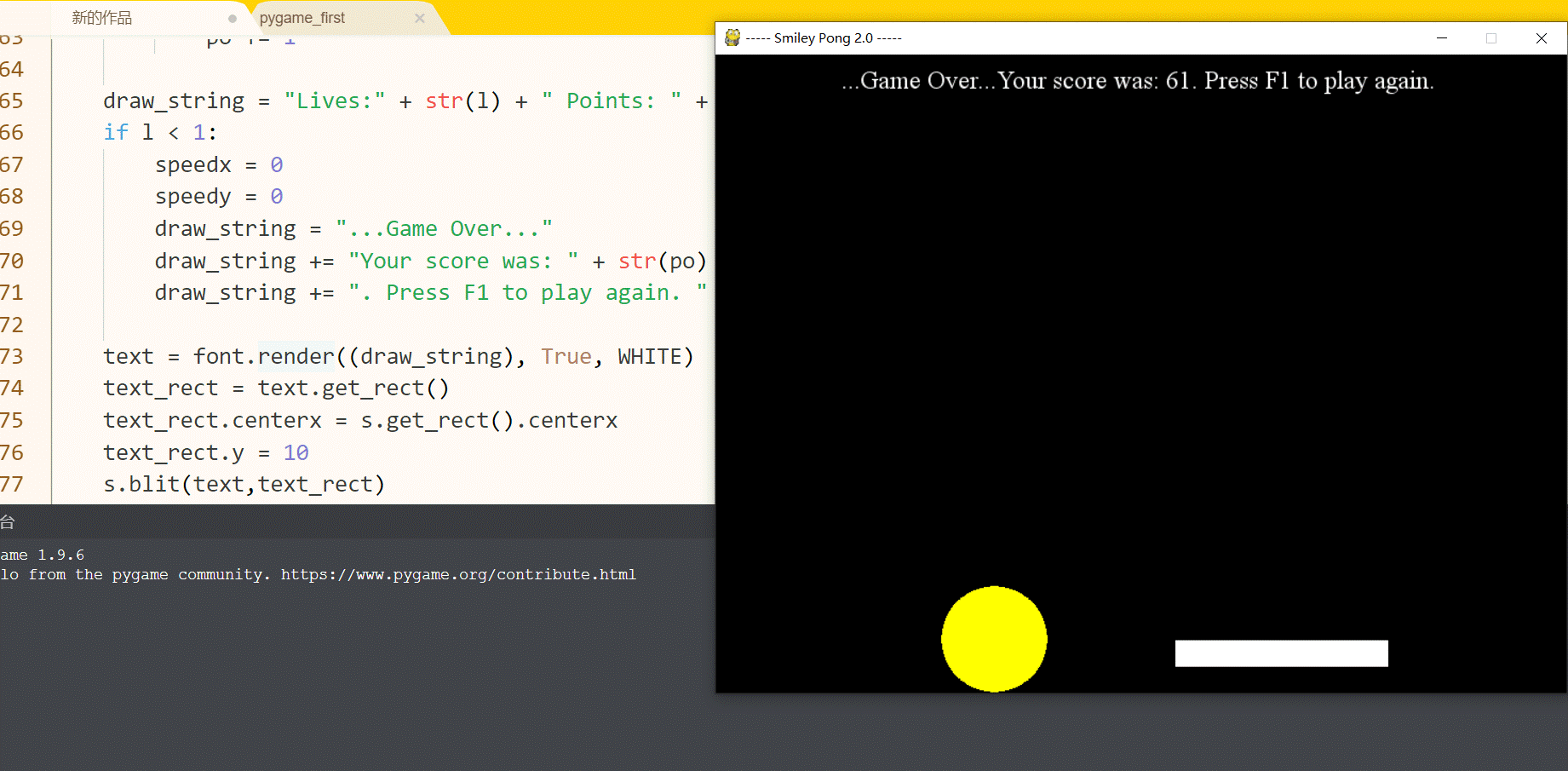
【作品介绍】
大家可能知道可以用tkinter模块做弹球游戏,不过其实用pygame也可以哟!这种弹球游戏其实是一本书里教过的,是升级版本,有重玩、速度逐增等新增功能,我基本是照抄,除了笑脸我改成了黄色的球,浮在界面上的文本改了一下内容(别问我为什么不用中文,因为用不了,用中文文本是□□□□)。
按F1可以在Game Over后重玩游戏,按F2可以把运行速度降到0.01秒一帧(这已经够慢了,别看数字挺小的)
至于什么时候球的速度会增加到最快状态,看你电脑性能,我这开机只需10秒的Windows 10 大约在球拍打了球十下时增加到最快状态。
字数,不说了。
【作品源代码】
import pygame as p
import time as t
p.init()
s = p.display.set_mode([800,600])
p.display.set_caption("----- Smiley Pong 2.0 -----")
k = True
BLACK = (0,0,0)
WHITE = (255,255,255)
YELLOW = (255,255,0)
ix = 60
iy = 60
speedx = 1
speedy = 1
pw = 200
ph = 25
px = 300
py = 550
iw = 100
ih = 100
po = 0
l = 5
r = 50
o = 0
ti = 0.01
font = p.font.SysFont("Times",24)

while k:
    for event in p.event.get():
        if event.type == p.QUIT:
            k = False
        if event.type == p.KEYDOWN:
            if event.key == p.K_F1:
                po = 0
                l = 5
                ix = 60
                iy = 60
                speedx = 1
                speedy = 1

            if event.key == p.K_F2:
                ti = 0.01

    ix += speedx
    iy += speedy

    if ix <= 50 or ix >= 750:
        speedx = -speedx
    if iy <= 50:
        speedy = -speedy
    if iy >= 550:
        l -= 1
        speedy = -1
        speedx = 1
        iy = 549

    s.fill(BLACK)
    p.draw.circle(s,YELLOW,(ix,iy),r)

    px = p.mouse.get_pos()[0]
    px -= pw/2
    p.draw.rect(s, WHITE, (px, py, pw, ph))
    ti -= 0.000001
    if ti > 0.001:
        t.sleep(ti)
    else:
        t.sleep(0.001)

    if iy + ih - 50 >= py and iy + ih - 50 <= py + ph and speedy > 0:
        if ix + iw/2 - 50 >= px and ix + iw/2 - 50 <= px + pw:
            speedy = -speedy
            po += 1

    draw_string = "Lives:" + str(l) + "  Points: " + str(po) + "  Press [F2] to turn the speed to 0.01.(Press [Fn] first)"
    if l < 1:
        speedx = 0
        speedy = 0
        draw_string = "...Game Over..."
        draw_string += "Your score was: " + str(po)
        draw_string += ". Press [F1] to play again. "

    text = font.render((draw_string), True, WHITE)
    text_rect = text.get_rect()
    text_rect.centerx = s.get_rect().centerx
    text_rect.y = 10
    s.blit(text,text_rect)
    p.display.update()

p.quit()
【提示】
部分含有Python第三方库相关内容的作品,在海龟编辑器网页端无法运行哦!如遇到这种情况,可以打开下面的链接,下载海龟编辑器客户端:
https://python.codemao.cn 僵还是老的辣
import pygame as p
import time as t
p.init()
s = p.display.set_mode([800,600])
p.display.set_caption("----- Smiley Pong 2.0 -----")
k = True
BLACK = (0,0,0)
WHITE = (255,255,255)
YELLOW = (255,255,0)
ix = 60
iy = 60
speedx = 1
speedy = 1
pw = 200
ph = 25
px = 300
py = 550
iw = 100
ih = 100
po = 0
l = 5
r = 50
o = 0
ti = 0.01
font = p.font.SysFont("Times",24)
while k:
for event in p.event.get():
if event.type == p.QUIT:
k = False
if event.type == p.KEYDOWN:
if event.key == p.K_F1:
po = 0
l = 5
ix = 60
iy = 60
speedx = 1
speedy = 1
if event.key == p.K_F2:
ti = 0.01
ix += speedx
iy += speedy
if ix <= 50 or ix >= 750:
speedx = -speedx
if iy <= 50:
speedy = -speedy
if iy >= 550:
l -= 1
speedy = -1
speedx = 1
iy = 549
s.fill(BLACK)
p.draw.circle(s,YELLOW,(ix,iy),r)
px = p.mouse.get_pos()[0]
px -= pw/2
p.draw.rect(s, WHITE, (px, py, pw, ph))
ti -= 0.000001
if ti > 0.001:
t.sleep(ti)
else:
t.sleep(0.001)
if iy + ih - 50 >= py and iy + ih - 50 <= py + ph and speedy > 0:
if ix + iw/2 - 50 >= px and ix + iw/2 - 50 <= px + pw:
speedy = -speedy
po += 1
draw_string = "Lives:" + str(l) + " Points: " + str(po) + " Press [F2] to turn the speed to 0.01.(Press [Fn] first)"
if l < 1:
speedx = 0
speedy = 0
draw_string = "...Game Over..."
draw_string += "Your score was: " + str(po)
draw_string += ". Press [F1] to play again. "
text = font.render((draw_string), True, WHITE)
text_rect = text.get_rect()
text_rect.centerx = s.get_rect().centerx
text_rect.y = 10
s.blit(text,text_rect)
p.display.update()
p.quit()点赞0
评论
僵还是老的辣import pygame as p
import time as t
p.init()
s = p.display.set_mode([800,600])
p.display.set_caption("----- Smiley Pong 2.0 -----")
k = True
BLACK = (0,0,0)
WHITE = (255,255,255)
YELLOW = (255,255,0)
ix = 60
iy = 60
speedx = 1
speedy = 1
pw = 200
ph = 25
px = 300
py = 550
iw = 100
ih = 100
po = 0
l = 5
r = 50
o = 0
ti = 0.01
font = p.font.SysFont("Times",24)
while k:
for event in p.event.get():
if event.type == p.QUIT:
k = False
if event.type == p.KEYDOWN:
if event.key == p.K_F1:
po = 0
l = 5
ix = 60
iy = 60
speedx = 1
speedy = 1
if event.key == p.K_F2:
ti = 0.01
ix += speedx
iy += speedy
if ix <= 50 or ix >= 750:
speedx = -speedx
if iy <= 50:
speedy = -speedy
if iy >= 550:
l -= 1
speedy = -1
speedx = 1
iy = 549
s.fill(BLACK)
p.draw.circle(s,YELLOW,(ix,iy),r)
px = p.mouse.get_pos()[0]
px -= pw/2
p.draw.rect(s, WHITE, (px, py, pw, ph))
ti -= 0.000001
if ti > 0.001:
t.sleep(ti)
else:
t.sleep(0.001)
if iy + ih - 50 >= py and iy + ih - 50 <= py + ph and speedy > 0:
if ix + iw/2 - 50 >= px and ix + iw/2 - 50 <= px + pw:
speedy = -speedy
po += 1
draw_string = "Lives:" + str(l) + " Points: " + str(po) + " Press [F2] to turn the speed to 0.01.(Press [Fn] first)"
if l < 1:
speedx = 0
speedy = 0
draw_string = "...Game Over..."
draw_string += "Your score was: " + str(po)
draw_string += ". Press [F1] to play again. "
text = font.render((draw_string), True, WHITE)
text_rect = text.get_rect()
text_rect.centerx = s.get_rect().centerx
text_rect.y = 10
s.blit(text,text_rect)
p.display.update()
p.quit()点赞0
评论