 屑雷神索尔查看:44 回复:0 评论:0 创建时间:2019-12-24T22:37:32
用户:屑雷神索尔查看:44 回复:0 评论:0 创建时间:2019-12-24T22:37:32
【作品展示】
【作品介绍】
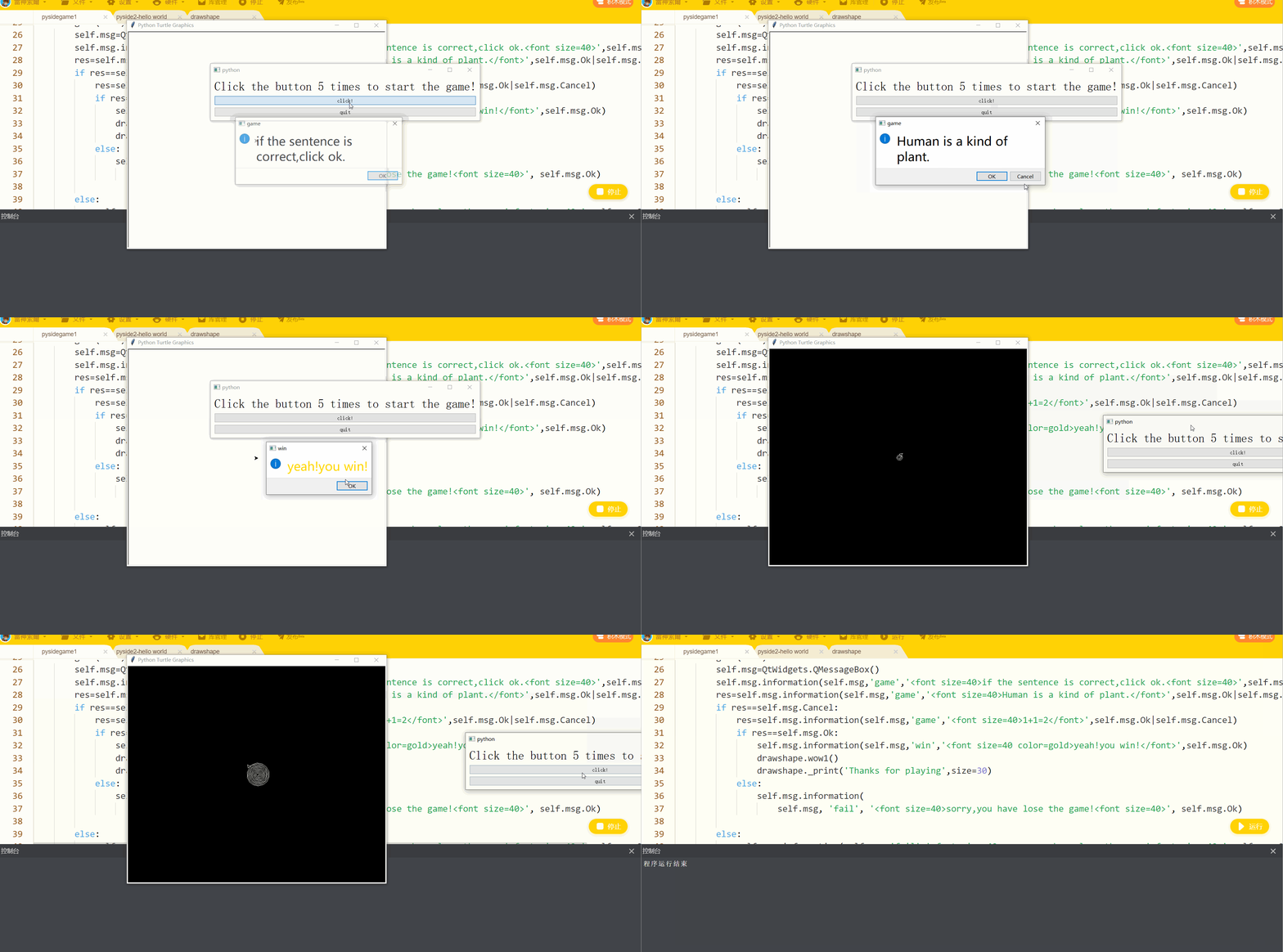
这是一个GUI答题游戏注意:
使用了自己的模组drawshape
大家可以在谈论找一下,或者把它换成其他海龟程序
【作品源代码】
from PySide2 import QtCore ,QtWidgets,QtGui

import drawshape
import sys
class Game(QtWidgets.QWidget):
    def __init__(self):
        QtWidgets.QWidget.__init__(self)
        self.button=QtWidgets.QPushButton('click!')
        self.button1=QtWidgets.QPushButton('quit')
        self.text=QtWidgets.QLabel('Click the button 5 times to start the game!')
        self.click=0
        self.text.setAlignment(QtCore.Qt.AlignCenter)
        self.layout=QtWidgets.QVBoxLayout()
        self.layout.addWidget(self.text)
        self.layout.addWidget(self.button)
        self.layout.addWidget(self.button1)
        self.setLayout(self.layout)
        self.button.clicked.connect(self.clicked)
        self.button1.clicked.connect(self.quit)
    def clicked(self):
        self.click+=1
        if self.click==5:
            self.game()
            return None
    def game(self):
        self.msg=QtWidgets.QMessageBox()
        self.msg.information(self.msg,'game','if the sentence is correct,click ok.',self.msg.Ok) res=self.msg.information(self.msg,'game','Human is a kind of plant.',self.msg.Ok|self.msg.Cancel) if res==self.msg.Cancel: res=self.msg.information(self.msg,'game','1+1=2',self.msg.Ok|self.msg.Cancel) if res==self.msg.Ok: self.msg.information(self.msg,'win','yeah!you win!',self.msg.Ok) drawshape.wow1() drawshape._print('Thanks for playing',size=30) else: self.msg.information( self.msg, 'fail', 'sorry,you have lose the game!', self.msg.Ok) else: self.msg.information(self.msg,'fail','sorry,you have lose the game!',self.msg.Ok) def quit(self): sys.exit(0) app=QtWidgets.QApplication(sys.argv) game=Game() game.show() app.exec_()
【提示】
部分含有Python第三方库相关内容的作品,在海龟编辑器网页端无法运行哦!如遇到这种情况,可以打开下面的链接,下载海龟编辑器客户端:
https://python.codemao.cn