正常一个人查看:70 回复:2 评论:1 创建时间:2019-12-01T20:12:23
用户:正常一个人查看:70 回复:2 评论:1 创建时间:2019-12-01T20:12:23
【作品展示】
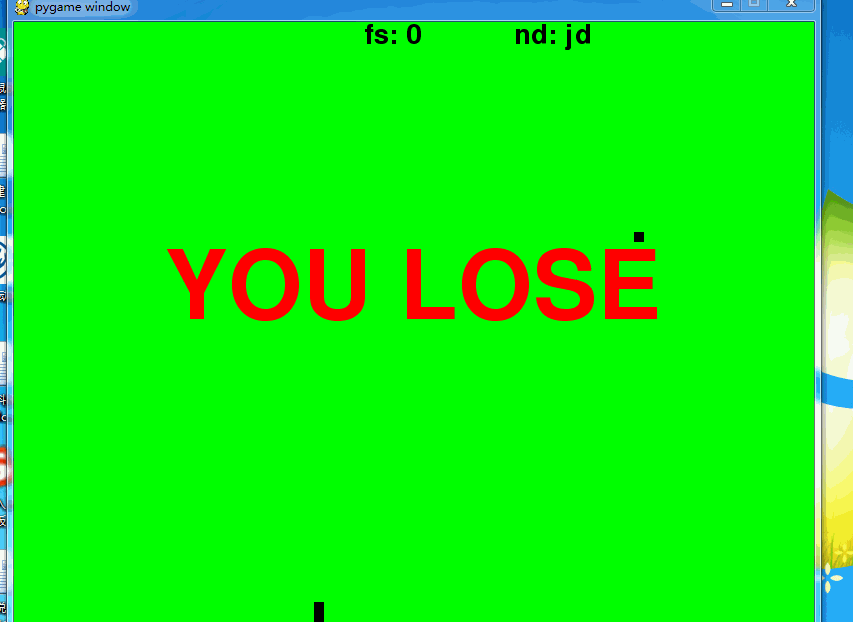
【作品介绍】
贪吃蛇1.0版本方向键控制蛇方向(不能直接转,如:向右走不能直接向左走)
难度随分数增加
吃黑块加分
吃红块扣分切蛇减短一节
撞墙‘、头碰到身体喵亡
喵亡后按回车重启
Esc退出
做的不好,请多指教!
【作品源代码】
import pygame
import random
from pygame.locals import *
pygame.init()

screen = pygame.display.set_mode((800, 600))
clock = pygame.time.Clock()
s_b = 10
s_body = [[100, 80], [90, 80], [80, 80]]
s_head = [100, 80]
s_fx = 'RIGHT'
gameover = False
food_pos = [random.randint(0, 79)*10, random.randint(0, 59)*10]
fs = 0
swwz = [0, 0]
swxs = 0


def s_move(s_fx):
    if s_fx == 'RIGHT':
        s_head[0] += 10
    elif s_fx == 'LEFT':
        s_head[0] -= 10
    elif s_fx == 'UP':
        s_head[1] -= 10
    else:
        s_head[1] += 10


def c_fx(s_fx):
    if event.key == K_UP and s_fx != 'DOWN':
        s_fx = 'UP'
    elif event.key == K_DOWN and s_fx != 'UP':
        s_fx = 'DOWN'
    elif event.key == K_LEFT and s_fx != 'RIGHT':
        s_fx = 'LEFT'
    elif event.key == K_RIGHT and s_fx != 'LEFT':
        s_fx = 'RIGHT'
    return s_fx


def show_end():
    font = pygame.font.Font(None, 140)
    danmu = font.render('YOU LOSE', True, (255, 0, 0))
    screen.blit(danmu, (150, 220))


def bzys(fs):
    if fs < 10:
        return 0, 255, 0
    elif fs < 20:
        return 255, 255, 0
    else:
        return 255, 0, 0


def nd(fs):
    if fs < 10:
        return 8
    elif fs < 20:
        return 12
    else:
        return 18


def ndxs(fs):
    if fs < 10:
        return 'jd'
    elif fs < 20:
        return 'zd'
    else:
        return 'kn'


swwz = [random.randint(0, 79)*10, random.randint(0, 59)*10]
while True:

    screen.fill((bzys(fs)))
    fs = len(s_body)-3

    pygame.draw.rect(screen, (0, 0, 0), (food_pos[0], food_pos[1], 10, 10))

    s_move(s_fx)
    s_body.insert(0, list(s_head))

    pd = random.randint(0, 100)

    if pd == 1:

        if swxs == 0:
            print(pd)
            swxs = 1

    if swxs == 1:
        pygame.draw.rect(screen, (255, 0, 0), (swwz[0], swwz[1], s_b, s_b))

    if s_head == swwz:
        if fs == 0:
            gameover = True
            swxs = 0
        else:
            swwz = [random.randint(0, 79)*10, random.randint(0, 59)*10]
            s_body.pop()
            swxs = 0


    if s_head == food_pos:
        food_pos = [random.randint(0, 79)*10, random.randint(0, 59)*10]
    else:
        s_body.pop()

    for i in s_body:
        pygame.draw.rect(screen, (0, 0, 0), (i[0], i[1], s_b, s_b))

    font = pygame.font.Font(None, 40)
    danmu = font.render('fs: '+str(fs), True, (0, 0, 0))
    screen.blit(danmu, (350, 0))

    danmu = font.render('nd: '+ndxs(fs), True, (0, 0, 0))
    screen.blit(danmu, (500, 0))

    if s_head[0] < 0 or s_head[1] > 590 or s_head[0] > 790 or s_head[1] < 0:
        gameover = True
    for i in s_body[1:]:

        if i == s_head:
            gameover = True

    if gameover:
        show_end()
        while 1:
            event = pygame.event.poll()
            if event.type == QUIT:
                pygame.quit()
            if event.type == KEYDOWN:
                if event.key == K_ESCAPE:
                    pygame.quit()
                if event.key == K_RETURN:
                    s_body = [[100, 80], [90, 80], [80, 80]]
                    s_head = [100, 80]
                    s_fx = 'RIGHT'
                    gameover = False
                    food_pos = [random.randint(
                        0, 79)*10, random.randint(0, 59)*10]
                    fs = 0
                    swwz = [random.randint(0, 79)*10, random.randint(0, 59)*10]
                    break
            pygame.display.update()

    for event in pygame.event.get():
        if event.type == QUIT:
            pygame.quit()
        if event.type == KEYDOWN:
            s_fx = c_fx(s_fx)

    pygame.display.update()
    clock.tick(nd(fs))
【提示】
部分含有Python第三方库相关内容的作品,在海龟编辑器网页端无法运行哦!如遇到这种情况,可以打开下面的链接,下载海龟编辑器客户端:
https://python.codemao.cn 调皮的百里玄策
Traceback (most recent call last):
File "D:/Zhou Murui/作品/Python作品/python_work/.py", line 149, in <module>
pygame.display.update()
pygame.error: video system not initialized
点赞0
评论
出现此错误是正常现象,因为关闭窗口后没有刷新对象,所以才会出现此错误。