菜鸟程序员查看:142 回复:5 评论:0 创建时间:2019-11-09T12:47:35
用户:
【作品展示】
【作品介绍】
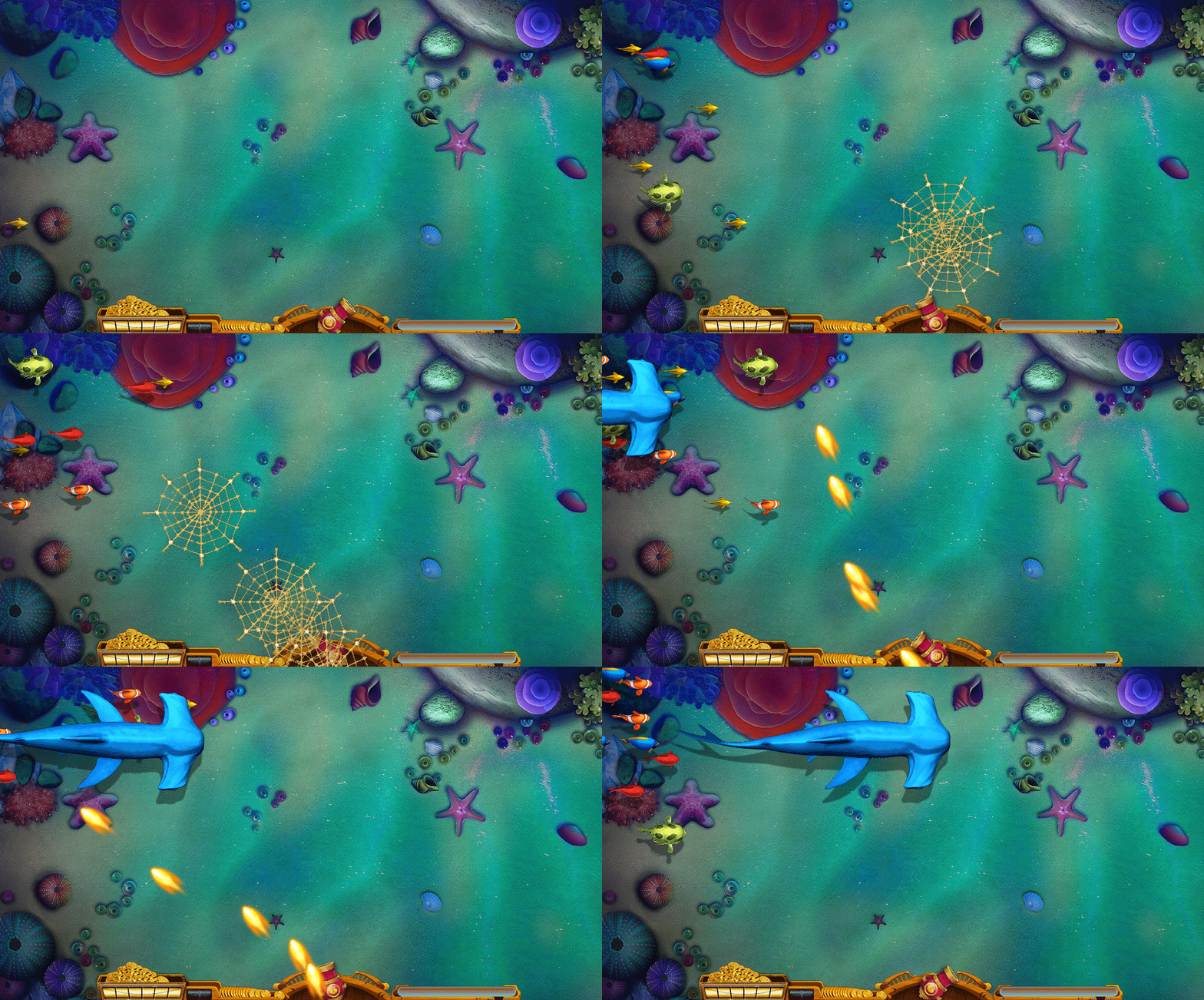
pygame实现捕鱼达人第二阶段【射击+碰撞检测】。pygame可以参考43-48思路。增加了射击和碰撞检测功能。【键盘数字1-4可以切换子弹】这里射击算法比较复杂,代码里写了详细注释。功能还不够完善,只是实现了基本的框架,记录积分、击杀金币特效、击杀音乐和子弹射击特效等等喜欢的喵喵们可以一起研究,欢迎在评论区留言。
https://pan.喵/s/18lAPyX8rZfLBRH4vNIVdog 提取码: 2喵7
场景素材保存在网盘,需要的喵喵们可以下载。下载后保持编译文件和素材文件在同路径就可以了。
【本作品由CJW老年喵工作室出品】
【作品源代码】
import pygame
import random
import sys
import math
from PIL import Image
from io import StringIO, BytesIO

#鱼类
class Fish():
    def __init__(self):
        self.w = 1080
        self.h = 600
        self.x = random.randint(-2000, -500)+100  # 鱼X坐标
        self.y = random.randint(0, random.randint(0, 0.7*self.h)+20)  # 鱼Y坐标
        self.speed = random.randint(4, 6)  # 鱼的速度

    def draw(self, image):
        window.blit(image, (self.x, self.y))
        self.updata()

    def updata(self):
        #如果鱼没超出消失范围
        if self.x < self.w:
            #鱼移动
            self.x += self.speed
        else:
            #超出范围回到初始位置
            self.__init__()

#子弹类
class Bullet():
    def __init__(self):
        self.w = 1080
        self.h = 600
        self.x = 560  # 子弹X坐标
        self.y = 600  # 子弹Y坐标
        self.PointX = 0
        self.PointY = 0
        self.speed = random.randint(20, 30)  # 子弹的速度
        self.angle = 0  #子弹旋转角度
        self.stop = True  #子弹停下来
    def draw(self, image,pointX,pointY,roteangle):
        #self.angle = roteangle
        angleImg = pygame.transform.rotate(image, roteangle)
        window.blit(angleImg, (self.x, self.y))
        #如果分母不等于0
        if self.y-pointY != 0 and self.x-pointX != 0:
            self.updata(self.speed*((self.x-pointX) /
                                    (self.y-pointY)), self.speed)
        else:
            #如果分母等于0,设定x速度为0.1
            self.updata(self.speed*((self.x-pointX) /
                                    0.1), self.speed)

    def updata(self,xspeed,yspeed):
        #如果子弹超出消失范围
        if self.y > -30 or self.x > -30 or self.x < 1080:
            #检测子弹是否在运动
            if self.stop == False:
                #子弹移动
                self.x -= xspeed
                self.y -= yspeed

#获取角度
def getAngle( x1,  y1,  x2,  y2):
        angle = 0.0
        dx = x2 - x1
        dy = y2 - y1
        if x2 == x1:
            angle = math.pi / 2.0
            if y2 == y1:
                angle = 0.0
            elif y2 < y1:
                angle = 3.0 * math.pi / 2.0
        elif x2 > x1 and y2 > y1:
            angle = math.atan(dx / dy)
        elif x2 > x1 and y2 < y1:
            angle = math.pi / 2 + math.atan(-dy / dx)
        elif x2 < x1 and y2 < y1:
            angle = math.pi + math.atan(dx / dy)
        elif x2 < x1 and y2 > y1:
            angle = 3.0 * math.pi / 2.0 + math.atan(dy / -dx)
        return (angle * 180 / math.pi)

#创建鱼
def createFish(imgpath):
    #实例化对象
    fish = Fish()
    fish.__init__()
    fish.draw(cropimg(imgpath, (0, 0, 50, 50)))
    return fish

#创建子弹
def createBullet(img):
    #实例化对象
    bullet = Bullet()
    bullet.__init__()
    bullet.draw(img,0,0,0)
    return bullet

#设置鱼的数量和种类
def SetFish(num, imgpath):
    fishs = []
    for i in range(num):
        fishs.append(createFish(imgpath))
    return fishs

#子弹弹夹
def Setbullet(num, imgpath):
    bullets = []
    for i in range(num):
        bullets.append(createBullet(imgpath))
    return bullets

#切割图片   鱼的图片是一张大图,切割成小图显示
def cropimg(image, region):
    img = Image.open(image)
    cropImg = img.crop(region)
    imgBuf = BytesIO(cropImg.tobytes())
    imgx = pygame.image.frombuffer(
        imgBuf.getvalue(), (region[2] - region[0], region[3] - region[1]), "RGBA")
    return imgx
#######################################start初始化变量start##############################
#图片动画切换
cnt = 0
#鼠标坐标
m_pointX = 0
m_pointY = 0
btRoteAngle = 0
btStart = False
#旋转角度
cannonAngle = 0
#旋转后的图片对象
cannonRote = ""
#######################################end初始化变量end##################################
#素材种类
ImageList = []
#鱼的种类
fishList = []
#弹夹管理
bulletList = []
#鱼图片路径  如果需要添加鱼的素材在imgagePathList中添加,但是最后两个位置鲨鱼要保持固定
#后面通过遍历字典切割图片,鲨鱼的素材需要切割12次,小鱼的素材需要切割8次
imagePathList = {'fish1':'fish1.png', 'fish2':'fish2.png', 'fish3':'fish3.png', 'fish4':'fish4.png', 'fish5':'fish5.png','shark1':'shark1.png', 'shark2':'shark2.png'}
#创建游戏窗口
pygame.init()
window = pygame.display.set_mode([1080, 600])
#----------------游戏资源加载Start-------------------------
#场景图
background = pygame.image.load("bg.png")
#控制台
bottom = pygame.image.load("bottom.png")
#大炮
cannon = pygame.image.load("cannon.png")
#获取图片大小
cannonRect = cannon.get_rect()
cannonRect = cannonRect.move(560,530)
#----------------游戏资源加载End-------------------------
#帧数
timeClock = pygame.time.Clock()

#切割鱼的图片并存储列表,用于动画切换
def cropFish(imagepath,num):
    imageList = []
    #鱼的图片切割
    image = Image.open(imagepath)
    #切割图片从1开始,到n+1结束
    for i in range(1,num+1):
        imageList.append(cropimg(
            imagepath, (0, (i-1)*image.size[1]//num, image.size[0], i*image.size[1]//num)))
    return imageList

for key in imagePathList.values():
    if key == 'shark1.png' or key == 'shark2.png':
        #切割图片
        ImageList.append(cropFish(key, 12))
        #创建鱼类 鲨鱼1条
        fishList.append(SetFish(1, key))
    else:
        #切割图片
        ImageList.append(cropFish(key, 8))
        #创建鱼类  小鱼10条
        fishList.append(SetFish(10, key))

#创建子弹
bulletimg = pygame.image.load("fishnet.png")
#创建子弹,预先设置20发,用完了在创建
bulletList = Setbullet(10, bulletimg)
bulletNum = 0
#核心代码
while True:
    for event in pygame.event.get():
        if event.type == pygame.QUIT:
            sys.exit()
        if event.type == pygame.MOUSEBUTTONDOWN:
            pressed_array = pygame.mouse.get_pressed()
            for index in range(len(pressed_array)):
                if pressed_array[index]:
                    #鼠标左键点击
                    if index == 0:
                        #将大炮的转向角度给子弹
                        bulletList[bulletNum].stop = False
                        bulletList[bulletNum].PointX = m_pointX
                        bulletList[bulletNum].PointY = m_pointY
                        bulletList[bulletNum].angle = cannonAngle
                        #每次点击弹夹发射子弹+1
                        bulletNum += 1
                        if bulletNum > 9:
                            bulletNum = 0
                    elif index == 1:
                        #滚轮点击
                        pass
                    elif index == 2:
                        #右键点击
                        pass
        if event.type == pygame.MOUSEMOTION:
            m_pointX, m_pointY = pygame.mouse.get_pos()
        if event.type == pygame.KEYDOWN and event.key == pygame.K_1:
            #切换子弹1
            bulletimg = pygame.image.load("bullet.png")
        if event.type == pygame.KEYDOWN and event.key == pygame.K_2:
            #切换子弹2
            bulletimg = pygame.image.load("paodan.png")
        if event.type == pygame.KEYDOWN and event.key == pygame.K_3:
            #切换子弹3
            bulletimg = pygame.image.load("sandia.png")
    #加载资源
    window.blit(background, (0, 0))
    window.blit(bottom, (170, 530))
    #计算大炮和鼠标位置的角度
    cannonAngle = getAngle(m_pointX, m_pointY, 560, 530)
    #旋转图片
    cannonRote = pygame.transform.rotate(cannon, cannonAngle)
    #校正大炮中心点
    window.blit(cannonRote, cannonRote.get_rect(center=cannonRect.center))
    #加载各种鱼
    for i in range(len(fishList)):
        for j in range(len(fishList[i])):
            for k in range(len(bulletList)):
                #碰撞检测
                if bulletList[k].x - fishList[i][j].x <10 and bulletList[k].y -  fishList[i][j].y < 10:
                    #鱼初始化到起点,子弹初始化到起点,子弹停止运动
                    fishList[i][j].__init__()
                    bulletList[k].__init__()
                    bulletList[k].stop = True
            if i < len(fishList)-2:
                fishList[i][j].draw(ImageList[i][cnt % 4])
            else:
                fishList[i][j].draw(ImageList[i][cnt % 8])
    #遍历弹夹,有多少子弹发喵
    for k in range(len(bulletList)):
        if bulletList[k].y < -30 or bulletList[k].x < -30 or bulletList[k].x > 1110:
            #btStart = False
            bulletList[k].__init__()
            bulletList[k].stop = True
        #if btStart == True:
        bulletList[k].draw(bulletimg, bulletList[k].PointX,bulletList[k].PointY, bulletList[k].angle)

    pygame.display.update()
    #帧数
    timeClock.tick(15)
    cnt += 1
【提示】
部分含有Python第三方库相关内容的作品,在海龟编辑器网页端无法运行哦!如遇到这种情况,可以打开下面的链接,下载海龟编辑器客户端:
https://python.codemao.cn