菜鸟程序员查看:389 回复:17 评论:7 创建时间:2019-10-20T15:47:45
用户:
【作品展示】
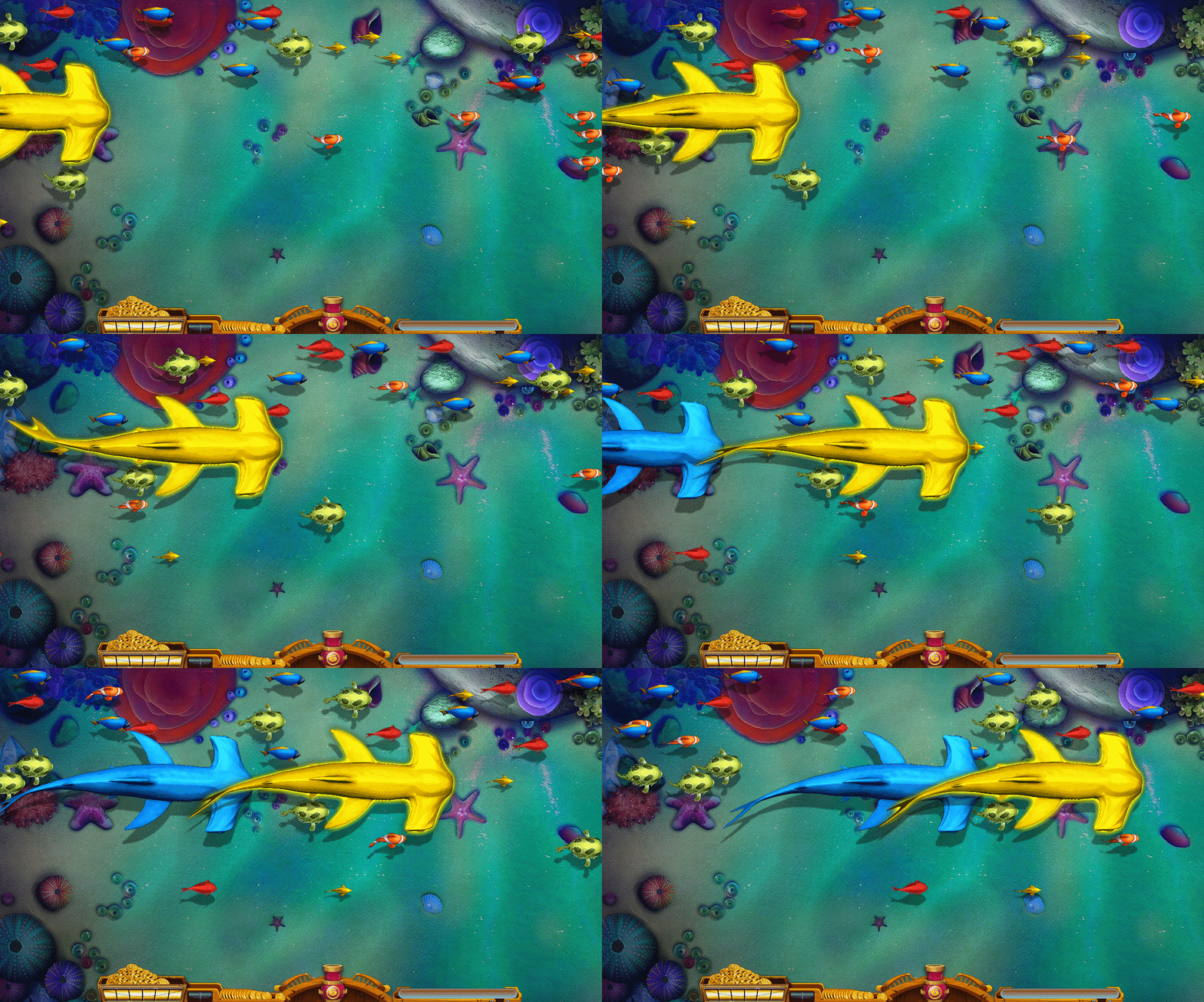
【作品介绍】
pygame实现捕鱼达人第一阶段【游来游去的鱼】。网上找的素材,pygame可以参考43-48思路。实现了游动的鱼效果。这里需要安装pygame库和pillow两个库。链接: https://pan.喵/s/1BHBgxB9xZCh8NJwoxXgYcA&shfl=shareset 提取码: y6ad 场景素材保存在网盘,需要的喵喵们可以下载。下载后保持编译文件和素材文件在同路径就可以了。
有不明白的喵喵可以在评论区留言,定时帮忙解决问题。
【作品源代码】
import pygame
import random
import sys
from PIL import Image
from io import StringIO, BytesIO

#鱼类
class Fish():
    def __init__(self):

        self.w = 1080
        self.h = 600
        self.x = random.randint(-2000, -100)+100  # 鱼X坐标
        self.y = random.randint(0, random.randint(0, 0.7*self.h)+20)  # 鱼Y坐标
        self.speed = random.randint(4, 6)  # 鱼的速度

    def draw(self, image):
        window.blit(image, (self.x, self.y))
        self.updata()

    def updata(self):
        #如果鱼没超出消失范围
        if self.x < self.w:
            #鱼移动
            self.x += self.speed
        else:
            #超出范围回到初始位置
            self.__init__()
#创建鱼
def createFish(imgpath):
    #实例化对象
    fish = Fish()
    fish.__init__()
    fish.draw(cropimg(imgpath, (0, 0, 50, 50)))
    return fish

#设置鱼的数量和种类
def SetFish(num, imgpath):
    fishs = []
    for i in range(num):
        fishs.append(createFish(imgpath))
    return fishs

#切割图片   鱼的图片是一张大图,切割成小图显示
def cropimg(image, region):
    img = Image.open(image)
    cropImg = img.crop(region)
    imgBuf = BytesIO(cropImg.tobytes())
    imgx = pygame.image.frombuffer(
        imgBuf.getvalue(), (region[2] - region[0], region[3] - region[1]), "RGBA")
    return imgx

#图片动画切换
cnt = 0
#鱼图片路径  如果需要添加鱼的素材在imgagePathList中添加,但是最后两个位置鲨鱼要保持固定
#后面通过遍历字典切割图片,鲨鱼的素材需要切割12次,小鱼的素材需要切割8次
imagePathList = {'fish1':'fish1.png', 'fish2':'fish2.png', 'fish3':'fish3.png', 'fish4':'fish4.png', 'fish5':'fish5.png','shark1':'shark1.png', 'shark2':'shark2.png'}
#创建游戏窗口
pygame.init()
window = pygame.display.set_mode([1080, 600])
#----------------游戏资源加载Start-------------------------
#场景图
background = pygame.image.load("bg.png")
#控制台
bottom = pygame.image.load("bottom.png")
#大炮
cannon6 = pygame.image.load("cannon6.png")
#----------------游戏资源加载End-------------------------
#帧数
timeClock = pygame.time.Clock()

#切割鱼的图片并存储列表,用于动画切换
def cropFish(imagepath,num):
    imageList = []
    #鱼的图片切割
    image = Image.open(imagepath)
    #切割图片从1开始,到n+1结束
    for i in range(1,num+1):
        imageList.append(cropimg(
            imagepath, (0, (i-1)*image.size[1]//num, image.size[0], i*image.size[1]//num)))
    return imageList

#素材种类
ImageList = []
#鱼的种类
fishList = []
for key in imagePathList.values():
    if key == 'shark1.png' or key == 'shark2.png':
        ImageList.append(cropFish(key, 12))
        #创建鱼类 鲨鱼1条
        fishList.append(SetFish(1, key))
    else:
        ImageList.append(cropFish(key, 8))
        #创建鱼类  小鱼10条
        fishList.append(SetFish(10, key))

#核心代码
while True:
    for event in pygame.event.get():
        if event.type == pygame.QUIT:
            sys.exit()
    #加载资源
    window.blit(background, (0, 0))
    window.blit(bottom, (170, 530))
    window.blit(cannon6, (560, 530))
    #加载各种鱼
    for i in range(len(fishList)):
        for j in range(len(fishList[i])):
            if i < len(fishList)-2:
                fishList[i][j].draw(ImageList[i][cnt % 4])
            else:
                fishList[i][j].draw(ImageList[i][cnt % 8])
    pygame.display.update()
    #帧数
    timeClock.tick(10)
    cnt += 1
【提示】
部分含有Python第三方库相关内容的作品,在海龟编辑器网页端无法运行哦!如遇到这种情况,可以打开下面的链接,下载海龟编辑器客户端:
https://python.codemao.cn 520669已退猫
训练师 菜鸟程序员:
你好。我是电阻小弟。我是CJW老年喵工作室的成员,极速程式(CJW附属项目)项目创始人。
我代表CJW老年喵工作室室长天马神坑,诚邀您加入CJW老年喵工作室。
CJW创建于2019年暑假,LV2工作室,是一个响当当的大佬团队。
下面是工作室主要人员介绍:
天马神坑:C++专精,曾经制作一个控制台版的贪吃蛇(控制台!难度可想而知)
任家小宝:Python大佬,编程猫点赞1000+,会利用海龟制作非常好玩的图案(如小猪佩奇)
爱因斯坦的弟子:Python大佬,精通游戏框架、硬件技术。目前有一个游戏合集的项目
岳仕林:Python大佬,目前有一个软件工具合集的项目,极度牛!
个人介绍:猫龄超过4年,精同UI设计、数据分析。有一个基于pygame和pynumk的物理模拟软件。极速程式创始人。
室长鉴赏您的pygame和pillow库能力,诚邀您的加入!
敬上!
天马神坑、电阻小弟
期待你的未来!
2019/11/2
点赞0
评论
如有意向,请加QQ:3083713919
 PeterChen
很厉害,不过给点意见,首先,Python不是编游戏的,因为这个库编游戏工作量太大
而且第二点,以后尽量不要发Python代码,容易被萌新院说是垃圾而被封工作室
点赞0
评论
1.那用java工作量就不大了吗? 2.按你这么说,那python专区是干什么用的?技术喵闲的设的?
不是这个意思,私聊发也可以,不过真的有人在水这个






 超赞的
超赞的