 Yosuga查看:64 回复:3 评论:4 创建时间:2019-08-09T20:36:56
用户:Yosuga查看:64 回复:3 评论:4 创建时间:2019-08-09T20:36:56
【作品展示】
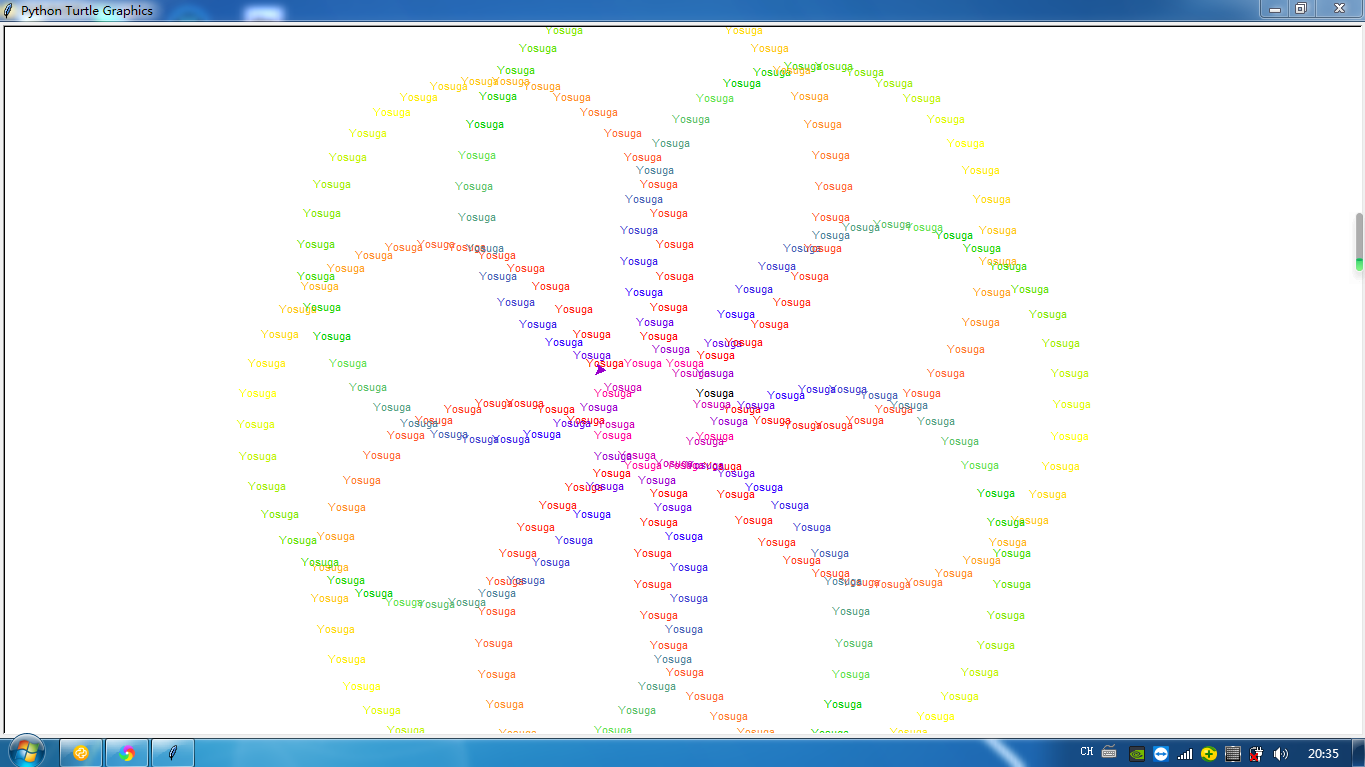
【作品介绍】
随心画图,渐变文字效果
【作品源代码】
import turtle


txt = input('你想写什么文字呢?')
t = turtle.Turtle()
t.penup()
t.goto((-50), 10)
for x in range(8):
    t.forward(30)
    t.right(45)
    t.forward(10)
    t.speed(1000)
    t.penup()
    t.circle(180, 10)
    t.write(txt)
    t.color('#FF0000')
    t.penup()
    t.circle(180, 10)
    t.write(txt)
    t.color('#FF0F07')
    t.penup()
    t.circle(180, 10)
    t.write(txt)
    t.color('#FF1D0F')
    t.penup()
    t.circle(180, 10)
    t.write(txt)
    t.color('#FF2C16')
    t.penup()
    t.circle(180, 10)
    t.write(txt)
    t.color('#FF3A1D')
    t.penup()
    t.circle(180, 10)
    t.write(txt)
    t.color('#FF4924')
    t.penup()
    t.circle(180, 10)
    t.write(txt)
    t.color('#FF572C')
    t.penup()
    t.circle(180, 10)
    t.write(txt)
    t.color('#FF6633')
    t.penup()
    t.circle(180, 10)
    t.write(txt)
    t.color('#FF792D')
    t.penup()
    t.circle(180, 10)
    t.write(txt)
    t.color('#FF8C26')
    t.penup()
    t.circle(180, 10)
    t.write(txt)
    t.color('#FF9F20')
    t.penup()
    t.circle(180, 10)
    t.write(txt)
    t.color('#FFB31A')
    t.penup()
    t.circle(180, 10)
    t.write(txt)
    t.color('#FFC613')
    t.penup()
    t.circle(180, 10)
    t.write(txt)
    t.color('#FFD90D')
    t.penup()
    t.circle(180, 10)
    t.write(txt)
    t.color('#FFEC06')
    t.penup()
    t.circle(180, 10)
    t.write(txt)
    t.color('#FFFF00')
    t.penup()
    t.circle(180, 10)
    t.write(txt)
    t.color('#DFF900')
    t.penup()
    t.circle(180, 10)
    t.write(txt)
    t.color('#BFF200')
    t.penup()
    t.circle(180, 10)
    t.write(txt)
    t.color('#9FEC00')
    t.penup()
    t.circle(180, 10)
    t.write(txt)
    t.color('#80E600')
    t.penup()
    t.circle(180, 10)
    t.write(txt)
    t.color('#60DF00')
    t.penup()
    t.circle(180, 10)
    t.write(txt)
    t.color('#40D900')
    t.penup()
    t.circle(180, 10)
    t.write(txt)
    t.color('#20D200')
    t.penup()
    t.circle(180, 10)
    t.write(txt)
    t.color('#00CC00')
    t.penup()
    t.circle(180, 10)
    t.write(txt)
    t.color('#60DF4D')
    t.penup()
    t.circle(180, 10)
    t.write(txt)
    t.color('#59BF66')
    t.penup()
    t.circle(180, 10)
    t.write(txt)
    t.color('#539F80')
    t.penup()
    t.circle(180, 10)
    t.write(txt)
    t.color('#4D8099')
    t.penup()
    t.circle(180, 10)
    t.write(txt)
    t.color('#4660B3')
    t.penup()
    t.circle(180, 10)
    t.write(txt)
    t.color('#4040CC')
    t.penup()
    t.circle(180, 10)
    t.write(txt)
    t.color('#3920E6')
    t.penup()
    t.circle(180, 10)
    t.write(txt)
    t.color('#3300FF')
    t.penup()
    t.circle(180, 10)
    t.write(txt)
    t.color('#6600E6')
    t.penup()
    t.circle(180, 10)
    t.write(txt)
    t.color('#9900CC')
    t.penup()
    t.circle(180, 10)
    t.write(txt)
    t.color('#CC00B3')
    t.penup()
    t.circle(180, 10)
    t.write(txt)
    t.color('#FF0099')
【提示】
部分含有Python第三方库相关内容的作品,在海龟编辑器网页端无法运行哦!如遇到这种情况,可以打开下面的链接,下载海龟编辑器客户端:
https://python.codemao.cn 阮老师
阮老师很棒哦!有许多重复部分的代码,这里分享一种使用循环修改后的代码。
ximport turtle as t
txt = input('你想写什么文字呢?')
t.penup()
t.goto((-50), 10)
L=['#FF0000','#FF0F07','#FF1D0F','#FF2C16','#FF3A1D','#FF4924','#FF572C','#FF6633',\
'#FF792D','#FF8C26','#FF9F20','#FFB31A','#FFC613','#FFD90D','#FFEC06','#FFFF00',\
'#DFF900','#BFF200','#9FEC00','#80E600','#60DF00','#40D900','#20D200','#00CC00',\
'#60DF4D','#59BF66','#539F80','#4D8099','#4660B3','#4040CC','#3920E6','#3300FF',\
'#6600E6','#9900CC','#CC00B3','#FF0099']
for x in range(8):
t.forward(30)
t.right(45)
t.forward(10)
t.speed(0)
for i in range(len(L)):
t.penup()
t.circle(180, 10)
t.write(txt)
t.color(L[i])
t.done()
点赞1
评论
第一行是import turtle as t 多了个x...不好意思哈=.=
好......好歹缩进一下啊!
复制粘贴过来是这样的啦
 QinJerry
送你一个游戏
#coding:utf-8
import pygame
from pygame.locals import*
bl = list()
pygame.init()
pygame.display.set_caption('方块闯关')
canvas = pygame.display.set_mode((1000,600))
u1 = pygame.font.Font(None,80)
No = 1
bks = 0
x,y,yu,yu2,yu3 = 0,420,0,0,0
text,duo,ui = pygame.font.SysFont('simhei',30),1,y-170
while 1:
    canvas.fill((255,255,255))
    pygame.draw.rect(canvas,(0,0,0),(0,450,1000,150))
    if No > 3:
        No = 1
    if No == 2:
        pygame.draw.rect(canvas,(255,255,255),(334,450,333,150))
        if x >= 334 and x < 637 and y >= 420:
            yu3 = -1
            duo = 0
            if y == 630:
                x,duo,yu3,y = 0,1,0,420
    elif No == 3:
        pygame.draw.rect(canvas,(255,0,0),(490,240,20,210))
        pygame.draw.rect(canvas,(0,255,0),(300,350,50,20))
        if x >= 460 and x <= 510 and y >= 210 and y <= 450:
            x = 0
        if y == 370 and x >= 270 and x<= 350:
            yu3 = -1
        elif y == 320 and x >= 270 and x<= 350 and yu3 == -1:
            yu3,bks = 0,1
        elif y == 320 and x < 270 and bks or y == 320 and x > 350 and bks:
            yu3,bks = -1,0
        if x > 270 and x < 301 and y > 320 and y < 370:
            duo = 0
        elif x > 319 and x < 350 and y > 320 and y < 370:
            duo = 0
        else:
            duo = 1
    pygame.draw.rect(canvas,(0,0,255),(x,y,30,30))
    canvas.blit(text.render('关卡'+str(No),1,(0,0,0)),(00,0))
    for event in pygame.event.get():
        if event.type == QUIT:
            exit()
        if event.type == KEYDOWN:
            if event.key == K_LEFT:
                yu = 1
            if event.key == K_RIGHT:
                yu2 = 1
            if event.key == K_SPACE and yu3 == 0:
                yu3 = 1
                ui = y-158
        elif event.type == 3:
            if event.key == K_LEFT:
                yu = 0
            if event.key == K_RIGHT:
                yu2 = 0
    if yu and x!=0 and duo:
        x -= 1
    if yu2 and duo:
        x += 1
    if x == 970:
        No += 1
        x = 0
    y -= yu3
    if y == ui:
        yu3 = -1
    elif y == 420:
        yu3 = 0
    pygame.display.update()
pygame.time.delay(1)点赞0
评论