 QinJerry查看:189 回复:0 评论:0 创建时间:2019-08-06T19:19:30
用户:QinJerry查看:189 回复:0 评论:0 创建时间:2019-08-06T19:19:30
【作品展示】
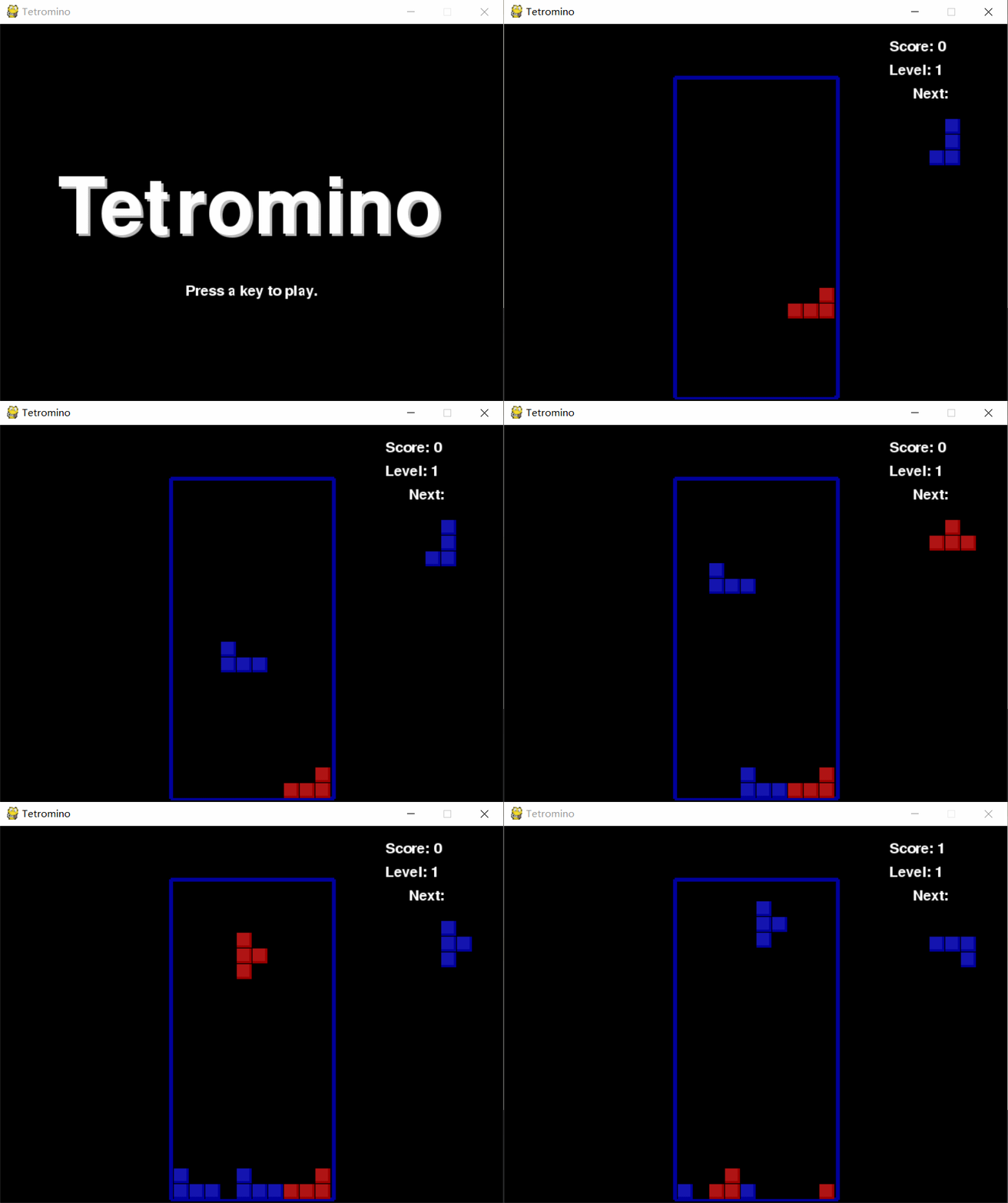
【作品介绍】
本文转载自https://inventwithpython.com/pygame/chapter7.html版权归原作者所有。点击键盘进入游戏,↑翻转方块,←→控制方块移动
【作品源代码】
##################---------------------#######################
##本文转载自https://inventwithpython.com/pygame/chapter7.html##
##################---------------------#######################
#Tetromino (a Tetris clone)
# By Al Sweigart al@inventwithpython.com
# http://inventwithpython.com/pygame
# Creative Commons BY-NC-SA 3.0 US
import random, time, pygame, sys
from pygame.locals import *
FPS = 25
WINDOWWIDTH = 喵0
WINDOWHEIGHT = 480
BOXSIZE = 20
BOARDWIDTH = 10
BOARDHEIGHT = 20
BLANK = '.'
MOVESIDEWAYSFREQ = 0.15
MOVEDOWNFREQ = 0.1
XMARGIN = int((WINDOWWIDTH - BOARDWIDTH * BOXSIZE) / 2)
TOPMARGIN = WINDOWHEIGHT - (BOARDHEIGHT * BOXSIZE) - 5
# R G B
WHITE = (255, 255, 255)
GRAY = (185, 185, 185)
BLACK = ( 0, 0, 0)
RED = (155, 0, 0)
LIGHTRED = (175, 20, 20)
GREEN = ( 0, 155, 0)
LIGHTGREEN = ( 20, 175, 20)
BLUE = ( 0, 0, 155)
LIGHTBLUE = ( 20, 20, 175)
YELLOW = (155, 155, 0)
LIGHTYELLOW = (175, 175, 20)
BORDERCOLOR = BLUE
BGCOLOR = BLACK
TEXTCOLOR = WHITE
TEXTSHADOWCOLOR = GRAY
COLORS = ( BLUE, GREEN, RED, YELLOW)
LIGHTCOLORS = (LIGHTBLUE, LIGHTGREEN, LIGHTRED, LIGHTYELLOW)
assert len(COLORS) == len(LIGHTCOLORS) # each color must have light color
TEMPLATEWIDTH = 5
TEMPLATEHEIGHT = 5
S_SHAPE_TEMPLATE = [['.....',
'.....',
'..OO.',
'.OO..',
'.....'],
['.....',
'..O..',
'..OO.',
'...O.',
'.....']]
Z_SHAPE_TEMPLATE = [['.....',
'.....',
'.OO..',
'..OO.',
'.....'],
['.....',
'..O..',
'.OO..',
'.O...',
'.....']]
I_SHAPE_TEMPLATE = [['..O..',
'..O..',
'..O..',
'..O..',
'.....'],
['.....',
'.....',
'OOOO.',
'.....',
'.....']]
O_SHAPE_TEMPLATE = [['.....',
'.....',
'.OO..',
'.OO..',
'.....']]
J_SHAPE_TEMPLATE = [['.....',
'.O...',
'.OOO.',
'.....',
'.....'],
['.....',
'..OO.',
'..O..',
'..O..',
'.....'],
['.....',
'.....',
'.OOO.',
'...O.',
'.....'],
['.....',
'..O..',
'..O..',
'.OO..',
'.....']]
L_SHAPE_TEMPLATE = [['.....',
'...O.',
'.OOO.',
'.....',
'.....'],
['.....',
'..O..',
'..O..',
'..OO.',
'.....'],
['.....',
'.....',
'.OOO.',
'.O...',
'.....'],
['.....',
'.OO..',
'..O..',
'..O..',
'.....']]
T_SHAPE_TEMPLATE = [['.....',
'..O..',
'.OOO.',
'.....',
'.....'],
['.....',
'..O..',
'..OO.',
'..O..',
'.....'],
['.....',
'.....',
'.OOO.',
'..O..',
'.....'],
['.....',
'..O..',
'.OO..',
'..O..',
'.....']]
SHAPES = {'S': S_SHAPE_TEMPLATE,
'Z': Z_SHAPE_TEMPLATE,
'J': J_SHAPE_TEMPLATE,
'L': L_SHAPE_TEMPLATE,
'I': I_SHAPE_TEMPLATE,
'O': O_SHAPE_TEMPLATE,
'T': T_SHAPE_TEMPLATE}
def main():
global FPSCLOCK, DISPLAYSURF, BASICFONT, BIGFONT
pygame.init()
FPSCLOCK = pygame.time.Clock()
DISPLAYSURF = pygame.display.set_mode((WINDOWWIDTH, WINDOWHEIGHT))
BASICFONT = pygame.font.Font('freesansbold.ttf', 18)
BIGFONT = pygame.font.Font('freesansbold.ttf', 100)
pygame.display.set_caption('Tetromino')
showTextScreen('Tetromino')
while True: # game loop
runGame()
showTextScreen('Game Over')
def runGame():
# setup variables for the start of the game
board = getBlankBoard()
lastMoveDownTime = time.time()
lastMoveSidewaysTime = time.time()
lastFallTime = time.time()
movingDown = False # note: there is no movingUp variable
movingLeft = False
movingRight = False
score = 0
level, fallFreq = calculateLevelAndFallFreq(score)
fallingPiece = getNewPiece()
nextPiece = getNewPiece()
while True: # main game loop
if fallingPiece == None:
# No falling piece in play, so start a new piece at the top
fallingPiece = nextPiece
nextPiece = getNewPiece()
lastFallTime = time.time() # reset lastFallTime
if not isValidPosition(board, fallingPiece):
return # can't fit a new piece on the board, so game over
checkForQuit()
for event in pygame.event.get(): # event handling loop
if event.type == KEYUP:
if (event.key == K_p):
# Pausing the game
DISPLAYSURF.fill(BGCOLOR)
pygame.mixer.music.stop()
showTextScreen('Paused') # pause until a key press
pygame.mixer.music.play(-1, 0.0)
lastFallTime = time.time()
lastMoveDownTime = time.time()
lastMoveSidewaysTime = time.time()
elif (event.key == K_LEFT or event.key == K_a):
movingLeft = False
elif (event.key == K_RIGHT or event.key == K_d):
movingRight = False
elif (event.key == K_DOWN or event.key == K_s):
movingDown = False
elif event.type == KEYDOWN:
# moving the block sideways
if (event.key == K_LEFT or event.key == K_a) and isValidPosition(board, fallingPiece, adjX=-1):
fallingPiece['x'] -= 1
movingLeft = True
movingRight = False
lastMoveSidewaysTime = time.time()
elif (event.key == K_RIGHT or event.key == K_d) and isValidPosition(board, fallingPiece, adjX=1):
fallingPiece['x'] += 1
movingRight = True
movingLeft = False
lastMoveSidewaysTime = time.time()
# rotating the block (if there is room to rotate)
elif (event.key == K_UP or event.key == K_w):
fallingPiece['rotation'] = (fallingPiece['rotation'] + 1) % len(SHAPES[fallingPiece['shape']])
if not isValidPosition(board, fallingPiece):
fallingPiece['rotation'] = (fallingPiece['rotation'] - 1) % len(SHAPES[fallingPiece['shape']])
elif (event.key == K_q): # rotate the other direction
fallingPiece['rotation'] = (fallingPiece['rotation'] - 1) % len(SHAPES[fallingPiece['shape']])
if not isValidPosition(board, fallingPiece):
fallingPiece['rotation'] = (fallingPiece['rotation'] + 1) % len(SHAPES[fallingPiece['shape']])
# making the block fall faster with the down key
elif (event.key == K_DOWN or event.key == K_s):
movingDown = True
if isValidPosition(board, fallingPiece, adjY=1):
fallingPiece['y'] += 1
lastMoveDownTime = time.time()
# move the current block all the way down
elif event.key == K_SPACE:
movingDown = False
movingLeft = False
movingRight = False
for i in range(1, BOARDHEIGHT):
if not isValidPosition(board, fallingPiece, adjY=i):
break
fallingPiece['y'] += i - 1
# handle moving the block because of user input
if (movingLeft or movingRight) and time.time() - lastMoveSidewaysTime > MOVESIDEWAYSFREQ:
if movingLeft and isValidPosition(board, fallingPiece, adjX=-1):
fallingPiece['x'] -= 1
elif movingRight and isValidPosition(board, fallingPiece, adjX=1):
fallingPiece['x'] += 1
lastMoveSidewaysTime = time.time()
if movingDown and time.time() - lastMoveDownTime > MOVEDOWNFREQ and isValidPosition(board, fallingPiece, adjY=1):
fallingPiece['y'] += 1
lastMoveDownTime = time.time()
# let the piece fall if it is time to fall
if time.time() - lastFallTime > fallFreq:
# see if the piece has landed
if not isValidPosition(board, fallingPiece, adjY=1):
# falling piece has landed, set it on the board
addToBoard(board, fallingPiece)
score += removeCompleteLines(board)
level, fallFreq = calculateLevelAndFallFreq(score)
fallingPiece = None
else:
# piece did not land, just move the block down
fallingPiece['y'] += 1
lastFallTime = time.time()
# drawing everything on the screen
DISPLAYSURF.fill(BGCOLOR)
drawBoard(board)
drawStatus(score, level)
drawNextPiece(nextPiece)
if fallingPiece != None:
drawPiece(fallingPiece)
pygame.display.update()
FPSCLOCK.tick(FPS)
def makeTextObjs(text, font, color):
surf = font.render(text, True, color)
return surf, surf.get_rect()
def terminate():
pygame.quit()
sys.exit()
def checkForKeyPress():
# Go through event queue looking for a KEYUP event.
# Grab KEYDOWN events to remove them from the event queue.
checkForQuit()
for event in pygame.event.get([KEYDOWN, KEYUP]):
if event.type == KEYDOWN:
continue
return event.key
return None
def showTextScreen(text):
# This function displays large text in the
# center of the screen until a key is pressed.
# Draw the text drop shadow
titleSurf, titleRect = makeTextObjs(text, BIGFONT, TEXTSHADOWCOLOR)
titleRect.center = (int(WINDOWWIDTH / 2), int(WINDOWHEIGHT / 2))
DISPLAYSURF.blit(titleSurf, titleRect)
# Draw the text
titleSurf, titleRect = makeTextObjs(text, BIGFONT, TEXTCOLOR)
titleRect.center = (int(WINDOWWIDTH / 2) - 3, int(WINDOWHEIGHT / 2) - 3)
DISPLAYSURF.blit(titleSurf, titleRect)
# Draw the additional "Press a key to play." text.
pressKeySurf, pressKeyRect = makeTextObjs('Press a key to play.', BASICFONT, TEXTCOLOR)
pressKeyRect.center = (int(WINDOWWIDTH / 2), int(WINDOWHEIGHT / 2) + 100)
DISPLAYSURF.blit(pressKeySurf, pressKeyRect)
while checkForKeyPress() == None:
pygame.display.update()
FPSCLOCK.tick()
def checkForQuit():
for event in pygame.event.get(QUIT): # get all the QUIT events
terminate() # terminate if any QUIT events are present
for event in pygame.event.get(KEYUP): # get all the KEYUP events
if event.key == K_ESCAPE:
terminate() # terminate if the KEYUP event was for the Esc key
pygame.event.post(event) # put the other KEYUP event objects back
def calculateLevelAndFallFreq(score):
# Based on the score, return the level the player is on and
# how many seconds pass until a falling piece falls one space.
level = int(score / 10) + 1
fallFreq = 0.27 - (level * 0.02)
return level, fallFreq
def getNewPiece():
# return a random new piece in a random rotation and color
shape = random.choice(list(SHAPES.keys()))
newPiece = {'shape': shape,
'rotation': random.randint(0, len(SHAPES[shape]) - 1),
'x': int(BOARDWIDTH / 2) - int(TEMPLATEWIDTH / 2),
'y': -2, # start it above the board (i.e. less than 0)
'color': random.randint(0, len(COLORS)-1)}
return newPiece
def addToBoard(board, piece):
# fill in the board based on piece's location, shape, and rotation
for x in range(TEMPLATEWIDTH):
for y in range(TEMPLATEHEIGHT):
if SHAPES[piece['shape']][piece['rotation']][y][x] != BLANK:
board[x + piece['x']][y + piece['y']] = piece['color']
def getBlankBoard():
# create and return a new blank board data structure
board = []
for i in range(BOARDWIDTH):
board.append([BLANK] * BOARDHEIGHT)
return board
def isOnBoard(x, y):
return x >= 0 and x < BOARDWIDTH and y < BOARDHEIGHT
def isValidPosition(board, piece, adjX=0, adjY=0):
# Return True if the piece is within the board and not colliding
for x in range(TEMPLATEWIDTH):
for y in range(TEMPLATEHEIGHT):
isAboveBoard = y + piece['y'] + adjY < 0
if isAboveBoard or SHAPES[piece['shape']][piece['rotation']][y][x] == BLANK:
continue
if not isOnBoard(x + piece['x'] + adjX, y + piece['y'] + adjY):
return False
if board[x + piece['x'] + adjX][y + piece['y'] + adjY] != BLANK:
return False
return True
def isCompleteLine(board, y):
# Return True if the line filled with boxes with no gaps.
for x in range(BOARDWIDTH):
if board[x][y] == BLANK:
return False
return True
def removeCompleteLines(board):
# Remove any completed lines on the board, move everything above them down, and return the number of complete lines.
numLinesRemoved = 0
y = BOARDHEIGHT - 1 # start y at the bottom of the board
while y >= 0:
if isCompleteLine(board, y):
# Remove the line and pull boxes down by one line.
for pullDownY in range(y, 0, -1):
for x in range(BOARDWIDTH):
board[x][pullDownY] = board[x][pullDownY-1]
# Set very top line to blank.
for x in range(BOARDWIDTH):
board[x][0] = BLANK
numLinesRemoved += 1
# Note on the next iteration of the loop, y is the same.
# This is so that if the line that was pulled down is also
# complete, it will be removed.
else:
y -= 1 # move on to check next row up
return numLinesRemoved
def convertToPixelCoords(boxx, boxy):
# Convert the given xy coordinates of the board to xy
# coordinates of the location on the screen.
return (XMARGIN + (boxx * BOXSIZE)), (TOPMARGIN + (boxy * BOXSIZE))
def drawBox(boxx, boxy, color, pixelx=None, pixely=None):
# draw a single box (each tetromino piece has four boxes)
# at xy coordinates on the board. Or, if pixelx & pixely
# are specified, draw to the pixel coordinates stored in
# pixelx & pixely (this is used for the "Next" piece).
if color == BLANK:
return
if pixelx == None and pixely == None:
pixelx, pixely = convertToPixelCoords(boxx, boxy)
pygame.draw.rect(DISPLAYSURF, COLORS[color], (pixelx + 1, pixely + 1, BOXSIZE - 1, BOXSIZE - 1))
pygame.draw.rect(DISPLAYSURF, LIGHTCOLORS[color], (pixelx + 1, pixely + 1, BOXSIZE - 4, BOXSIZE - 4))
def drawBoard(board):
# draw the border around the board
pygame.draw.rect(DISPLAYSURF, BORDERCOLOR, (XMARGIN - 3, TOPMARGIN - 7, (BOARDWIDTH * BOXSIZE) + 8, (BOARDHEIGHT * BOXSIZE) + 8), 5)
# fill the background of the board
pygame.draw.rect(DISPLAYSURF, BGCOLOR, (XMARGIN, TOPMARGIN, BOXSIZE * BOARDWIDTH, BOXSIZE * BOARDHEIGHT))
# draw the individual boxes on the board
for x in range(BOARDWIDTH):
for y in range(BOARDHEIGHT):
drawBox(x, y, board[x][y])
def drawStatus(score, level):
# draw the score text
scoreSurf = BASICFONT.render('Score: %s' % score, True, TEXTCOLOR)
scoreRect = scoreSurf.get_rect()
scoreRect.topleft = (WINDOWWIDTH - 150, 20)
DISPLAYSURF.blit(scoreSurf, scoreRect)
# draw the level text
levelSurf = BASICFONT.render('Level: %s' % level, True, TEXTCOLOR)
levelRect = levelSurf.get_rect()
levelRect.topleft = (WINDOWWIDTH - 150, 50)
DISPLAYSURF.blit(levelSurf, levelRect)
def drawPiece(piece, pixelx=None, pixely=None):
shapeToDraw = SHAPES[piece['shape']][piece['rotation']]
if pixelx == None and pixely == None:
# if pixelx & pixely hasn't been specified, use the location stored in the piece data structure
pixelx, pixely = convertToPixelCoords(piece['x'], piece['y'])
# draw each of the blocks that make up the piece
for x in range(TEMPLATEWIDTH):
for y in range(TEMPLATEHEIGHT):
if shapeToDraw[y][x] != BLANK:
drawBox(None, None, piece['color'], pixelx + (x * BOXSIZE), pixely + (y * BOXSIZE))
def drawNextPiece(piece):
# draw the "next" text
nextSurf = BASICFONT.render('Next:', True, TEXTCOLOR)
nextRect = nextSurf.get_rect()
nextRect.topleft = (WINDOWWIDTH - 120, 80)
DISPLAYSURF.blit(nextSurf, nextRect)
# draw the "next" piece
drawPiece(piece, pixelx=WINDOWWIDTH-120, pixely=100)
if __name__ == '__main__':
main()
【提示】
部分含有Python第三方库相关内容的作品,在海龟编辑器网页端无法运行哦!如遇到这种情况,可以打开下面的链接,下载海龟编辑器客户端:
https://python.codemao.cn