努力吧查看:117 回复:4 评论:0 创建时间:2019-07-27T21:46:30
用户:
【作品展示】
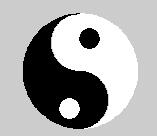
【作品介绍】
本程序实现画太极图的。
【作品源代码】
import turtle
import time

__Pen = turtle.Pen()


#开始进入Python的世界
__Pen.hideturtle()
__Pen.speed(100)
__Pen.goto(0, 0)
turtle.bgcolor("#cccccc")
__Pen.fillcolor("#ffffff")
__Pen.pencolor("#ffffff")
__Pen.begin_fill()
for __count in range(90):
    __Pen.forward(2)
    __Pen.left(2)
for __count in range(90):
    __Pen.forward(1)
    __Pen.left(2)
for __count in range(90):
    __Pen.forward(1)
    __Pen.right(2)
__Pen.end_fill()
__Pen.pencolor("#000000")
__Pen.fillcolor("#000000")
__Pen.begin_fill()
for __count in range(90):
    __Pen.forward(2)
    __Pen.right(2)
for __count in range(90):
    __Pen.forward((-1))
    __Pen.left(2)
for __count in range(90):
    __Pen.forward((-1))
    __Pen.right(2)
__Pen.end_fill()
__Pen.penup()
__Pen.goto(10, 80)
__Pen.pendown()
__Pen.begin_fill()
__Pen.circle(10)
__Pen.end_fill()
__Pen.pencolor("#ffffff")
__Pen.fillcolor("#ffffff")
__Pen.penup()
__Pen.goto((-10), 10)
__Pen.pendown()
__Pen.begin_fill()
__Pen.circle(10)
__Pen.end_fill()
time.sleep(3)
【提示】
部分含有Python第三方库相关内容的作品,在海龟编辑器网页端无法运行哦!如遇到这种情况,可以打开下面的链接,下载海龟编辑器客户端:
https://python.codemao.cn 庄自修
庄自修import turtle
def yin(radius, color1, color2): t.width(3) t.color("black", color1) t.begin_fill() t.circle(radius/2, 180) t.circle(radius, 180) t.left(180) t.circle(-radius/2, 180) t.end_fill()
t.left(90) t.up() t.fd(radius * 0.35) t.right(90) t.down() t.color(color1, color2) t.begin_fill() t.circle(radius * 0.15) t.end_fill() t.left(90) t.up() t.bk(radius * 0.35) t.down() t.left(90)
def main(): t.reset() yin(200, 'black', 'white') yin(200, 'white', 'black')
if __name__ == "__main__": t = turtle.Turtle() main() turtle.mainloop()
点赞0
评论
庄自修import turtle
def yin(radius, color1, color2):
t.width(3)
t.color("black", color1)
t.begin_fill()
t.circle(radius/2, 180)
t.circle(radius, 180)
t.left(180)
t.circle(-radius/2, 180)
t.end_fill()
t.left(90)
t.up()
t.fd(radius * 0.35)
t.right(90)
t.down()
t.color(color1, color2)
t.begin_fill()
t.circle(radius * 0.15)
t.end_fill()
t.left(90)
t.up()
t.bk(radius * 0.35)
t.down()
t.left(90)
def main():
t.reset()
yin(200, 'black', 'white')
yin(200, 'white', 'black')
if __name__ == "__main__":
t = turtle.Turtle()
main()
turtle.mainloop()点赞0
评论