 晓梦_Max查看:97 回复:0 评论:0 创建时间:2019-06-04T18:55:36
用户:
【作品展示】
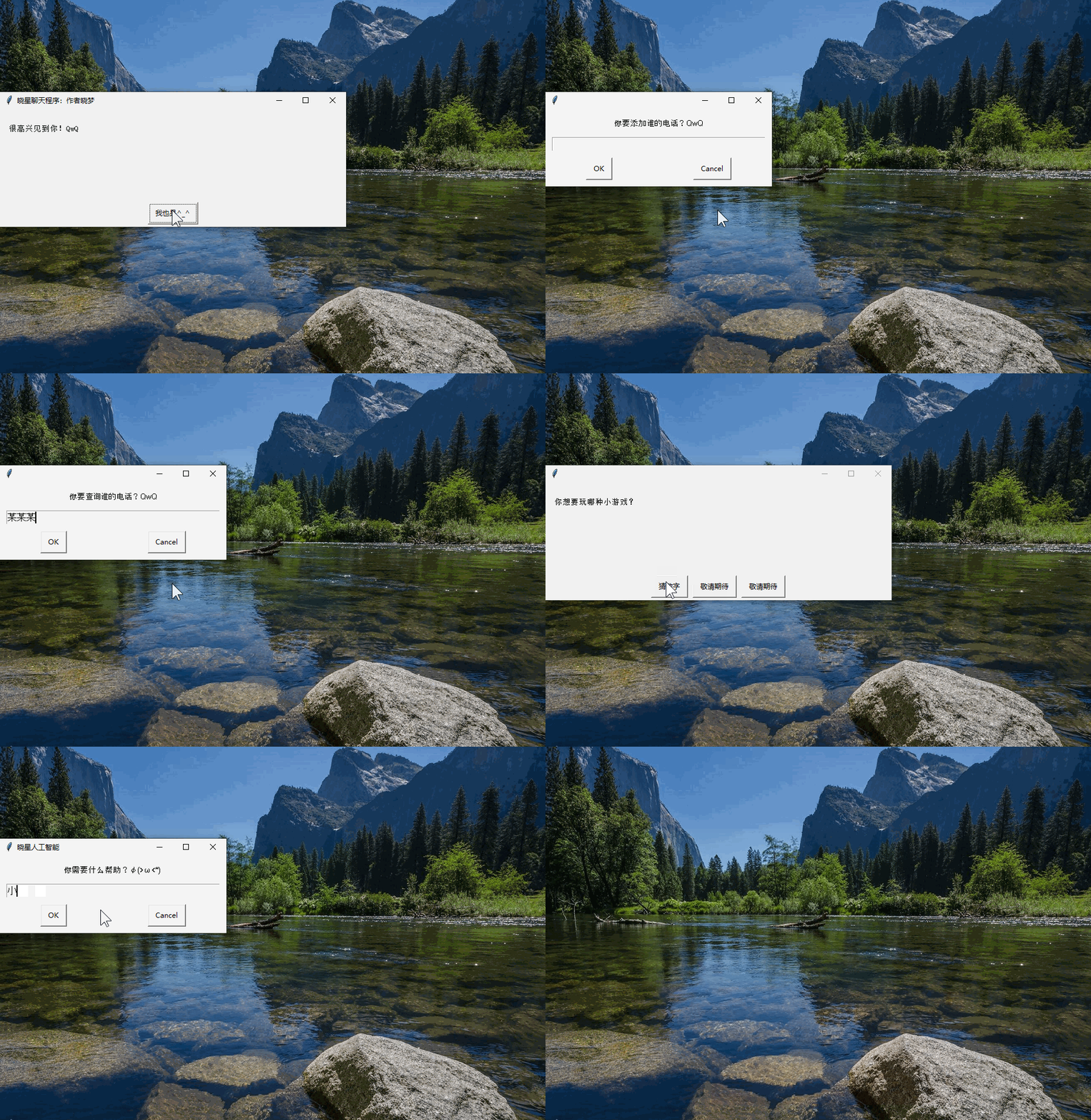
【作品介绍】
晓星1.2版本发布!!更新提示:
1.修复了诸多BUG
2.添加了一些功能
如有BUG,欢迎禀告!
【作品源代码】
import easygui
import time
import requests
import random
import os


#小说功能还在调试中,编程猫没有lxml库,所以暂时用不了。大家可以参考参考
#class Spider(object):

#    def start_request(self):
        # 1. 请求一级页面拿到H喵L源代码,抽取小说名、小说链接 创建文件夹
#       response = requests.ge喵all")
#       html = etree.H喵L(response.text)
#       Bigtit_list = html.xpath('//div[@class="book-mid-info"]/h4/a/text()')
#      Bigsrc_list = html.xpath('//div[@class="book-mid-info"]/h4/a/@href')
#       for Bigtit, Bigsrc in zip(Bigtit_list, Bigsrc_list):
#           if os.path.exists(Bigtit) == False:
#               os.mkdir(Bigtit)
#       self.next_file(Bigtit, Bigsrc)
#
#   def next_file(self, Bigtit, Bigsrc):
#       # 2. 请求二级页面拿到H喵L源代码,抽取章名、章链接
#      response = requests.get("https:" + Bigsrc)
#      html = etree.H喵L(response.text)
#     Littit_list = html.xpath('//ul[@class="cf"]/li/a/text()')
#      Litsrc_list = html.xpath('//ul[@class="cf"]/li/a/@href')
#       for Littit, Litsrc in zip(Littit_list, Litsrc_list):
#           self.finally_file(Littit, Litsrc, Bigtit)

#   def finally_file(self, Littit, Litsrc, Bigtit):
        # 3. 请求三级页面拿到H喵L源代码,抽取文章内容,保存数据
#       response = requests.get("https:" + Litsrc)
#       html = etree.H喵L(response.text)
#      content = "\n".join(html.xpath('//div[@class="read-content j_readContent"]/p/text()'))
#      file_name = Bigtit + "\\" + Littit + ".txt"
#       print("正在保存小说文件:" + file_name)
#       with open(file_name, "w", encoding="utf-8") as f:
#          f.write(content)
def guess():
    secret = random.randint(1, 30)
    hih = 0
    temp = easygui.enterbox("""不妨猜一下晓星现在心里想的是哪个数字:D(1-30)
    :""")
    guess = int(temp)
    while hih == 0:
        if (guess == secret):
            easygui.msgbox("我去!你是我心中的蛆吗?")
            easygui.msgbox("猜中了也没有奖励!")
            easygui.msgbox("气不气,气不气?有本事就来打我呀!略略略略略略。")
            easygui.msgbox("“游戏”结束,不玩了!^_^")
            break
        elif (guess > secret):
            temp = easygui.msgbox("""哥,想多了。没这莫大~~~:""")
        elif (guess > 30):
            easygui.msgbox("1~30之间哦!")

        elif (guess < secret):
            temp = easygui.msgbox("""小了小了:""")

q = ['你好,我是晓星,你的智能助理~','哈喽哈~~我是晓星丫','你好呀,很高兴见到你!']
x = 1
phonenumber = {'默认电话': '1234567890x'}

easygui.msgbox('你好\(@^0^@)/', '晓星聊天程序:作者晓梦', '你好!')
easygui.msgbox('我是晓星', '晓星聊天程序:作者晓梦', '好滴(u‿ฺu✿ฺ)')
easygui.msgbox('很高兴见到你!QwQ', '晓星聊天程序:作者晓梦', '我也是^_^')
name = easygui.enterbox('你叫什莫名字?', '晓星聊天程序:作者晓梦')
easygui.msgbox(('你好,' + name), 'Codemao', 'Ok')
while (x == 1):
    say = easygui.enterbox('你需要什么帮助?φ(>ω<*) ', '晓星人工智能')
    if (say == '你好漂亮'):
        easygui.msgbox('谢谢Thanks♪(・ω・)ノ(哈哈哈...)')
    if (say == '你真漂亮'):
        easygui.msgbox('谢谢Thanks♪(・ω・)ノ(哈哈哈...)')
    if (say == '你好美'):
        easygui.msgbox('谢谢Thanks♪(・ω・)ノ(哈哈哈...)')
    if (say == '今天天气如何?'):
        #天气功能还在调试
        pass
    try:
        if (say == '电话'):
            number = easygui.enterbox('你要查询谁的电话?QwQ')
            if (number == '添加'):
                number1 = easygui.enterbox("你要添加谁的电话?QwQ")
                number2 = easygui.enterbox("号码是?")
                phonenumber[number1] = number2
                #将Key和值都保存到ponenumber里
            easygui.msgbox((number + '的号码是'), '电话查询', phonenumber[number])
            #显示查询结果
    except KeyError as Error:
        print('出错啦~~\n' + '原因是:' + str(Error))
    if (say == '小说'):
        easygui.msgbox('小说功能还在调试中,编程猫没有lxml库,所以暂时用不了。大家可以参考参考')
        #easygui.msgbox('小说正在保存到文件夹...(来自起点网)文件夹路径为:此电脑》Tencent Files》(略)》FileRecv')
        #spider = Spider()
        #spider.start_request()
    if (say == '你好'):
        #(q为预设回答)
        #随机显示q中的一项
        easygui.msgbox(random.choice(q))
    if (say == '游戏'):
        game = easygui.buttonbox('你想要玩哪种小游戏?', '', ('猜数字', '敬请期待', '敬请期待'))
        if (game == '猜数字'):
            guess()
        if (game == '敬请期待'):
            easygui.msgbox('都说了敬请期待!')

    if False:
        pass
【提示】
部分含有Python第三方库相关内容的作品,在海龟编辑器网页端无法运行哦!如遇到这种情况,可以打开下面的链接,下载海龟编辑器客户端:
https://python.codemao.cn